Hello!
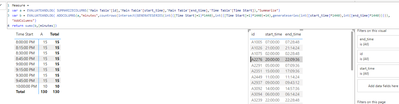
I currently have a main table that stores information about event start times and event end times. I have also created a time table that has both 15-minute intervals from midnight (00:00:00) through 11:45 PM (23:45:00), and those 15-minute intervals plus 15 to get me a 15-minute window. (e.g., 00:00:00 - 00:15:00, 02:30:00 - 02:45:00). I am going to be using the time table's values to return the main table records that fall within the time period. Additionally, I need to create a caclulation that takes the total amount of time that a record falls within the time table's 15-minute window.
For example: if I have an event in my main table that has a start time at 8:07 AM and ends at 8:35 AM, and the filter in the time table is from 8:00 - 8:15, it should return a value of 8. Similarly, if the window was 8:15 - 8:30, it should return a value of 15 minutes, and if it was a window of 8:30 - 8:45, it would return a value of 7 minutes.
I have tried following the advice of other forum posts, including this one which recommends the following:
time between =
SUMX(
    VALUES('Time Table'),
    VAR _t= 'Time Table'[Time Start]
    VAR _e = 'Time Table'[Time End]
RETURN
    IF(
        COUNTROWS(
            FILTER(
                'Main Table',
                'Main Table'[start_time] >=_t && 'Main Table'[end_time] <= _t))>0,
            1,0
        )
    )
I stored this in the TIME BETWEEN CALC measure. Of course, this would only give a small portion of the solution required, but unfortunately, does not appear to be working for me. I have also tried using the related and relatedtable functions, but cannot get it to work that way, either.
Any support would be appreciated; I am at a loss on this, unfortunately. I've attached a link here with my PBIX file.