cancel
Showing results for 
Search instead for 
Did you mean: 

Get Fabric Certified for FREE during Fabric Data Days. Don't miss your chance! Request now

Reply
jcambareri
Frequent Visitor

Filter dates from the 27th day of the previous month until now

I'm trying to create a filter in power query that will show me only items that are created on or after the 27th day of the previous month until "today".


For example, today is July 26th. The query would show me only items created from June 27th 

1 ACCEPTED SOLUTION
Vera_33
Resident Rockstar
Resident Rockstar

Hi @jcambareri 


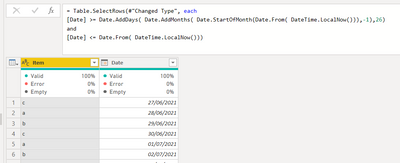
You have a date column you can filter, right? Here is one way, provide sample data in a format which people can copy in the future


Vera_33_0-1627276269598.png


let
    Source = Table.FromRows(Json.Document(Binary.Decompress(Binary.FromText("bdJLCgMxDATRu3g9MFLL37MMs0hy/zvEziY4lW3BA0HrutIjHcnHafWUydN9XOk5k2xLr5V8SwtKhEGYCQthJWyEnXAAhgHavL7t0LSlBS229IGZsBBWwkbYCQegG6A7oIswCDNhIayEjbATDkAZoBxQIgzCTFgIK2Ej7IQDMAww/nzOTP1nR33T/QY=", BinaryEncoding.Base64), Compression.Deflate)), let _t = ((type nullable text) meta [Serialized.Text = true]) in type table [Item = _t, Date = _t]),
    #"Changed Type" = Table.TransformColumnTypes(Source,{{"Item", type text}, {"Date", type date}}),
    #"Filtered Rows" = Table.SelectRows(#"Changed Type", each 
[Date] >= Date.AddDays( Date.AddMonths( Date.StartOfMonth(Date.From( DateTime.LocalNow())),-1),26) 
and 
[Date] <= Date.From( DateTime.LocalNow()))
in
    #"Filtered Rows"


View solution in original post

2 REPLIES 2
mussaenda
Super User
Super User

Hi @jcambareri,


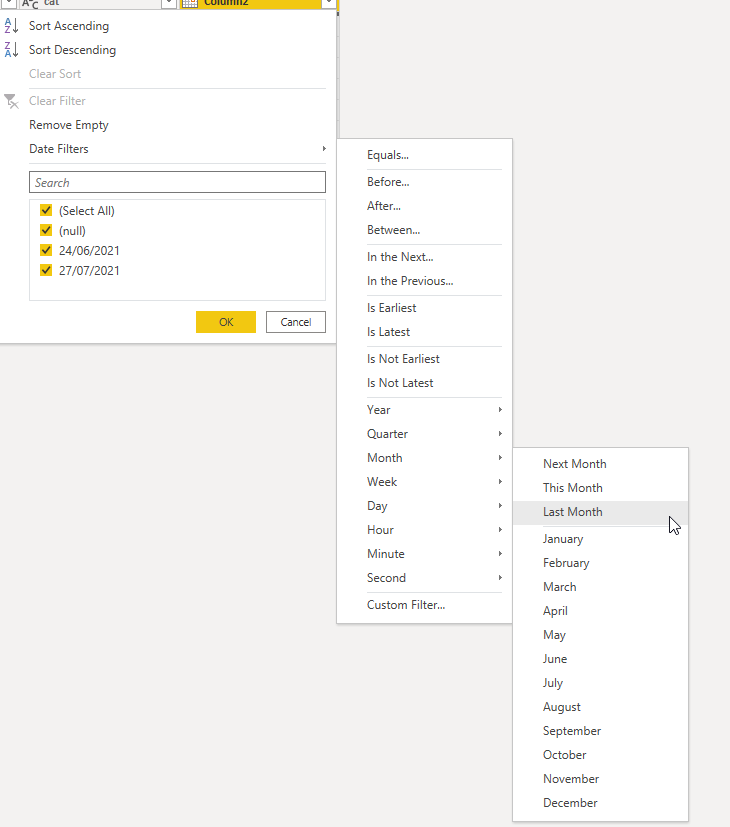
Assuming you have a Date column and the data type is Date,

You can do the filtering and select last month. 

It will automatically filter your data for the past 1 month.

Untitled.png 


Hope this idea helps.

Vera_33
Resident Rockstar
Resident Rockstar

Hi @jcambareri 


You have a date column you can filter, right? Here is one way, provide sample data in a format which people can copy in the future


Vera_33_0-1627276269598.png


let
    Source = Table.FromRows(Json.Document(Binary.Decompress(Binary.FromText("bdJLCgMxDATRu3g9MFLL37MMs0hy/zvEziY4lW3BA0HrutIjHcnHafWUydN9XOk5k2xLr5V8SwtKhEGYCQthJWyEnXAAhgHavL7t0LSlBS229IGZsBBWwkbYCQegG6A7oIswCDNhIayEjbATDkAZoBxQIgzCTFgIK2Ej7IQDMAww/nzOTP1nR33T/QY=", BinaryEncoding.Base64), Compression.Deflate)), let _t = ((type nullable text) meta [Serialized.Text = true]) in type table [Item = _t, Date = _t]),
    #"Changed Type" = Table.TransformColumnTypes(Source,{{"Item", type text}, {"Date", type date}}),
    #"Filtered Rows" = Table.SelectRows(#"Changed Type", each 
[Date] >= Date.AddDays( Date.AddMonths( Date.StartOfMonth(Date.From( DateTime.LocalNow())),-1),26) 
and 
[Date] <= Date.From( DateTime.LocalNow()))
in
    #"Filtered Rows"


Helpful resources

Announcements
November Power BI Update Carousel

Power BI Monthly Update - November 2025

Check out the November 2025 Power BI update to learn about new features.

Fabric Data Days Carousel

Fabric Data Days

Advance your Data & AI career with 50 days of live learning, contests, hands-on challenges, study groups & certifications and more!

FabCon Atlanta 2026 carousel

FabCon Atlanta 2026

Join us at FabCon Atlanta, March 16-20, for the ultimate Fabric, Power BI, AI and SQL community-led event. Save $200 with code FABCOMM.