cancel
Showing results for 
Search instead for 
Did you mean: 

The Power BI Data Visualization World Championships is back! Get ahead of the game and start preparing now! Learn more

Reply
kleighton
Helper II
Helper II

Filter a value from another table

Hi,


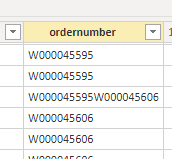
I have the following calculated column in DAX which filters the ordernumber from another table (Work table) based on the start and end date of the runtime event (Runtime table). Can anybody assist in how i could perform this same filter in Powerquery. In certain cases, the ordernumber changes during a runtime event so i will have 2 workorders listed and i should split these into seperate rows (i have a similar custom column to calculate the duration per ordernumber). Unless i'm mistaken, the only place i can split to new rows is within power query.


Custom column:

ordernumber =
var MinDate =
MINX(
FILTER(
'Work',
'Work'[machineid] = Runtime[Column1.machineId]
&& 'Work'[Column1.EndDate] > Runtime[Column1.endTime]
),
'Work'[Column1.EndDate]
)
var MaxDate =
MAXX(
FILTER(
'Work',
'Work'[machineid] = Runtime[Column1.machineId]
&& 'Work'[Column1.EndDate] < Runtime[Column1.endTime]
),
'Work'[Column1.EndDate]
)
var OrderNum =
CALCULATE(
VALUES('Work'[Column1.OrderNumber]),
FILTER(
ALL('Work'),
'Work'[machineid] = Runtime[Column1.machineId]
&& 'Work'[Column1.StartDate] <= Runtime[Column1.startTime]
&& 'Work'[Column1.EndDate] >= Runtime[Column1.endTime]
)
)
var MaxOrder =
CALCULATE(
VALUES('Work'[Column1.OrderNumber]),
FILTER('Work','Work'[machineid] = Runtime[Column1.machineId] && 'Work'[Column1.EndDate] = MinDate)
)
var MinOrder =
CALCULATE(
VALUES('Work'[Column1.OrderNumber]),
FILTER('Work','Work'[machineid] = Runtime[Column1.machineId] && 'Work'[Column1.EndDate] = MaxDate)
)
return
IF( ISBLANK(OrderNum), CONCATENATE(MinOrder,MaxOrder), OrderNum )
 
kleighton_0-1628583295821.png


Thanks in advance,
Keith
 
 
1 REPLY 1
edhans
Super User
Super User

Can you give us some sample data and expected results? You are more likely to get a faster and cleaner example rather than someone having to figure out what all of that unformatted DAX is doing with an image of some numbers.


How to get good help fast. Help us help you.

How To Ask A Technical Question If you Really Want An Answer

How to Get Your Question Answered Quickly - Give us a good and concise explanation
How to provide sample data in the Power BI Forum - Provide data in a table format per the link, or share an Excel/CSV file via OneDrive, Dropbox, etc.. Provide expected output using a screenshot of Excel or other image. Do not provide a screenshot of the source data. I cannot paste an image into Power BI tables.


Did I answer your question? Mark my post as a solution!
Did my answers help arrive at a solution? Give it a kudos by clicking the Thumbs Up!

DAX is for Analysis. Power Query is for Data Modeling


Proud to be a Super User!

MCSA: BI Reporting

Helpful resources

Announcements
Power BI DataViz World Championships

Power BI Dataviz World Championships

The Power BI Data Visualization World Championships is back! Get ahead of the game and start preparing now!

December 2025 Power BI Update Carousel

Power BI Monthly Update - December 2025

Check out the December 2025 Power BI Holiday Recap!

FabCon Atlanta 2026 carousel

FabCon Atlanta 2026

Join us at FabCon Atlanta, March 16-20, for the ultimate Fabric, Power BI, AI and SQL community-led event. Save $200 with code FABCOMM.