cancel
Showing results for 
Search instead for 
Did you mean: 

Get Fabric Certified for FREE during Fabric Data Days. Don't miss your chance! Request now

Reply
Anonymous
Not applicable

Fill rows between dates with average values

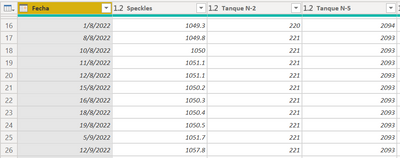
Hello, I've been struggling finding a solution for my problem. I need to add average values between dates in power query, I recieve the readings of a lot of water meters and sometimes we skip like 2 or 3 days, I need to fill those days between with incremental averages so the values are not the same between the days with readings.

JuanCampos_0-1667337799239.png

Thanks in advance!!!

1 ACCEPTED SOLUTION
edhans
Super User
Super User

Hi @Anonymous - you weren't very clear. What is an incremental average? I don't see any blanks in your values above to fill in. However, you can use a pattern similar to this.

edhans_0-1667340567012.png


You can see there are some dates missing.

The following code fills in those dates:

let
    Source = Table.FromRows(Json.Document(Binary.Decompress(Binary.FromText("i45WMtQ31DcyMDJS0lEyVorVAQkYwQSMoAIm6CpM0QUsYAKmUAFLJBWxAA==", BinaryEncoding.Base64), Compression.Deflate)), let _t = ((type nullable text) meta [Serialized.Text = true]) in type table [Date = _t, Value = _t]),
    #"Changed Type" = Table.TransformColumnTypes(Source,{{"Date", type date}, {"Value", Currency.Type}}),
    varStartDate = Number.From(List.Min(#"Changed Type"[Date])),
    varEndDate = Number.From(List.Max(#"Changed Type"[Date])),
    Custom1 = {varStartDate..varEndDate},
    #"Converted to Table" = Table.FromList(Custom1, Splitter.SplitByNothing(), {"Date"}, null, ExtraValues.Error),
    #"Changed Type1" = Table.TransformColumnTypes(#"Converted to Table",{{"Date", type date}}),
    #"Merged Queries" = Table.NestedJoin(#"Changed Type1", {"Date"}, #"Changed Type", {"Date"}, "Changed Type1", JoinKind.LeftOuter),
    #"Added Values" = 
        Table.AddColumn(
            #"Merged Queries", 
            "New Value", 
            each
                let
                    varValue = [Changed Type1][Value],
                    varDate = [Date],
                    varRunningTable =
                        Table.SelectRows(#"Changed Type", each [Date] < varDate),
                    varAverages = List.Average(varRunningTable[Value])
                in
                    if List.NonNullCount(varValue) = 1 then varValue{0} else varAverages

            ),
    #"Expanded Changed Type1" = Table.ExpandTableColumn(#"Added Values", "Changed Type1", {"Value"}, {"Value"})
in
    #"Expanded Changed Type1"
 

edhans_1-1667340632710.png

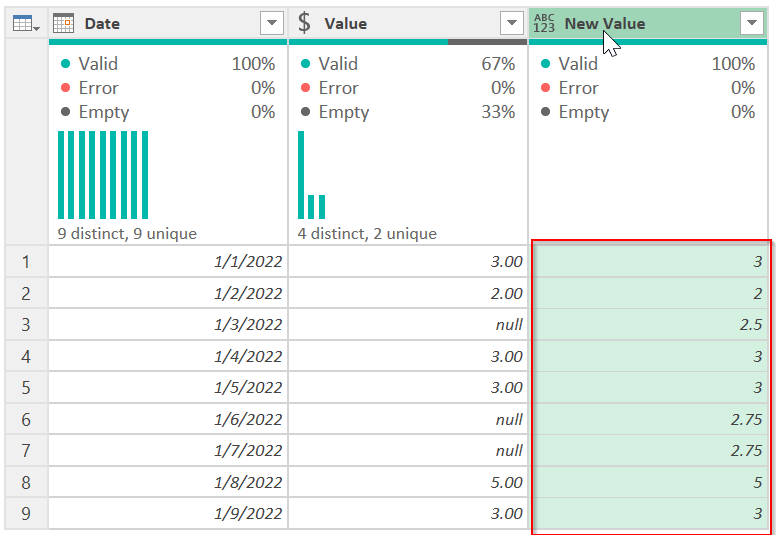
The last column is all you need. The middle column is just there to show you where there are nulls and what was filled in. 


If you need more help, you need to give us more info. Usable sample data, expected results, how to calculate them. Please follow the directions below, or if this is enough, then mark it as the solution.


How to use M code provided in a blank query:
1) In Power Query, select New Source, then Blank Query
2) On the Home ribbon, select "Advanced Editor" button
3) Remove everything you see, then paste the M code I've given you in that box.
4) Press Done
5) See this article if you need help using this M code in your model.


How to get good help fast. Help us help you.

How To Ask A Technical Question If you Really Want An Answer

How to Get Your Question Answered Quickly - Give us a good and concise explanation
How to provide sample data in the Power BI Forum - Provide data in a table format per the link, or share an Excel/CSV file via OneDrive, Dropbox, etc.. Provide expected output using a screenshot of Excel or other image. Do not provide a screenshot of the source data. I cannot paste an image into Power BI tables.


Did I answer your question? Mark my post as a solution!
Did my answers help arrive at a solution? Give it a kudos by clicking the Thumbs Up!

DAX is for Analysis. Power Query is for Data Modeling


Proud to be a Super User!

MCSA: BI Reporting

View solution in original post

1 REPLY 1
edhans
Super User
Super User

Hi @Anonymous - you weren't very clear. What is an incremental average? I don't see any blanks in your values above to fill in. However, you can use a pattern similar to this.

edhans_0-1667340567012.png


You can see there are some dates missing.

The following code fills in those dates:

let
    Source = Table.FromRows(Json.Document(Binary.Decompress(Binary.FromText("i45WMtQ31DcyMDJS0lEyVorVAQkYwQSMoAIm6CpM0QUsYAKmUAFLJBWxAA==", BinaryEncoding.Base64), Compression.Deflate)), let _t = ((type nullable text) meta [Serialized.Text = true]) in type table [Date = _t, Value = _t]),
    #"Changed Type" = Table.TransformColumnTypes(Source,{{"Date", type date}, {"Value", Currency.Type}}),
    varStartDate = Number.From(List.Min(#"Changed Type"[Date])),
    varEndDate = Number.From(List.Max(#"Changed Type"[Date])),
    Custom1 = {varStartDate..varEndDate},
    #"Converted to Table" = Table.FromList(Custom1, Splitter.SplitByNothing(), {"Date"}, null, ExtraValues.Error),
    #"Changed Type1" = Table.TransformColumnTypes(#"Converted to Table",{{"Date", type date}}),
    #"Merged Queries" = Table.NestedJoin(#"Changed Type1", {"Date"}, #"Changed Type", {"Date"}, "Changed Type1", JoinKind.LeftOuter),
    #"Added Values" = 
        Table.AddColumn(
            #"Merged Queries", 
            "New Value", 
            each
                let
                    varValue = [Changed Type1][Value],
                    varDate = [Date],
                    varRunningTable =
                        Table.SelectRows(#"Changed Type", each [Date] < varDate),
                    varAverages = List.Average(varRunningTable[Value])
                in
                    if List.NonNullCount(varValue) = 1 then varValue{0} else varAverages

            ),
    #"Expanded Changed Type1" = Table.ExpandTableColumn(#"Added Values", "Changed Type1", {"Value"}, {"Value"})
in
    #"Expanded Changed Type1"


edhans_1-1667340632710.png

The last column is all you need. The middle column is just there to show you where there are nulls and what was filled in. 


If you need more help, you need to give us more info. Usable sample data, expected results, how to calculate them. Please follow the directions below, or if this is enough, then mark it as the solution.


How to use M code provided in a blank query:
1) In Power Query, select New Source, then Blank Query
2) On the Home ribbon, select "Advanced Editor" button
3) Remove everything you see, then paste the M code I've given you in that box.
4) Press Done
5) See this article if you need help using this M code in your model.


How to get good help fast. Help us help you.

How To Ask A Technical Question If you Really Want An Answer

How to Get Your Question Answered Quickly - Give us a good and concise explanation
How to provide sample data in the Power BI Forum - Provide data in a table format per the link, or share an Excel/CSV file via OneDrive, Dropbox, etc.. Provide expected output using a screenshot of Excel or other image. Do not provide a screenshot of the source data. I cannot paste an image into Power BI tables.


Did I answer your question? Mark my post as a solution!
Did my answers help arrive at a solution? Give it a kudos by clicking the Thumbs Up!

DAX is for Analysis. Power Query is for Data Modeling


Proud to be a Super User!

MCSA: BI Reporting
Helpful resources

Announcements
Fabric Data Days Carousel

Fabric Data Days

Advance your Data & AI career with 50 days of live learning, contests, hands-on challenges, study groups & certifications and more!

October Power BI Update Carousel

Power BI Monthly Update - October 2025

Check out the October 2025 Power BI update to learn about new features.

FabCon Atlanta 2026 carousel

FabCon Atlanta 2026

Join us at FabCon Atlanta, March 16-20, for the ultimate Fabric, Power BI, AI and SQL community-led event. Save $200 with code FABCOMM.