cancel
Showing results for 
Search instead for 
Did you mean: 

Learn from the best! Meet the four finalists headed to the FINALS of the Power BI Dataviz World Championships! Register now

Reply
SteveGTR
New Member

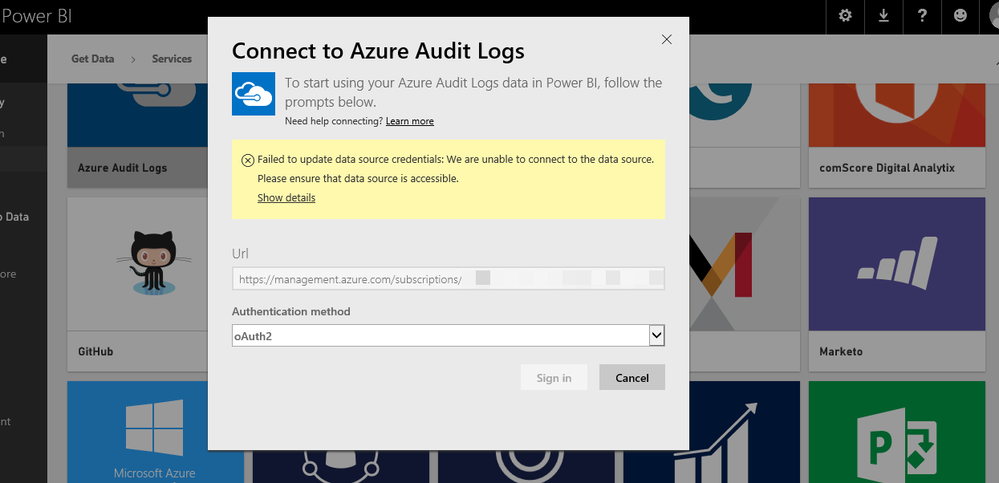
Failed to Import Data Azure Audit Log

I was attempting to checkout Power BI the Azure Audit Logs Power Pack as described in the blog:


https://azure.microsoft.com/en-us/blog/analyze-azure-audit-logs-in-powerbi-more/


I setup a Power BI using my company email. It wouldn't accept my MSDN "personal account" email (outlook.com) or my government email account (.gov). But, no problem...


Once I was able to get into the Power BI portal I selected Get Data --> Services (Get) --> Azure Audit Logs --> Connect


Entered my Azure subscription (BizSpark account) and clicked Next


Selected OAuth2 as the Authentication Method and clicked Sign In


Entered my Azure signin information and clicked Sign in


A window came up saying that it was "Importing Data" and that this could take awhile


In less than a minute a window popped up stating that it had "Failed to import data"


If I click on the technical details link it shows some ID and a status code of 200


I tried this in Firefox and Edge on a Windows 10 machine

5 REPLIES 5
ashwink
Microsoft Employee
Microsoft Employee

Steve, 

There is an issue in the content pack that's impacting certain users. we are fixing this and will roll it out soon. Thank you for your patience.

Ashwin Kamath

PM, Azure

This seems to have popped up again. I had several subscriptions which had not had a data refresh from 15/12 on. 


Symptoms:

  • Unable to refresh credentials on existing connections successfully. 
  • Unable to authenticate through the Content Pack Azure Audit wizard for any Azure suscription

powerbifail.png

Did anyone solved this issue yet? Cause, im still having this problem. 

I've got the same issue.


Any ETA on when the fix is to be rolled out?

Anonymous
Not applicable

My issue is "similar", however my does "say" that it successfully imported the data, although when i browse the dataset, report and dashboard it is completely empty.  I have tried removing and re-adding, and allowing it to sit for over 48 hours, but there is still no data..

Helpful resources

Announcements
New to Fabric survey Carousel

New to Fabric Survey

If you have recently started exploring Fabric, we'd love to hear how it's going. Your feedback can help with product improvements.

Power BI DataViz World Championships carousel

Power BI DataViz World Championships - June 2026

A new Power BI DataViz World Championship is coming this June! Don't miss out on submitting your entry.

Join our Fabric User Panel

Join our Fabric User Panel

Share feedback directly with Fabric product managers, participate in targeted research studies and influence the Fabric roadmap.

March Power BI Update Carousel

Power BI Community Update - March 2026

Check out the March 2026 Power BI update to learn about new features.