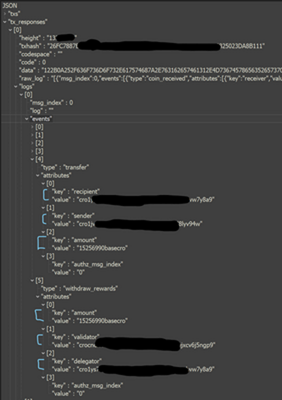
I've been trying for months to figure this out. Without expanding the columns (because it creates duplicate rows of my primary key field), I'd like to extract various field values which reside in a record column, within a list column, within a record column, within a list column, within a record column, within a list column.
I do not want to expand the columns. I just want to extract the values into a custom column. If I could expand to new columns instead of rows, that would solve everything. I want [txhash] to remain a field with distinct values. When you get to the bottom of list, there are various key & value attribute pairs. The value in the [key] field, I want as the column header. The value in the [value] field should be the value in the respective key column it is paired with.
In its simplest form, I want to expand all the bottom level values to new columns instead of rows. To add to the complexity, the parent list creates multiple sub list having similar key names. I am not sure how to handle this and its driving me nuts.
I'm thinking I need something like this below. A bunch of nested List.Transform & Record.Field functions to dive into the List/Record,List/Record,List/Record,Attribute Pairs... What am I doing wrong here?
= Table.AddColumn(#"PreviousStep",List.Transform([Column1.logs], each Record.Field([Column1.logs], List.Transform([Column1.logs.events], each Record.Field([Column1.logs.events], List.Transform([Column1.logs.events.attributes], each Record.Field([Column1.logs.events.attributes],[Value]))))))
This is what the structure looks like.
- List Column: Column1.Logs
- Record Column: Column1.logs
- List Column: Column1.Logs.events
- Record Column: Column1.Logs.events
- List Column: Column1.Logs.events.attributes
- Record Column: Column1.Logs.events.attributes
- Field 1: [Key]
- Field 2: [Value]
I want to get the JSON into this format.
TxHash | Transfer.Recipent | Transfer.Sender | Transfer.Amount | withdraw_rewards.amount | withdraw_rewards.validator | withdraw_rewards.delegator |
asdfghjkl | 1234567 | 345678 | 500 | 450 | 56789 | 7890 |
When I expand the lists and records, it does this. As you can see, the TxHash repeats. I want the list of values to be columns instead of rows.
TxHash | type | Key | Value |
asdfghjkl | transfer | recipient | 1234567 |
asdfghjkl | transfer | sender | 345678 |
asdfghjkl | transfer | amount | 500 |
asdfghjkl | withdraw_rewards | amount | 450 |
asdfghjkl | withdraw_rewards | validator | 56789 |
asdfghjkl | withdraw_rewards | delegator | 7890 |
Below is a clip of the JSON