We've captured the moments from FabCon & SQLCon that everyone is talking about, and we are bringing them to the community, live and on-demand. Starts on April 14th. Register now
Hello Everyone,
This is my first post so please let me know if I need to change anything. I have a need to extract a 5 digit number from a text string. Unfortunately there wasn't a specific format set for this string so the 5 digits I need appear in different locations of the string. I have provided an example below of what I need. What is consistent is that there is only ever 5 consecutive numbers once per string and they always follow a period.
| Starting String | Extract |
| C402.asdfl.43582.2 | 43582 |
| F423D.6.62418.LJ4864 | 62418 |
| LDOFK.48673.5.KGFO | 48673 |
| G453.14162.9.LDKFI | 14162 |
| C532.15354GHC.2 | 15354 |
I have tried a variety of methods but so far no luck. If you have any ideas, please let me know.
Solved! Go to Solution.
Hi @Anonymous ,
Paste this code over the default code in a new blank query to see the steps I took to complete this:
let
removeChars = List.Transform({65..90, 97..122}, each Character.FromNumber(_)),
Source = Table.FromRows(Json.Document(Binary.Decompress(Binary.FromText("HY1LCgIxEETv0uuhMP2JcZ2QqAnMAYYsBHHlzvuDmd71q1dFHwdlvTBev/fnCxVLDKaN/KK5HVSVpSAisoaE8dQUdRUcvTDKXjtWfBUYeqv7uT/RdVMTBA2RccMovT6WdnadTRjBxLTds792oDn/", BinaryEncoding.Base64), Compression.Deflate)), let _t = ((type nullable text) meta [Serialized.Text = true]) in type table [#"Starting String" = _t, Extract = _t]),
chgTypes = Table.TransformColumnTypes(Source,{{"Starting String", type text}, {"Extract", Int64.Type}}),
addCalcOutput = Table.AddColumn(chgTypes, "calcOutput", each Text.Remove([Starting String], removeChars)),
splitByDelimiter = Table.ExpandListColumn(Table.TransformColumns(addCalcOutput, {{"calcOutput", Splitter.SplitTextByDelimiter(".", QuoteStyle.Csv), let itemType = (type nullable text) meta [Serialized.Text = true] in type {itemType}}}), "calcOutput"),
filterLengthFive = Table.SelectRows(splitByDelimiter, each Text.Length([calcOutput]) = 5)
in
filterLengthFive
Summary:
1) Create list of all letters, lower and upper case.
2) Use list to remove all text characters from starting string.
3) Split resulting values by "." delimiter into new rows.
4) Filter column on value length = 5.
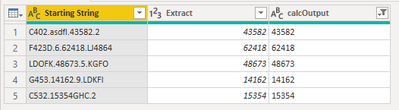
This gives me the following output ([calcOutput] column):
Pete
Proud to be a Datanaut!
Hi @Anonymous ,
Paste this code over the default code in a new blank query to see the steps I took to complete this:
let
removeChars = List.Transform({65..90, 97..122}, each Character.FromNumber(_)),
Source = Table.FromRows(Json.Document(Binary.Decompress(Binary.FromText("HY1LCgIxEETv0uuhMP2JcZ2QqAnMAYYsBHHlzvuDmd71q1dFHwdlvTBev/fnCxVLDKaN/KK5HVSVpSAisoaE8dQUdRUcvTDKXjtWfBUYeqv7uT/RdVMTBA2RccMovT6WdnadTRjBxLTds792oDn/", BinaryEncoding.Base64), Compression.Deflate)), let _t = ((type nullable text) meta [Serialized.Text = true]) in type table [#"Starting String" = _t, Extract = _t]),
chgTypes = Table.TransformColumnTypes(Source,{{"Starting String", type text}, {"Extract", Int64.Type}}),
addCalcOutput = Table.AddColumn(chgTypes, "calcOutput", each Text.Remove([Starting String], removeChars)),
splitByDelimiter = Table.ExpandListColumn(Table.TransformColumns(addCalcOutput, {{"calcOutput", Splitter.SplitTextByDelimiter(".", QuoteStyle.Csv), let itemType = (type nullable text) meta [Serialized.Text = true] in type {itemType}}}), "calcOutput"),
filterLengthFive = Table.SelectRows(splitByDelimiter, each Text.Length([calcOutput]) = 5)
in
filterLengthFive
Summary:
1) Create list of all letters, lower and upper case.
2) Use list to remove all text characters from starting string.
3) Split resulting values by "." delimiter into new rows.
4) Filter column on value length = 5.
This gives me the following output ([calcOutput] column):
Pete
Proud to be a Datanaut!
Thanks @BA_Pete ! I used this to extract times written as a string of four consecutive digits from a column of long-form text strings.
The changes I had to make:
My adapted code below in case it's useful for future readers.
= let
removeChars = List.Transform({33..47, 58..90, 97..122}, each Character.FromNumber(_)),
Source = My_Source,
chgTypes = Table.TransformColumnTypes(Source,{{"My_Text_Field", type text}, {"My_Output_Column", Int64.Type}}),
addCalcOutput = Table.AddColumn(chgTypes, "calcOutput", each Text.Remove([My_Text_Field], removeChars)),
splitByDelimiter = Table.ExpandListColumn(Table.TransformColumns(addCalcOutput, {{"calcOutput", Splitter.SplitTextByDelimiter(" ", QuoteStyle.Csv), let itemType = (type nullable text) meta [Serialized.Text = true] in type {itemType}}}), "calcOutput"),
filterLengthFour = Table.SelectRows(splitByDelimiter, each Text.Length([calcOutput]) = 4)
in
filterLengthFour
Pedantic suggestion:
Whitelisting digits rather than blacklisting letters is slightly simpler and slightly more robust.
That is, instead of Text.Remove([Starting String], removeChars), use Text.Select([Starting String], {".", "0..9"}).
This worked perfectly! Thank you!
If you have recently started exploring Fabric, we'd love to hear how it's going. Your feedback can help with product improvements.
A new Power BI DataViz World Championship is coming this June! Don't miss out on submitting your entry.
Share feedback directly with Fabric product managers, participate in targeted research studies and influence the Fabric roadmap.
| User | Count |
|---|---|
| 5 | |
| 3 | |
| 3 | |
| 2 | |
| 2 |
| User | Count |
|---|---|
| 10 | |
| 9 | |
| 7 | |
| 7 | |
| 5 |