cancel
Showing results for 
Search instead for 
Did you mean: 

July 7 - July 17 | Round 2 of the Power BI Dataviz World Championships. Don't miss your chance! Learn more

Reply
Anonymous
Not applicable

Excel data source functionality in Power BI

Hi all,


Wondered if anyone could clarify what I should expect to be able to do with Excel files uploaded to the Power BI office 365 Portal in relation to external data sources.


To put this into context we have recently locked down SQL access which has left some users with quite a few Excel files with a combination of sharepoint and SQL data connections which now have issues accessing the SQL servers locally.


I've had some success making use of the on premise gateway with Excel files with a data model I've tested, but I've been unable to find any documentation related to hitting data sources/files stored in SharePoint, is this even possible? And how would it handle authentication?


I guess putting the file in SharePoint would be the exact opposite issue, or can Excel files access stored in SharePoint make use of the on-Premis Gateway?


I've attempted to research this but I've been unable to find an awful lot of quality documentation, any help pointing me in the right direction would be much appreciated.


Thanks.


Matt 

1 ACCEPTED SOLUTION
Anonymous
Not applicable

@Anonymous,

Do you combine sharepoint online file and SQL Server database as external data sources in Excel file? If so, you can use on-premises gateway in this case.

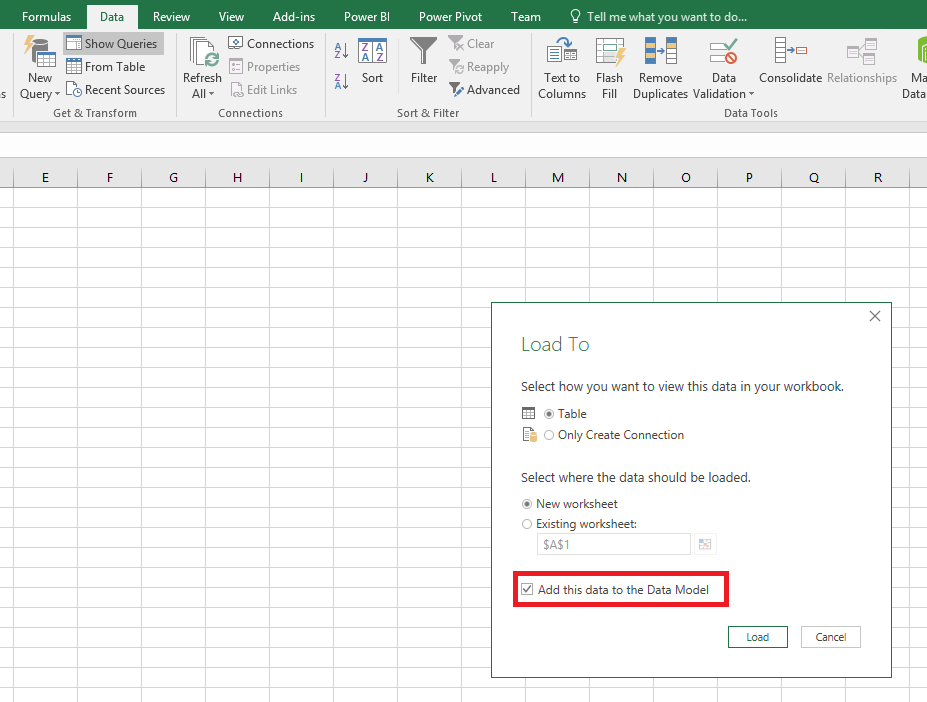
Firstly, in Excel file, make sure that you load data to data model when connecting to the two external data sources in Excel file.
1.PNG

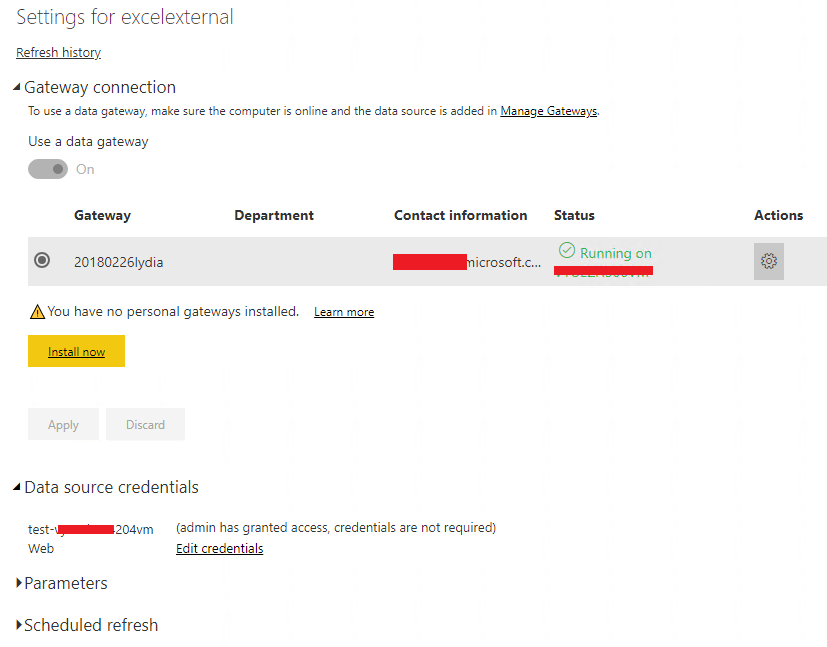
Secondly, in Power BI Service, please enable the "allow user's..." option for your gateway as shown in the following screenshot.
3.PNG


Thirdly, you can set schedule refresh for the excel file containing external data sources in Power BI Service.
2.PNG

Regards,
Lydia

View solution in original post

3 REPLIES 3
Anonymous
Not applicable

@Anonymous,

Do you combine sharepoint online file and SQL Server database as external data sources in Excel file? If so, you can use on-premises gateway in this case.

Firstly, in Excel file, make sure that you load data to data model when connecting to the two external data sources in Excel file.
1.PNG

Secondly, in Power BI Service, please enable the "allow user's..." option for your gateway as shown in the following screenshot.
3.PNG


Thirdly, you can set schedule refresh for the excel file containing external data sources in Power BI Service.
2.PNG

Regards,
Lydia

Anonymous
Not applicable

Thank you for such a detailed response Lydia, one question however, can you confirm if it matters how the data is added in Excel to the data model? Is it ok if the data has been added with Power Query and then added to the data model? I don't see any additional data locations appear in the Power BI gateway as in your screen shot above, just the one entry for the DB connection.

Anonymous
Not applicable

@Anonymous,

It is OK to use Power Query option in Excel, just make sure that you select the Add this data to the Data Model option in the Load To dialog box. For more details, please check "How do I make sure data is loaded to the Excel data model" part in this official article: https://docs.microsoft.com/en-us/power-bi/refresh-excel-file-onedrive.


Regards,
Lydia

Helpful resources

Announcements
FabCon and SQLCon Barcelona 2026

FabCon & SQLCon – Barcelona 2026

Join us in Barcelona for FabCon and SQLCon, the Fabric, Power BI, SQL, and AI community event. Save €200 with code FABCMTY200.

July Power BI Update Carousel

Power BI Monthly Update - July 2026

Check out the July 2026 Power BI update to learn about new features.

60 days of Data Days Carousel

Data Days 2026

Join Data Days 2026: 60 days of free live/on-demand sessions, challenges, study groups, and certification opportunities.

Power BI DataViz World Championships carousel

Power BI DataViz World Championships - June 2026

A new Power BI DataViz World Championship is coming this June! Don't miss out on submitting your entry.

Top Solution Authors