cancel
Showing results for 
Search instead for 
Did you mean: 

Learn from the best! Meet the four finalists headed to the FINALS of the Power BI Dataviz World Championships! Register now

Reply
Anonymous
Not applicable

Error with < query

Hi,

I'm trying to add a column to a table by which looks at value in another column and adds "Yes" or "No" depending on if it's less that 0.

The line is

= Table.AddColumn(#"Grouped Rows", "Required Rework", each if [Min Vote] < 0 then "Yes" else "No")


where the content of [Min vote] is a number and the column type if also a number. Teh Min Vote column is created in a previous Table.Group aggregate using {"Min Vote", each List.Min([Vote Only]), type number}.


However I get an error

Expression.Error: We cannot apply operator < to types Number and Text.
Details:
Operator=<
Left=0
Right=10


Any idea why this is giving me an error?

4 REPLIES 4
ImkeF
Community Champion
Community Champion

Please try this:


 Table.AddColumn(#"Grouped Rows", "Required Rework", each if Number.From( [Min Vote] ) < 0 then "Yes" else "No")

Imke Feldmann (The BIccountant)

If you liked my solution, please give it a thumbs up. And if I did answer your question, please mark this post as a solution. Thanks!

How to integrate M-code into your solution -- How to get your questions answered quickly -- How to provide sample data -- Check out more PBI- learning resources here -- Performance Tipps for M-queries

v-juanli-msft
Community Support
Community Support

Hi @Anonymous 

It works on my side.

Could you show me your code in Advanced editor?
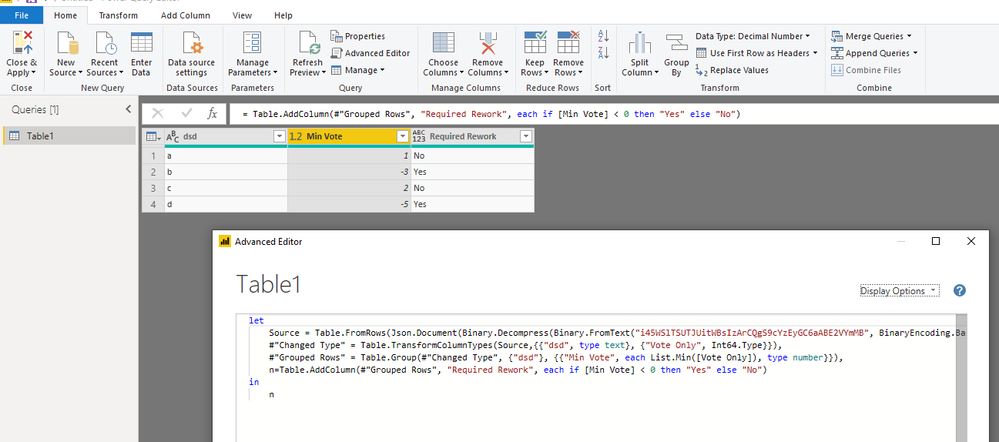
5.png

let
    Source = Table.FromRows(Json.Document(Binary.Decompress(Binary.FromText("i45WSlTSUTJUitWBsIzArCQgS9cYzEyGC6aABE2VYmMB", BinaryEncoding.Base64), Compression.Deflate)), let _t = ((type text) meta [Serialized.Text = true]) in type table [dsd = _t, #"Vote Only" = _t]),
    #"Changed Type" = Table.TransformColumnTypes(Source,{{"dsd", type text}, {"Vote Only", Int64.Type}}),
    #"Grouped Rows" = Table.Group(#"Changed Type", {"dsd"}, {{"Min Vote", each List.Min([Vote Only]), type number}}),
    n=Table.AddColumn(#"Grouped Rows", "Required Rework", each if [Min Vote] < 0 then "Yes" else "No")
in
    n

Best Regards
Maggie


Community Support Team _ Maggie Li
If this post helps, then please consider Accept it as the solution to help the other members find it more quickly.

HotChilli
Community Champion
Community Champion

One of my stock answers on the forum now is : Try using the Column quality, distribution, profile features from the View menu to look at your data.

The M language looks fine to me.

The error message thinks there is a text value somewhere in the column

Anonymous
Not applicable

Thanks, that's the strange thing, I can't find any entry which is text, and the whole column type shows as number in the column header.

Helpful resources

Announcements
Join our Fabric User Panel

Join our Fabric User Panel

Share feedback directly with Fabric product managers, participate in targeted research studies and influence the Fabric roadmap.

March Power BI Update Carousel

Power BI Community Update - March 2026

Check out the March 2026 Power BI update to learn about new features.