cancel
Showing results for 
Search instead for 
Did you mean: 

The Power BI Data Visualization World Championships is back! Get ahead of the game and start preparing now! Learn more

Reply
Anonymous
Not applicable

Dynamically remove string from one column if string is contained in another column

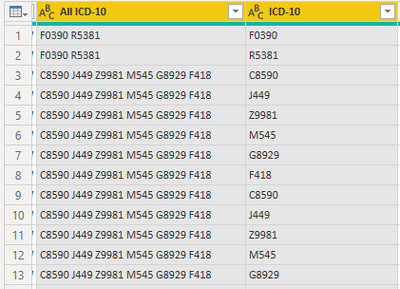
I have a dataset that has a primary code for each transaction and then in a separate column has all related codes for that transaction. Probably easiest to just describe it in an example. So for instance the primary code for the first record is F0390 ("ICD-10" column). Then the "All ICD-10" column contains all relevant codes for that transaction, including the primary code. So in the first record "F0390" and "R5381". What I am hoping to do is remove the primary code from the column with all relevant codes. So in the first record, I want to remove "F0390" from the "All ICD-10" column. In the second record, I want to remove "R5381" from the "All ICD-10" column. Is there a way to do this in Power Query?


mkraemer_0-1619544196117.png


1 ACCEPTED SOLUTION
Jakinta
Solution Sage
Solution Sage

Hi,


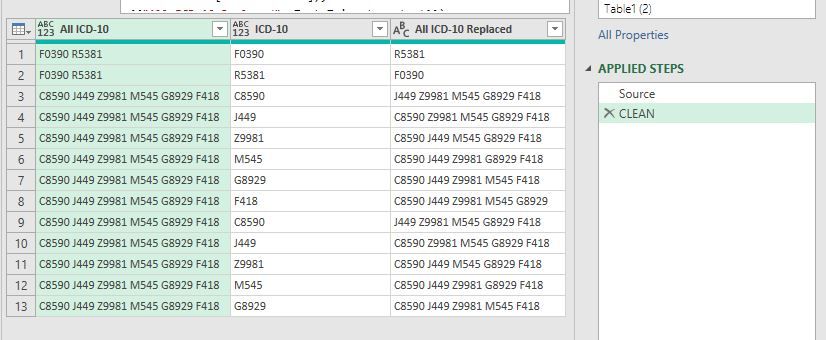
maybe this can help. Refer to your table in Source step.


let
    Source = Excel.CurrentWorkbook(){[Name="Table1"]}[Content],
    CLEAN = Table.ReplaceValue(Table.TransformColumns(Table.AddColumn(Source, "All ICD-10 Replaced", 
    each if Text.Contains([#"All ICD-10"], [#"ICD-10"])
        then Text.Replace([#"All ICD-10"], [#"ICD-10"], "")
        else [#"All ICD-10"]),
    {{"All ICD-10 Replaced", Text.Trim, type text}}),
     "  "," ",Replacer.ReplaceText,{"All ICD-10 Replaced"})
in
    CLEAN


Capture.JPG

View solution in original post

3 REPLIES 3
Jakinta
Solution Sage
Solution Sage

Hi,


maybe this can help. Refer to your table in Source step.


let
    Source = Excel.CurrentWorkbook(){[Name="Table1"]}[Content],
    CLEAN = Table.ReplaceValue(Table.TransformColumns(Table.AddColumn(Source, "All ICD-10 Replaced", 
    each if Text.Contains([#"All ICD-10"], [#"ICD-10"])
        then Text.Replace([#"All ICD-10"], [#"ICD-10"], "")
        else [#"All ICD-10"]),
    {{"All ICD-10 Replaced", Text.Trim, type text}}),
     "  "," ",Replacer.ReplaceText,{"All ICD-10 Replaced"})
in
    CLEAN


Capture.JPG

This worked for a project for me. Is there a way to make it match if it begins with the data in the ICD-10 column and not the entire column? For instance the ICD-10 column, the data might be F0390.0 instead of just F0390 but you still want to remove it from the All ICD-10 column

Anonymous
Not applicable

Awesome, that worked! Thanks a lot for the help! 

Helpful resources

Announcements
Power BI DataViz World Championships

Power BI Dataviz World Championships

The Power BI Data Visualization World Championships is back! Get ahead of the game and start preparing now!

December 2025 Power BI Update Carousel

Power BI Monthly Update - December 2025

Check out the December 2025 Power BI Holiday Recap!

FabCon Atlanta 2026 carousel

FabCon Atlanta 2026

Join us at FabCon Atlanta, March 16-20, for the ultimate Fabric, Power BI, AI and SQL community-led event. Save $200 with code FABCOMM.

Top Solution Authors