Join us at FabCon Atlanta from March 16 - 20, 2026, for the ultimate Fabric, Power BI, AI and SQL community-led event. Save $200 with code FABCOMM.
Register now!The Power BI Data Visualization World Championships is back! Get ahead of the game and start preparing now! Learn more
I am trying to setup data set that could help us document our data warehouse and Power Bi environments.
I am currently working on pulling in system info from analysis services and am running into an issue with a dynamic datasource. In my attempt to make my life easier I created a loop that would loop through a list of cubes and pull all of the data together into one query (instead of creating 20+ queries and another to union them together).It didnt hit me that this would be dynamic until I published.
Is there anyway to do this without having to create a query for each table?
Thanks for the help.
Bare bones version of the M code.
let
DataCatalog = {"Cube1", "Cube2", "Cube3"},
FnGetOnePage =
(i) as record =>
let
CatalogTables = AnalysisServices.Database("{Server Address}",
List.First(List.Range(DataCatalog,i,1)), [Query="Select * from $System.TMSCHEMA_PARTITIONS"]),
CatalogTables2 = Table.AddColumn(CatalogTables,"Dataset", each List.First(List.Range(DataCatalog,i,1))),
res = [Data=CatalogTables2, Next = i+1 ]
in
res,
GeneratedList =
List.Generate(
()=>[i=0,res=FnGetOnePage(i)],
each [res][Next]<= List.Count(DataCatalog),
each [i=[i]+1,res=FnGetOnePage([res][Next])],
each [res][Data] )
in
GeneratedList
Solved! Go to Solution.
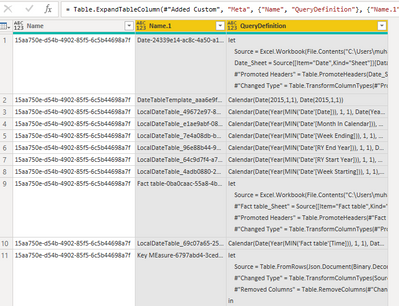
Here's how I would approach it. Create a simple table out of the list of the cubes you want to query, and then run the query inside an added column. (Note: only one cube shown in this example)
let
Server = "localhost:62185",
Databases = #table({"Name"},{{"15aa750e-d54b-4902-85f5-6c5b44698a7f"}}),
#"Added Custom" = Table.AddColumn(Databases, "Meta", each AnalysisServices.Database(Server, [Name], [Query="Select * from $System.TMSCHEMA_PARTITIONS"])),
#"Expanded Meta" = Table.ExpandTableColumn(#"Added Custom", "Meta", {"Name", "QueryDefinition"}, {"Name.1", "QueryDefinition"})
in
#"Expanded Meta"
Here's how I would approach it. Create a simple table out of the list of the cubes you want to query, and then run the query inside an added column. (Note: only one cube shown in this example)
let
Server = "localhost:62185",
Databases = #table({"Name"},{{"15aa750e-d54b-4902-85f5-6c5b44698a7f"}}),
#"Added Custom" = Table.AddColumn(Databases, "Meta", each AnalysisServices.Database(Server, [Name], [Query="Select * from $System.TMSCHEMA_PARTITIONS"])),
#"Expanded Meta" = Table.ExpandTableColumn(#"Added Custom", "Meta", {"Name", "QueryDefinition"}, {"Name.1", "QueryDefinition"})
in
#"Expanded Meta"
Hi @lbendlin , I have similar scenario but data is coming from web. I have to build dynamic query to extract second level of data. How can we acheive ?
I did try the similar way but it didn't work.
Thanks for the reply. I gave it a try and am able to pull back data in PBI Desktop but it still gives me a dynamic dataset error once I publish. I am going to look into pulling this data into our data warehouse somehow.
@wkmaylish I'm curious if you ever found a good solution for this. I'm trying to do something similar where I want to run a series of analysis services queries against a list of datasets, but I can't find a suitable way of working around the dynamic datasource issue. It seems the majority of people running into this issue can work around it with the web.contents relative path parameter, but that doesn't really apply to what we're trying to accomplish.
You can run your DMV queries from Powershell scripts if you want.
The Power BI Data Visualization World Championships is back! Get ahead of the game and start preparing now!
Check out the November 2025 Power BI update to learn about new features.