cancel
Showing results for 
Search instead for 
Did you mean: 

The Power BI Data Visualization World Championships is back! Get ahead of the game and start preparing now! Learn more

Reply
LordOfAfford
Frequent Visitor

Dynamic connection string based on list

Hi,

I want to be able to connect to different SQL database environments using a dynamic connection string.
Let's say I have Table list defined with the connections

LordOfAfford_0-1650464657017.png

How do I get this data into a source connection so it's updated dynamically by the other values from the list ?

LordOfAfford_4-1650464917562.png

LordOfAfford_5-1650465144997.png


Is there a way the report can have a drop down list from the values Test1, 2 and 3 and when selected the Test1\Test1 will be updated to value Test2\Test2 and then the report will refresh the data based on the new source connection to the other database.


I tried the approach of a parameter but you can not have that as a drop-down selection list on your report.

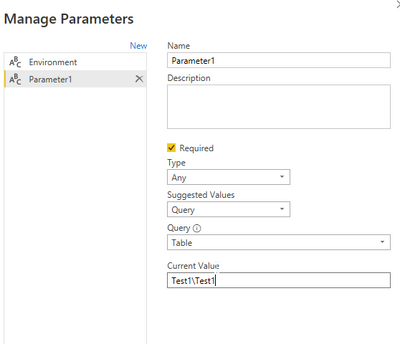
I tried to have the Table list in the parameter, but the parameter is not updated when you change the drop-down Table list on your report.

LordOfAfford_6-1650465281838.png


Is there any solution for this ?

We are using on premise Power BI server.


Regards

3 REPLIES 3
LordOfAfford
Frequent Visitor

I'm not actually looking for a template file that can be opened on demand by developers but rather a report with this embedded in it as a choice at runtime when they open the report on the Power BI Server. And then based on what the choice of their parameter will be they can see the contents of tables on that database with the selected paramter.

The data sources would have to be cloud-based (not requiring a gateway, at least not in the PBIX, since each on-prem data source requires a separate gateway connection and that cannot be done dynamically).  Further, since the user should be making selections from an embedded report, the options for the user would need to be available in the data model (not Power Query). I think you would need to include queries for each datasource that would be an option to select, load all of them to the model with applicable visuals and then present the choice to the user in the form of bookmarks so the user can toggle.  

jennratten
Super User
Super User

Hello - you can create parameters that have a list of suggested values.  These will appear as drop-down menus for the user to select.


jennratten_0-1650473738876.pngjennratten_1-1650473765176.pngjennratten_2-1650473797155.png

Then create your query to use those parameters.

jennratten_3-1650473825880.png


If you like, you can then save your file as a PBIT (template).  This will show the parameters when the file is opened and prompt the user to make selections and refresh based on those selections.

Please let me know if you are looking for something different.


Helpful resources

Announcements
Power BI DataViz World Championships

Power BI Dataviz World Championships

The Power BI Data Visualization World Championships is back! Get ahead of the game and start preparing now!

December 2025 Power BI Update Carousel

Power BI Monthly Update - December 2025

Check out the December 2025 Power BI Holiday Recap!

FabCon Atlanta 2026 carousel

FabCon Atlanta 2026

Join us at FabCon Atlanta, March 16-20, for the ultimate Fabric, Power BI, AI and SQL community-led event. Save $200 with code FABCOMM.

Top Solution Authors