Don't miss your chance to take the Fabric Data Engineer (DP-600) exam for FREE! Find out how by attending the DP-600 session on April 23rd (pacific time), live or on-demand.
Learn moreJoin the FabCon + SQLCon recap series. Up next: Power BI, Real-Time Intelligence, IQ and AI, and Data Factory take center stage. All sessions are available on-demand after the live show. Register now
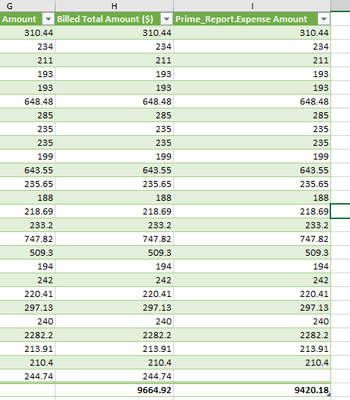
I am trying to merge two financial statements in order to reconcile on amounts. I rather have a unique key to reconcile, but the statments do not seem to have any unique identifier to tie them together. What happens when I merge as new in Power Query, any unique number works perfect, and leaves blank which is the result I am looking for. However, if the number matches ($193.00 in the example below) Power Query adds that number even if it doesn't exist on one of the statements. How can I prevent this from happening?
If the reports have the same number of rows then add an index column and merge by index column.
Otherwise maybe try grouping by number first and count of the number. Next you merge and maybe you will see that 193 is count 2 on one sheet but count 1 on the other.
Check out the April 2026 Power BI update to learn about new features.
If you have recently started exploring Fabric, we'd love to hear how it's going. Your feedback can help with product improvements.
A new Power BI DataViz World Championship is coming this June! Don't miss out on submitting your entry.
| User | Count |
|---|---|
| 5 | |
| 3 | |
| 3 | |
| 3 | |
| 2 |
| User | Count |
|---|---|
| 7 | |
| 5 | |
| 5 | |
| 5 | |
| 4 |