This time we’re going bigger than ever. Fabric, Power BI, SQL, AI and more. We're covering it all. You won't want to miss it.
Learn moreDid you hear? There's a new SQL AI Developer certification (DP-800). Start preparing now and be one of the first to get certified. Register now
Hi everyone,
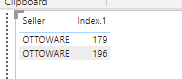
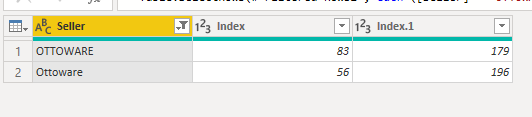
For some reason when I see my data in power query is as follow
First link for the power bi file
LInk for the data
Solved! Go to Solution.
basically power query seems data as characters meaning OTTOWARE <> Ottoware so power query understand they are 2 different things, if you want to merge those 2 rows as part of a same data you need to do some tranformation such as making all the letters upper or lower case letters and them group them, that would do the trick.
Proud to be a Super User!
Hello @Anonymous
Power Query is case sensitive. So whenever you would try to group or doing other transformation, power query will treat both values differently. However when you make a visualation in the desktop both values should be treated as one. So can you check if there are some spaces after the text "Ottoware"? This I think can be the only reason here.
If this post helps or solves your problem, please mark it as solution (to help other users find useful content and to acknowledge the work of users that helped you)
Kudoes are nice too
Have fun
Jimmy
Hello @Anonymous
Power Query is case sensitive. So whenever you would try to group or doing other transformation, power query will treat both values differently. However when you make a visualation in the desktop both values should be treated as one. So can you check if there are some spaces after the text "Ottoware"? This I think can be the only reason here.
If this post helps or solves your problem, please mark it as solution (to help other users find useful content and to acknowledge the work of users that helped you)
Kudoes are nice too
Have fun
Jimmy
basically power query seems data as characters meaning OTTOWARE <> Ottoware so power query understand they are 2 different things, if you want to merge those 2 rows as part of a same data you need to do some tranformation such as making all the letters upper or lower case letters and them group them, that would do the trick.
Proud to be a Super User!
Check out the April 2026 Power BI update to learn about new features.
If you have recently started exploring Fabric, we'd love to hear how it's going. Your feedback can help with product improvements.
| User | Count |
|---|---|
| 5 | |
| 4 | |
| 4 | |
| 4 | |
| 3 |