
This time we’re going bigger than ever. Fabric, Power BI, SQL, AI and more. We're covering it all. You won't want to miss it.
Learn moreLevel up your Power BI skills this month - build one visual each week and tell better stories with data! Get started
Good day,
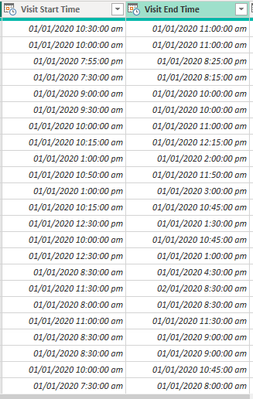
How do I divide these two columns?
When I attempted to do so by creating a custom column in power query it said I could not use the divide (/) operator. The calculation I am trying to attempt is ((Visit End Time - Visit Start Time)/Visit Start Time) * 100 to create a visit time variance percentage. I got the calculation from this website https://codepal.ai/excel-formula-generator/query/sSEVcN4p/excel-formula-time-percentage-variance. Any suggestions or help with this would be greatly appreciated. Thanks!
Solved! Go to Solution.
Hi @kingmeesh242 ,
How about this:
Here the M code:
Duration.TotalMinutes([Visit End Time] - [Visit Start Time]) / Duration.TotalMinutes(DateTime.Time([Visit Start Time]) - #time(0, 0, 0) )
Let me know if this helps 🙂
/Tom
https://www.tackytech.blog/
https://www.instagram.com/tackytechtom/
| Did I answer your question❓➡️ Please, mark my post as a solution ✔️ |
| Also happily accepting Kudos 🙂 |
| Feel free to connect with me on LinkedIn! | |
| #proudtobeasuperuser | |
Hi @tackytechtom,
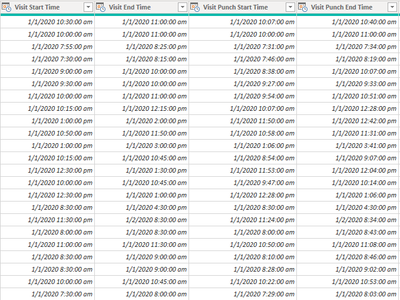
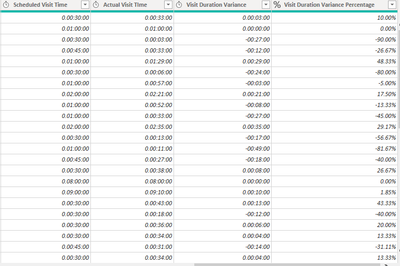
You answered my question perfectly for the question I asked and the link I provided. I was actually looking for the equation of the (Actual Visit Time (Punch End Time - Punch Start Time) - Scheduled Visit Time (Visit End Time - Visit Start Time)) = Visit Duration Variance I was looking for / Scheduled Visit Time.
Hi @kingmeesh242 ,
How about this:
Here the M code:
Duration.TotalMinutes([Visit End Time] - [Visit Start Time]) / Duration.TotalMinutes(DateTime.Time([Visit Start Time]) - #time(0, 0, 0) )
Let me know if this helps 🙂
/Tom
https://www.tackytech.blog/
https://www.instagram.com/tackytechtom/
| Did I answer your question❓➡️ Please, mark my post as a solution ✔️ |
| Also happily accepting Kudos 🙂 |
| Feel free to connect with me on LinkedIn! | |
| #proudtobeasuperuser | |
Check out the April 2026 Power BI update to learn about new features.
Sign up to receive a private message when registration opens and key events begin.
If you have recently started exploring Fabric, we'd love to hear how it's going. Your feedback can help with product improvements.