cancel
Showing results for 
Search instead for 
Did you mean: 

The Power BI Data Visualization World Championships is back! Get ahead of the game and start preparing now! Learn more

Reply
Anonymous
Not applicable

Distribution Budget with Defined Rule

Hi,


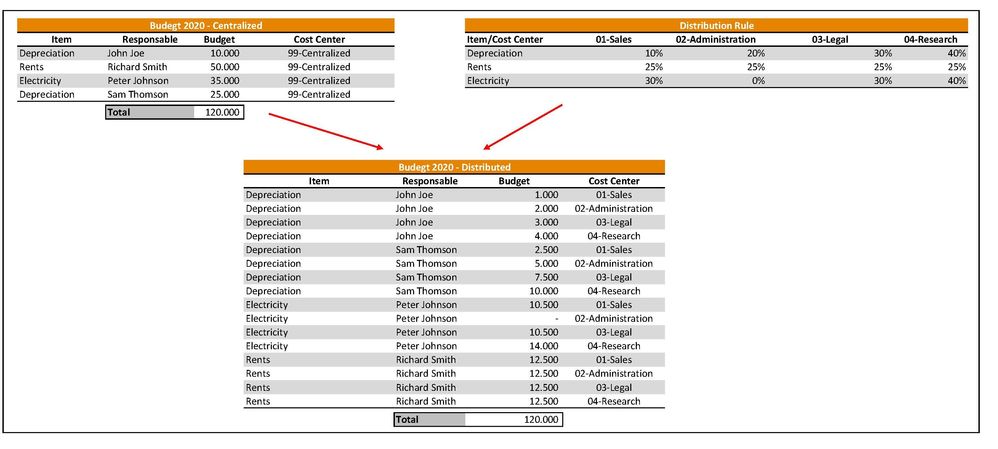
I need to distribute a Budget for specific items that is made for all the Company to various Cost Centers (approx. 50). The Budget is initially located in the Cost Center called 99-Centralized and later distributed it in all the Cost Centers (e.g. 01-Sales, 02-Administration, 03-Legal, 04-Research, etc) of the company depending in a pred define distribution rule. ¿How I can achieve this using Power Query?


In other words, I need the following result:


Budget Distributed.jpg

Here a link with the example excel I show above: 


https://1drv.ms/u/s!Asber9wcpjf8iV3jiy57QKcUyJRE?e=enmgjQ


Best Regards


Samuel


1 ACCEPTED SOLUTION
Anonymous
Not applicable

Hi Samuel,


My approach would be:


1)  Unpivot other columns in your ditribution rules table, so you can have a table with Cost Center, Areas, and %.

2) Merge this new table with your Budget Centralized table based on the column Item.

3) Expand the percentages to create new rows. It will create multiple rows with your percentages, and will also duplicate your budget value.

4) Create a calculated column mulitplying your Budget and your percentage.


I didn`t try it here, but I think it should work.


Please let me know if that works,


Vagner

View solution in original post

2 REPLIES 2
Anonymous
Not applicable

Hi Samuel,


My approach would be:


1)  Unpivot other columns in your ditribution rules table, so you can have a table with Cost Center, Areas, and %.

2) Merge this new table with your Budget Centralized table based on the column Item.

3) Expand the percentages to create new rows. It will create multiple rows with your percentages, and will also duplicate your budget value.

4) Create a calculated column mulitplying your Budget and your percentage.


I didn`t try it here, but I think it should work.


Please let me know if that works,


Vagner

Anonymous
Not applicable

Vagner,


Thank you very much! It works really well your approach. Additionaly I put cases were the budget was not designated to the Cost Center CC 99-Centralized, but to only a specific one.


Here I attach a link with the solution https://1drv.ms/x/s!Asber9wcpjf8iV6qLd0CKk1zYYrb?e=tEEVZc


Best Regards

Helpful resources

Announcements
Power BI DataViz World Championships

Power BI Dataviz World Championships

The Power BI Data Visualization World Championships is back! Get ahead of the game and start preparing now!

December 2025 Power BI Update Carousel

Power BI Monthly Update - December 2025

Check out the December 2025 Power BI Holiday Recap!

FabCon Atlanta 2026 carousel

FabCon Atlanta 2026

Join us at FabCon Atlanta, March 16-20, for the ultimate Fabric, Power BI, AI and SQL community-led event. Save $200 with code FABCOMM.

Top Solution Authors