Get certified for free when you join Fabric Data Days 2026 and dive into Fabric, Power BI, SQL, AI, and other essential data skills.
Join nowJuly 28 - August 9 | Final Round of the Power BI Dataviz World Championships. This is your chance. Learn more
Hi,
I'm having trouble solving a data transform unpivot/pivot issue.
I have the following table:
| ID | Date | Q1:How did you like it? | Q1:Code 1 | Q1:Code 2 | Q2:Were they late? | Q2:Code 1 | Q2:Code 2 |
| 1 | 1/1/2022 | I liked it | 1 | 2 | They didn't come | 4 | 6 |
| 2 | 2/2/2022 | I hated it | 2 | 3 | They were late | 6 | 8 |
I'd like to get to the following:
| ID | Date | Question | Question Text | Q1:How did you like it? | Code 1 | Code 2 |
| 1 | 1/1/2022 | Q1 | How did you like it? | I liked it | 1 | 2 |
| 1 | 1/1/2022 | Q2 | Were they late? | They didn't come | 4 | 6 |
| 2 | 2/2/2022 | Q1 | How did you like it? | I hated it | 2 | 3 |
| 2 | 2/2/2022 | Q2 | Were they late? | 6 | 8 |
I know it's something like an unpivot / split / repivot, but having troubles gettin there.
Can anyone help?
Thanks
Solved! Go to Solution.
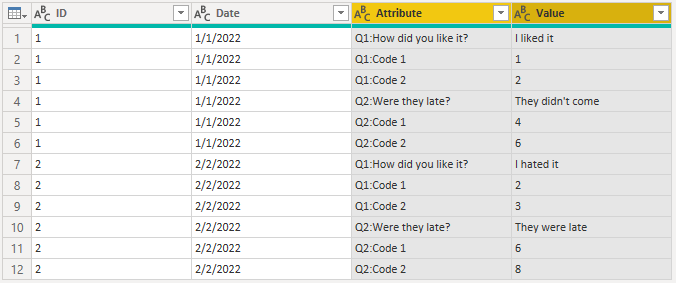
1. Unpivot all except the ID and Date columns.
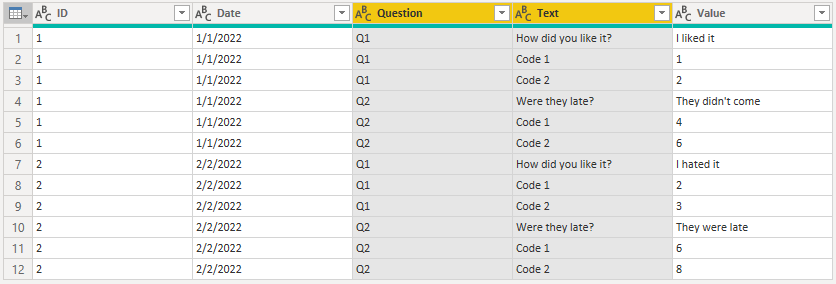
2. Split the Attribute column on the colon.
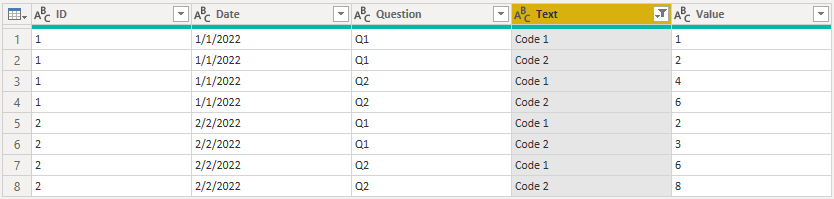
3. Separate into code rows and question rows.
4. Pivot the code rows.
5. Merge the code rows onto the question rows.
Fully sample query:
let
Source = Table.FromRows(Json.Document(Binary.Decompress(Binary.FromText("i45WMlTSUTLUN9Q3MjAyAjI9FXIys1NTFDJLQOJADBIMyUitVEjJTMmLKTUwMDIvUUjOz00FipsAsZlSrE40WJWRvhHClIzEEpgpIAFjmCnlqUWpCjlASbBWHSULpdhYAA==", BinaryEncoding.Base64), Compression.Deflate)), let _t = ((type nullable text) meta [Serialized.Text = true]) in type table [ID = _t, Date = _t, #"Q1:How did you like it?" = _t, #"Q1:Code 1" = _t, #"Q1:Code 2" = _t, #"Q2:Were they late?" = _t, #"Q2:Code 1" = _t, #"Q2:Code 2" = _t]),
#"Unpivoted Other Columns" = Table.UnpivotOtherColumns(Source, {"ID", "Date"}, "Attribute", "Value"),
#"Split Column by Delimiter" = Table.SplitColumn(#"Unpivoted Other Columns", "Attribute", Splitter.SplitTextByEachDelimiter({":"}, QuoteStyle.Csv, false), {"Question", "Text"}),
#"Code Rows" = Table.SelectRows(#"Split Column by Delimiter", each Text.StartsWith([Text], "Code")),
#"Pivoted Column" = Table.Pivot(#"Code Rows", List.Distinct(#"Code Rows"[Text]), "Text", "Value"),
#"Question Rows" = Table.SelectRows(#"Split Column by Delimiter", each not Text.StartsWith([Text], "Code")),
#"Renamed Columns" = Table.RenameColumns(#"Question Rows",{{"Text", "Question Text"}, {"Value", "Answer"}}),
#"Merged Queries" = Table.NestedJoin(#"Renamed Columns", {"ID", "Date", "Question"}, #"Pivoted Column", {"ID", "Date", "Question"}, "Renamed Columns", JoinKind.LeftOuter),
#"Expanded Renamed Columns" = Table.ExpandTableColumn(#"Merged Queries", "Renamed Columns", {"Code 1", "Code 2"}, {"Code 1", "Code 2"}),
#"Changed Type" = Table.TransformColumnTypes(#"Expanded Renamed Columns",{{"ID", Int64.Type}, {"Date", type date}, {"Question", type text}, {"Question Text", type text}, {"Answer", type text}, {"Code 1", Int64.Type}, {"Code 2", Int64.Type}})
in
#"Changed Type"
1. Unpivot all except the ID and Date columns.
2. Split the Attribute column on the colon.
3. Separate into code rows and question rows.

4. Pivot the code rows.

5. Merge the code rows onto the question rows.

Fully sample query:
let
Source = Table.FromRows(Json.Document(Binary.Decompress(Binary.FromText("i45WMlTSUTLUN9Q3MjAyAjI9FXIys1NTFDJLQOJADBIMyUitVEjJTMmLKTUwMDIvUUjOz00FipsAsZlSrE40WJWRvhHClIzEEpgpIAFjmCnlqUWpCjlASbBWHSULpdhYAA==", BinaryEncoding.Base64), Compression.Deflate)), let _t = ((type nullable text) meta [Serialized.Text = true]) in type table [ID = _t, Date = _t, #"Q1:How did you like it?" = _t, #"Q1:Code 1" = _t, #"Q1:Code 2" = _t, #"Q2:Were they late?" = _t, #"Q2:Code 1" = _t, #"Q2:Code 2" = _t]),
#"Unpivoted Other Columns" = Table.UnpivotOtherColumns(Source, {"ID", "Date"}, "Attribute", "Value"),
#"Split Column by Delimiter" = Table.SplitColumn(#"Unpivoted Other Columns", "Attribute", Splitter.SplitTextByEachDelimiter({":"}, QuoteStyle.Csv, false), {"Question", "Text"}),
#"Code Rows" = Table.SelectRows(#"Split Column by Delimiter", each Text.StartsWith([Text], "Code")),
#"Pivoted Column" = Table.Pivot(#"Code Rows", List.Distinct(#"Code Rows"[Text]), "Text", "Value"),
#"Question Rows" = Table.SelectRows(#"Split Column by Delimiter", each not Text.StartsWith([Text], "Code")),
#"Renamed Columns" = Table.RenameColumns(#"Question Rows",{{"Text", "Question Text"}, {"Value", "Answer"}}),
#"Merged Queries" = Table.NestedJoin(#"Renamed Columns", {"ID", "Date", "Question"}, #"Pivoted Column", {"ID", "Date", "Question"}, "Renamed Columns", JoinKind.LeftOuter),
#"Expanded Renamed Columns" = Table.ExpandTableColumn(#"Merged Queries", "Renamed Columns", {"Code 1", "Code 2"}, {"Code 1", "Code 2"}),
#"Changed Type" = Table.TransformColumnTypes(#"Expanded Renamed Columns",{{"ID", Int64.Type}, {"Date", type date}, {"Question", type text}, {"Question Text", type text}, {"Answer", type text}, {"Code 1", Int64.Type}, {"Code 2", Int64.Type}})
in
#"Changed Type"
Please see this video on how to handle this pattern. You can also adapt the M code in the sample file in the description to your data.
(1) Faster Data Transformations with List/Record M Functions - YouTube
Pat
Join us in Barcelona for FabCon and SQLCon, the Fabric, Power BI, SQL, and AI community event. Save €200 with code FABCMTY200.
If you love stickers, then you will definitely want to check out our community sticker challenge, Barcelona edition!
Check out the July 2026 Power BI update to learn about new features.