cancel
Showing results for 
Search instead for 
Did you mean: 

The Power BI Data Visualization World Championships is back! Get ahead of the game and start preparing now! Learn more

Reply
YounesM
New Member

Date slicer not working with my date format (DirectQuery from SAP BW Connect)

Hello community, 

I am quite new to Power BI world and I am facing some difficulties with my report.

I am using data from SAP with a DirectQuery from SAP.

I'm trying to add a date slicer but the data I have is not allowing me to do so. 


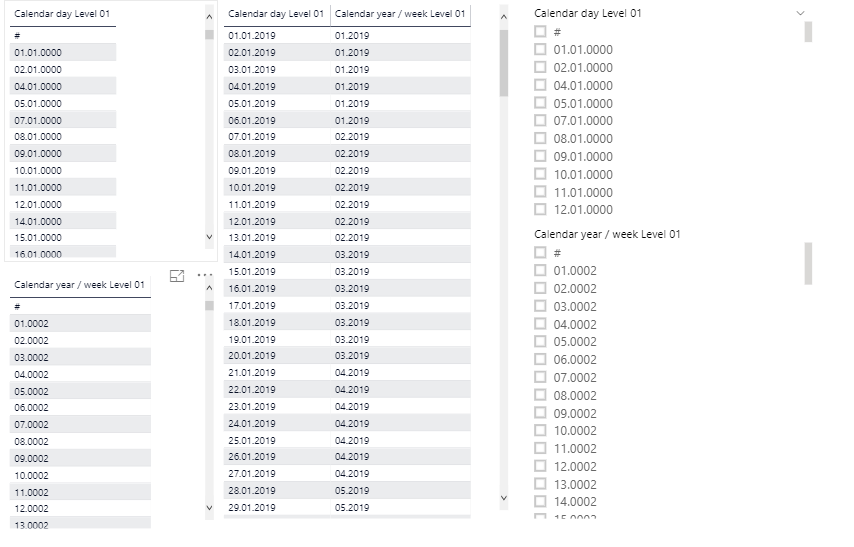
At the left are my two columns separately (Calendar day & Calendar year / week). From what I understood, it uses a unique code, so when I put them together it gives me the date in a good format (table in the middle).

Unfortunately when I want to make a slicer, it is not showing in the correct format (slicer at the right).

Any recommendations on how I can make this work?  

Troubleshot1.PNG

Thanks you for the help.

regards

YM

2 REPLIES 2
Nolock
Resident Rockstar
Resident Rockstar

Hi @YounesM,

I'd try to create a new column in PowerQuery or in DAX which contains the expected date.

Hello NoLock,

Thanks for the tip.

I unfortunately can't create a new column since I am using DirectQuery from SAP.

So the problem is still there


@Nolock wrote:

Hi @YounesM,

I'd try to create a new column in PowerQuery or in DAX which contains the expected date.


Helpful resources

Announcements
Power BI DataViz World Championships

Power BI Dataviz World Championships

The Power BI Data Visualization World Championships is back! Get ahead of the game and start preparing now!

December 2025 Power BI Update Carousel

Power BI Monthly Update - December 2025

Check out the December 2025 Power BI Holiday Recap!

FabCon Atlanta 2026 carousel

FabCon Atlanta 2026

Join us at FabCon Atlanta, March 16-20, for the ultimate Fabric, Power BI, AI and SQL community-led event. Save $200 with code FABCOMM.

Top Solution Authors