This time we’re going bigger than ever. Fabric, Power BI, SQL, AI and more. We're covering it all. You won't want to miss it.
Learn moreDid you hear? There's a new SQL AI Developer certification (DP-800). Start preparing now and be one of the first to get certified. Register now
Hey Guys,
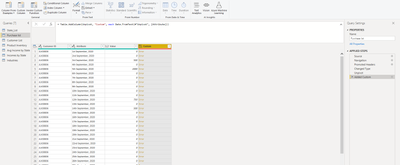
I have a set of data for training and I reach the point where I pivot the data properly yet, when I try to change the data type from text to date format (by changing type or using the date from text function it always returns error)
any Idea how to fix this ??
Solved! Go to Solution.
Date.From(Text.Combine(Splitter.SplitTextByAnyDelimiter({"st ","nd ","rd ","th "})([Attribute]),"-"))
Worked like magic
don't wanna bother, but can u tell me what was I doing wrong and how u wrote this formula, I'm a newbie in M
text with "st ","nd ","rd ","th " can not be recognized as a date, so you must replace them with "-".
Hi, @Anonymous ;
You could try it.
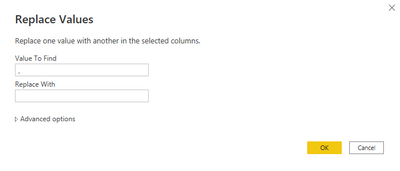
1.replace "," to ""
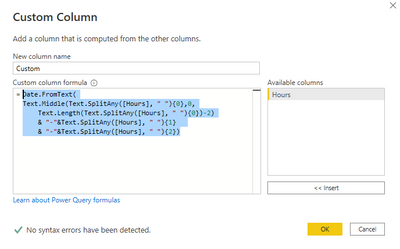
2.add custom column.
Date.FromText(
Text.Middle(Text.SplitAny([Hours], " "){0},0,
Text.Length(Text.SplitAny([Hours], " "){0})-2)
& "-"&Text.SplitAny([Hours], " "){1}
& "-"&Text.SplitAny([Hours], " "){2})
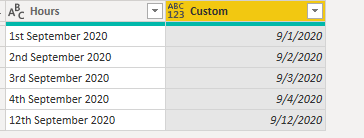
The final show:
Best Regards,
Community Support Team _ Yalan Wu
If this post helps, then please consider Accept it as the solution to help the other members find it more quickly.
You need to remove the ordinal suffixes.
Something like:
#"Convert to Date" = Table.TransformColumns(#"Previous Step", {
"Attribute", each Date.From(List.Min(List.Accumulate({"st","nd","rd","th"},{}, (state, current)=>
state & {Text.Replace(_,current,"")}))), type date
})
Check out the April 2026 Power BI update to learn about new features.
Sign up to receive a private message when registration opens and key events begin.
If you have recently started exploring Fabric, we'd love to hear how it's going. Your feedback can help with product improvements.