cancel
Showing results for 
Search instead for 
Did you mean: 

Data Days is here! Join us now for 60+ days of learning, challenges, and connection. Learn more

Reply
JAbarca
New Member

DataSource.Error: Microsoft SQL

Hola


Les agradeceré me puedan ayudar con este problema:


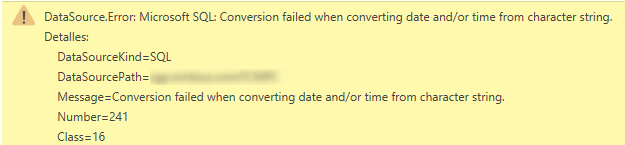
Desde PowerBI Desktop, al intentar conectar con una vista de MSSQL 2008 tengo el siguiente error. La vista no contiene columnas definidas como campos de fechas.


2018-05-30_21h17_05.png


Muchas gracias.

2 REPLIES 2
Anonymous
Not applicable

@JAbarca,

This is English forum, please post question in English. I translate your question using translator, and it seems that you get error message when connecting to a SQL view.

Could you please share sample data of all columns in the SQL view? I will try to produce this issue in my Desktop. In addition, after you import data to Power BI Desktop, do you find a "Change Type" step under APPLIED STEPS in Query Editor? If the step exists, remove it and check if the error goes away.

Regards,

Lydia Zhang

Anonymous
Not applicable

Sorry that I don't speak spanish but from what I can tell of the error message, you have some data which is readable as "Text" and you have insteaded PowerBI to make a conversion attempt into the datatype of Date.  I often have this issue when I have DateTime data held in Text.  I firstly convert it into a DateTime datatype, then have a second step that makes the conversation from DateTime to Date.

Helpful resources

Announcements
Fabric Data Days is here Carousel

Fabric Data Days 2026

Don't miss out on Data Days, June 15 through August 7. Learn Fabric, Power BI, SQL, AI and more.

May Power BI Update Carousel

Power BI Monthly Update - May 2026

Check out the May 2026 Power BI update to learn about new features.

Power BI DataViz World Championships carousel

Power BI DataViz World Championships - June 2026

A new Power BI DataViz World Championship is coming this June! Don't miss out on submitting your entry.