cancel
Showing results for 
Search instead for 
Did you mean: 

The Power BI Data Visualization World Championships is back! Get ahead of the game and start preparing now! Learn more

Reply
Rishabh_THB
Frequent Visitor

Data refresh issue

Right now i'm facing an issue with data refresh. I have used DirectQuery to get data through sql server. I have also used on premises data gateway and connected my live server with it.


Now once i have made the report and scheduled a refresh of 30 min, i published the report to web. What i'm getting on the web page is an error with no visualization. Also the data doesn't get updated even after repeated automatic refresh and my online server on which i'm running the query has already updated the data and this new data was supposed to be visible in my report. 

Please help !!!

1 ACCEPTED SOLUTION
Anonymous
Not applicable

Hi @Rishabh_THB,

Do you pin individual visuals to dashboard or pin live page? If it is the former case, dashboard tiles should refresh properly after you change the underlying dataset in your scenario, please also wait for more than 30 min and check if tiles are refreshed. And you can force a tile refresh by selecting the ellipse (...) in the upper right of a dashboard and selecting Refresh dashboard tiles as other post to reflect the change.

However, if you pin live page to dashboard, refreshing live page tiles is currently not supported by Power BI. You need to pin individual tiles to dashboard, instead of pinning whole report.

Thanks,
Lydia Zhang

View solution in original post

5 REPLIES 5
Anonymous
Not applicable

Hi @Rishabh_THB,

Do you use “Publish to web” feature in Power BI Service? Could you please post a screenshot about the full error message you get?

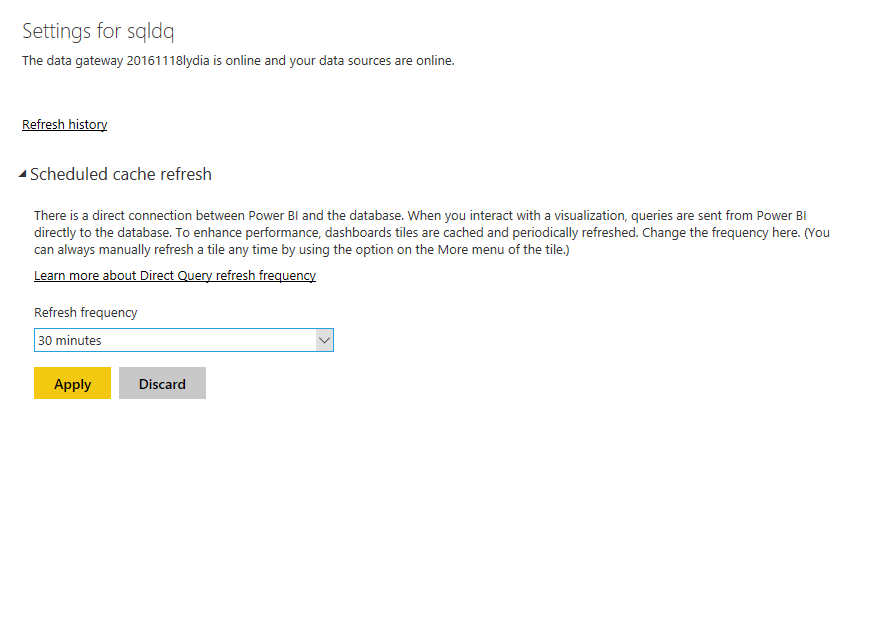
In addition, based on your description, you schedule cache refresh frequency to be 30 min as shown in the following screenshot, right? If so, could you please elaborate that the report of your dataset don’t get updated or the tiles in dashboard don’t get updated in your scenario?
1.PNG


Thanks,
Lydia Zhang

Hello Thanks for responding. 

Sorry i wont be able to share the error message as i already took the report down.  In response to your other questions, the screenshot you have forwarded is totally correct. 

And the report doesn't get updated because of which the tiles also remain static and doesn't show updated data.


Anonymous
Not applicable

Hi @Rishabh_THB,

Do you pin individual visuals to dashboard or pin live page? If it is the former case, dashboard tiles should refresh properly after you change the underlying dataset in your scenario, please also wait for more than 30 min and check if tiles are refreshed. And you can force a tile refresh by selecting the ellipse (...) in the upper right of a dashboard and selecting Refresh dashboard tiles as other post to reflect the change.

However, if you pin live page to dashboard, refreshing live page tiles is currently not supported by Power BI. You need to pin individual tiles to dashboard, instead of pinning whole report.

Thanks,
Lydia Zhang

Hi 

Ohh, is that the case? I was actually doing pin live to dashboard. Anyways, i'll now pin individual tiles to dashboard and see if it is working. 

Anonymous
Not applicable

Hi @Rishabh_THB,

Refreshing live page tiles is currently not supported by Power BI. Please pin individual tiles to dashboard and check the result.

Thanks,
Lydia Zhang

Helpful resources

Announcements
Power BI DataViz World Championships

Power BI Dataviz World Championships

The Power BI Data Visualization World Championships is back! Get ahead of the game and start preparing now!

December 2025 Power BI Update Carousel

Power BI Monthly Update - December 2025

Check out the December 2025 Power BI Holiday Recap!

FabCon Atlanta 2026 carousel

FabCon Atlanta 2026

Join us at FabCon Atlanta, March 16-20, for the ultimate Fabric, Power BI, AI and SQL community-led event. Save $200 with code FABCOMM.

Top Solution Authors