cancel
Showing results for 
Search instead for 
Did you mean: 

The Power BI Data Visualization World Championships is back! Get ahead of the game and start preparing now! Learn more

Reply
Anonymous
Not applicable

DAX Measure Running Total by Category - Two Separated Lines on Cluster Chart

Hi all,


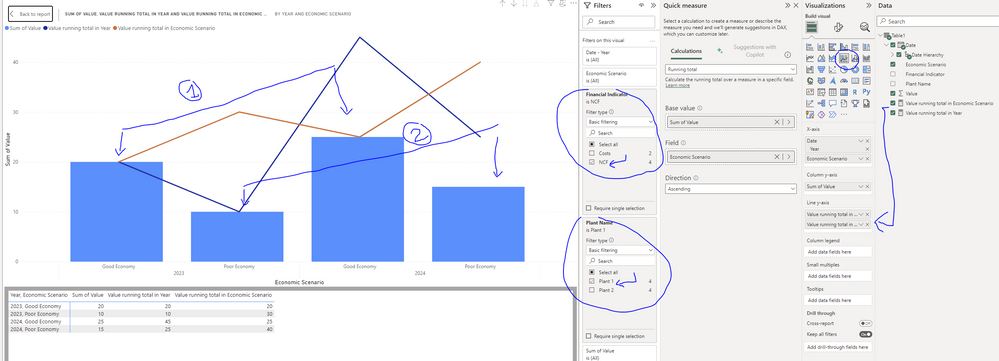
I am struggling with the following issue: I try to add a running total (cumulative sum) line splitted by two different categories see screenshot below. I would like to create a measure that shows the cumulative sum of the "Good Economy" scenario and another one line showing separately the cumulative sum of the "Poor Economy" scenario. My database is only one master file as follow: 


Only requirement: I may add some other economic scenarios and/or financial indicators into my table so the measure should adapt to any update. Is someone able to help on this? I have been struggling a lot. As you can see on the screenshot, the running total (orange and blue lines) shown are wrong. I would like something similar to what I added on the charts manually (#1 and #2 lines)


Thanks a lot for that!


DAX measure "Running Total in Year"

Value running total in Year =
CALCULATE(
SUM('Table1'[Value]),
FILTER(
ALLSELECTED('Table1'[Date].[Year]),
ISONORAFTER('Table1'[Date].[Year], MAX('Table1'[Date].[Year]), DESC)
)
)


and in Economic Scenario

Value running total in Economic Scenario =
CALCULATE(
SUM('Table1'[Value]),
FILTER(
ALLSELECTED('Table1'[Economic Scenario]),
ISONORAFTER('Table1'[Economic Scenario], MAX('Table1'[Economic Scenario]), DESC)
)
)


Database

Financial Indicator

Economic Scenario

Date

Plant Name

Value

NCF

Poor Economy

31/12/2023

Plant 1

10

NCF

Poor Economy

31/12/2024

Plant 1

15

NCF

Good Economy

31/12/2023

Plant 1

20

NCF

Good Economy

31/12/2024

Plant 1

25

NCF

Poor Economy

31/12/2023

Plant 2

100

NCF

Poor Economy

31/12/2024

Plant 2

110

NCF

Good Economy

31/12/2023

Plant 2

120

NCF

Good Economy

31/12/2024

Plant 2

130

Costs

Poor Economy

31/12/2023

Plant 1

1

Costs

Poor Economy

31/12/2024

Plant 1

3

Costs

Good Economy

31/12/2023

Plant 2

5

Costs

Good Economy

31/12/2024

Plant 2

7


Thanks a lot 🙂


 0_Capture.PNG

1 ACCEPTED SOLUTION
Payeras_BI
Solution Sage
Solution Sage

Hi @Anonymous ,

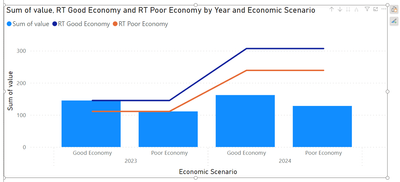
I would create a measure per Economic Scenario like this:

RT Good Economy = 
VAR MaxDate = MAX('Date'[Date])
RETURN
CALCULATE(
    [Sum of value], 
    'Date'[Date] <=MaxDate,
    Table1[Economic Scenario] = "Good Economy"
)
------------------------------------------------
RT Poor Economy = 
VAR MaxDate = MAX('Date'[Date])
RETURN
CALCULATE(
    [Sum of value], 
    'Date'[Date] <=MaxDate,
    Table1[Economic Scenario] = "Poor Economy"
    )


Payeras_BI_0-1686218183380.png

Regards,


If this post answered your question, please mark it as a solution to help other users find useful content.
Kudos are another nice way to acknowledge those who tried to help you.

J. Payeras
Mallorca, Spain

View solution in original post

1 REPLY 1
Payeras_BI
Solution Sage
Solution Sage

Hi @Anonymous ,

I would create a measure per Economic Scenario like this:

RT Good Economy = 
VAR MaxDate = MAX('Date'[Date])
RETURN
CALCULATE(
    [Sum of value], 
    'Date'[Date] <=MaxDate,
    Table1[Economic Scenario] = "Good Economy"
)
------------------------------------------------
RT Poor Economy = 
VAR MaxDate = MAX('Date'[Date])
RETURN
CALCULATE(
    [Sum of value], 
    'Date'[Date] <=MaxDate,
    Table1[Economic Scenario] = "Poor Economy"
    )


Payeras_BI_0-1686218183380.png

Regards,


If this post answered your question, please mark it as a solution to help other users find useful content.
Kudos are another nice way to acknowledge those who tried to help you.

J. Payeras
Mallorca, Spain

Helpful resources

Announcements
Power BI DataViz World Championships

Power BI Dataviz World Championships

The Power BI Data Visualization World Championships is back! Get ahead of the game and start preparing now!

November Power BI Update Carousel

Power BI Monthly Update - November 2025

Check out the November 2025 Power BI update to learn about new features.

FabCon Atlanta 2026 carousel

FabCon Atlanta 2026

Join us at FabCon Atlanta, March 16-20, for the ultimate Fabric, Power BI, AI and SQL community-led event. Save $200 with code FABCOMM.