Join us at FabCon Atlanta from March 16 - 20, 2026, for the ultimate Fabric, Power BI, AI and SQL community-led event. Save $200 with code FABCOMM.
Register now!The Power BI Data Visualization World Championships is back! Get ahead of the game and start preparing now! Learn more
| Region | REVENUE | Close Date | Stage | Fiscal Period | Indiviual |
| US | 3159.63 | 03/13/20 | Win | Q1-2020 | A |
| US | 5440 | 01/16/20 | Win | Q1-2020 | A |
| US | 11054.52 | 01/16/20 | Win | Q1-2020 | A |
| US | 11383.11 | 01/23/20 | Win | Q1-2020 | A |
| US | 12314.4 | 02/23/20 | Win | Q1-2020 | A |
| US | 3600 | 03/25/20 | Win | Q1-2020 | B |
| US | 3703.704 | 02/24/20 | Win | Q1-2020 | B |
| US | 5444.444 | 01/27/20 | Win | Q1-2020 | B |
| US | 6912 | 04/01/20 | Win | Q2-2020 | B |
| US | 11105.03 | 02/28/20 | Win | Q1-2020 | B |
| US | 15555.56 | 04/01/20 | Win | Q2-2020 | B |
| US | 19555.56 | 04/08/20 | Win | Q2-2020 | B |
| US | 40740.74 | 01/17/20 | Win | Q1-2020 | B |
| US | 67541.48 | 02/10/20 | Win | Q1-2020 | B |
| US | 71563.7 | 01/20/20 | Win | Q1-2020 | B |
| US | 81590.37 | 01/22/20 | Win | Q1-2020 | B |
| US | 174392.6 | 03/17/20 | Win | Q1-2020 | B |
| US | 3500 | 03/19/20 | Win | Q1-2020 | c |
| US | 101136 | 03/31/20 | Win | Q1-2020 | c |
| Region | REVENUE | Close Date | Stage | Fiscal Period | Indiviual |
| US | 3159.63 | 03/13/20 | FORCEAST | Q1-2020 | A |
| US | 5440 | 01/16/20 | FORCEAST | Q1-2020 | A |
| US | 11054.52 | 01/16/20 | FORCEAST | Q1-2020 | A |
| US | 11383.11 | 01/23/20 | FORCEAST | Q1-2020 | A |
| US | 12314.4 | 02/23/20 | FORCEAST | Q1-2020 | A |
| US | 3600 | 03/25/20 | FORCEAST | Q1-2020 | B |
| US | 3703.704 | 02/24/20 | FORCEAST | Q1-2020 | B |
| US | 5444.444 | 01/27/20 | FORCEAST | Q1-2020 | B |
| US | 6912 | 04/01/20 | FORCEAST | Q2-2020 | B |
| US | 11105.03 | 02/28/20 | FORCEAST | Q1-2020 | B |
| US | 15555.56 | 04/01/20 | FORCEAST | Q2-2020 | B |
| US | 19555.56 | 04/08/20 | FORCEAST | Q2-2020 | B |
| US | 40740.74 | 01/17/20 | FORCEAST | Q1-2020 | B |
| US | 67541.48 | 02/10/20 | FORCEAST | Q1-2020 | B |
| US | 71563.7 | 01/20/20 | FORCEAST | Q1-2020 | B |
| US | 81590.37 | 01/22/20 | FORCEAST | Q1-2020 | B |
| US | 174392.6 | 03/17/20 | FORCEAST | Q1-2020 | B |
| US | 3500 | 03/19/20 | FORCEAST | Q1-2020 | c |
| US | 101136 | 03/31/20 | FORCEAST | Q1-2020 | c |
| Individual Target | Q1-2020 | Q2-2020 | Q3-2020 | Q4-2020 |
| A | 213,000 | 213,000 | 213,000 | 414,000 |
| B | 328,000 | 328,000 | 328,000 | 328,000 |
| C | 190,000 | 190,000 | 190,000 |
Solved! Go to Solution.
Hi @Anonymous
1.
Go to Transform data, select "Individual Target" column in "Target" table, then "Unpivot other columns", rename columns, colse&&apply.
2. create new tables
date:
date = ADDCOLUMNS(CALENDARAUTO(),"year",YEAR([Date]),"month",MONTH([Date]),"quarter",FORMAT([Date],"q"))
add columns
year-quarter = "Q"&[quarter]&"-"&[year]
Individual table
Individual = VALUES(Win[Indiviual])
3
create relationships among tables
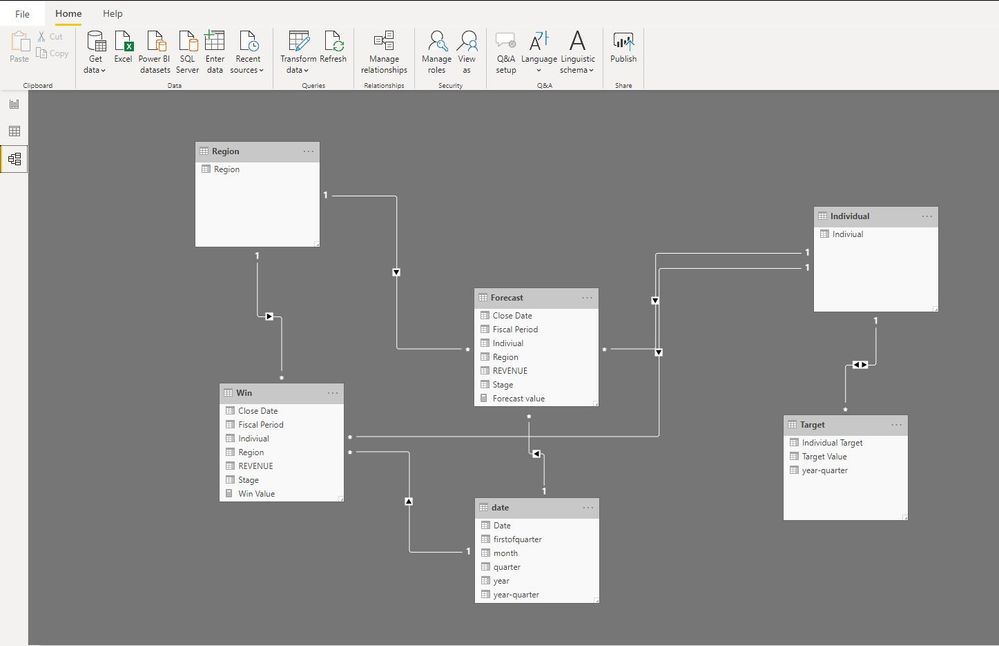
4
Create measures, add them in a matrix visual
Win Value = CALCULATE(SUM(Win[REVENUE]),FILTER(ALLSELECTED('date'),'date'[year-quarter]=MAX(Target[year-quarter])))
Forecast value = CALCULATE(SUM(Forecast[REVENUE]),FILTER(ALLSELECTED('date'),'date'[year-quarter]=MAX(Target[year-quarter])))
Now, you could see the "win value", "forecast value","target value" per year/quarter for each individual.
Best Regards
Maggie
Community Support Team _ Maggie Li
If this post helps, then please consider Accept it as the solution to help the other members find it more quickly.
Hi @Anonymous
1.
Go to Transform data, select "Individual Target" column in "Target" table, then "Unpivot other columns", rename columns, colse&&apply.
2. create new tables
date:
date = ADDCOLUMNS(CALENDARAUTO(),"year",YEAR([Date]),"month",MONTH([Date]),"quarter",FORMAT([Date],"q"))
add columns
year-quarter = "Q"&[quarter]&"-"&[year]
Individual table
Individual = VALUES(Win[Indiviual])
3
create relationships among tables
4
Create measures, add them in a matrix visual
Win Value = CALCULATE(SUM(Win[REVENUE]),FILTER(ALLSELECTED('date'),'date'[year-quarter]=MAX(Target[year-quarter])))
Forecast value = CALCULATE(SUM(Forecast[REVENUE]),FILTER(ALLSELECTED('date'),'date'[year-quarter]=MAX(Target[year-quarter])))
Now, you could see the "win value", "forecast value","target value" per year/quarter for each individual.
Best Regards
Maggie
Community Support Team _ Maggie Li
If this post helps, then please consider Accept it as the solution to help the other members find it more quickly.
It might look weird, but this is the kind of data I have. The target table is coming from a different source and the other two tables are from another source... Some reports I need to make based on these data..type. The win numbers required to show against the target.
The Power BI Data Visualization World Championships is back! Get ahead of the game and start preparing now!
| User | Count |
|---|---|
| 19 | |
| 10 | |
| 9 | |
| 8 | |
| 7 |