cancel
Showing results for 
Search instead for 
Did you mean: 

Try your skills in the Power BI Dataviz World Championship! Round one ends June 26. Join now

Reply
Anonymous
Not applicable

Custom Connector Creation

I am attempting to create a custom connector for an ODBC SQL Anywhere server. I used the provided example for a custom ODBC connector and attempted to modify it.

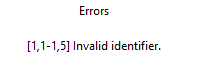
When I test it, I repeatedly get the same error:

adunn_0-1601497281362.png


I am uncertain how to troubleshoot this bug. If anyone has created Custom Connectors and can point me in the right direction, that would be appreciated. Thanks.

1 ACCEPTED SOLUTION
Anonymous
Not applicable

I ended up starting over with a fresh copy of the sample code from Microsoft (https://github.com/microsoft/DataConnectors/tree/master/samples/ODBC) and was able to get it working.

View solution in original post

5 REPLIES 5
Icey
Community Support
Community Support

Hi @Anonymous ,


I know few about Custom Connector. I may not be able to help you in this regard.

But for Direct Query, there are some limitations of data transformations. And to my knowledge, there is no workaround unless connection mode is switched to Import.


Best Regards,

Icey


If this post helps, then please consider Accept it as the solution to help the other members find it more quickly.

Anonymous
Not applicable

I ended up starting over with a fresh copy of the sample code from Microsoft (https://github.com/microsoft/DataConnectors/tree/master/samples/ODBC) and was able to get it working.

Icey
Community Support
Community Support

Hi @Anonymous ,


Glad to hear that. Could you share the sample code with us? We are curious about that.😀 

And please accept it as solution to your question so that people who may have the same question can get the solution directly.


Best Regards,

Icey

Anonymous
Not applicable

Yeah, I got it from here: https://github.com/microsoft/DataConnectors/tree/master/samples/ODBC


I copied the SQL sample. I initially was just pasting parts of it into the default custom connector, but then I started over with a fresh download of their whole sample and just made the changes I needed.

Anonymous
Not applicable

Have attempted to troubleshoot this issue myself. What I have ascertained is that it is related to the options used in the ODBC.DataSource function. When I comment out some of the options from the ODBC example code, this error stops appearing. However, at that point, Power BI fails to query fold my data source and I can't do anything except list the values in a table. Can't do very much in the way of filtering or using DAX functions.

I would assume something in this set of options needs to be set correctly based on my driver. While I can find documentation on these options, I am uncertain what resources to peruse in terms of the ODBC driver I am using to figure out which settings are necessary to make the Direct Query functional in Power BI.

Any assistance would be appreciated.

Helpful resources

Announcements
Fabric Data Days is here Carousel

Fabric Data Days 2026

Don't miss out on Data Days, June 15 through August 7. Learn Fabric, Power BI, SQL, AI and more.

Power BI DataViz World Championships carousel

Power BI DataViz World Championships - June 2026

A new Power BI DataViz World Championship is coming this June! Don't miss out on submitting your entry.