cancel
Showing results for 
Search instead for 
Did you mean: 

The Power BI Data Visualization World Championships is back! Get ahead of the game and start preparing now! Learn more

Reply
Espen1515
Advocate I
Advocate I

Creating multiple relationships

Hi,


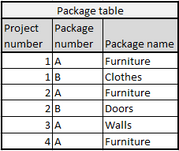
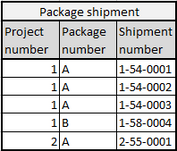
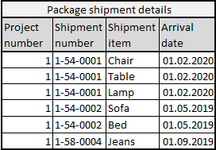
I am having trouble creating the proper relationships between my tables. I have four separate tables, and my problem is connecting them in the same way. I am pretty new to Power BI, so I believe the problem is due mostly to my lack of basic knowledge. I have made a mock-up example below.


Project table: Project number is a unique value

Package table: The package number is unique to a project, but could occur more than once in the table (just not more than once per project)

Package shipment table: The shipment number is unique

Package shipment details table: The shipment item is unique per shipment number
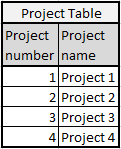
 

Project table image.pngPackage table image.pngPackage shipment table image.pngPackage shipment details table image.png


So if I try to establish relationships here, for example "Count of shipment items on package number A on Project 1, I am not able to set this up. Any tips? I have managed to establish the relationship between Project number in all tables, but don't know how to handle the fact that package number is Unique per project.


With kind regards,

Espen Lütken

1 ACCEPTED SOLUTION

Hi Lydia,


Thanks for your reply!

My question is not really concerning getting up that measure that I used as an example, but about how to establish a relationship between these tables. In reality these tables have thousands and thousands of lines and I need to be able to make counts, measures, etc. appear by themselves as soon as I filter. And to do that the tables need to have relationships between them. 🙂

View solution in original post

4 REPLIES 4
Anonymous
Not applicable


@Espen1515 wrote:


Project table image.pngPackage table image.pngPackage shipment table image.pngPackage shipment details table image.png


So if I try to establish relationships here, for example "Count of shipment items on package number A on Project 1, I am not able to set this up. Any tips?


@Espen1515,

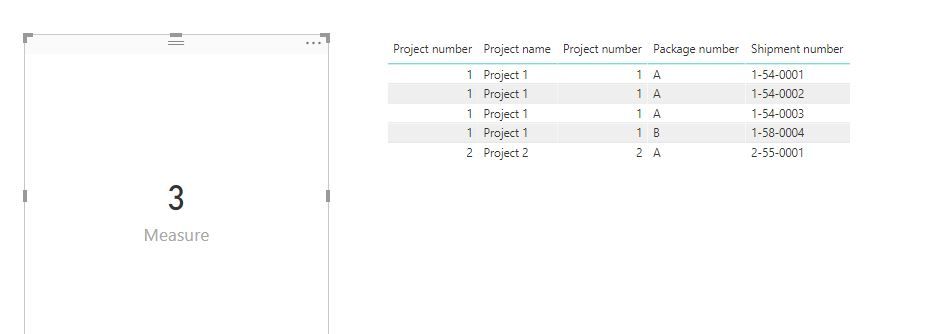
Does the following measure return your expected result?

Measure = CALCULATE(COUNT('Package shipment'[Shipment number]),FILTER('Package shipment','Package shipment'[Project number]=1 && 'Package shipment'[Package number]="A"))

1.JPG

Regards,
Lydia

Hi Lydia,


Thanks for your reply!

My question is not really concerning getting up that measure that I used as an example, but about how to establish a relationship between these tables. In reality these tables have thousands and thousands of lines and I need to be able to make counts, measures, etc. appear by themselves as soon as I filter. And to do that the tables need to have relationships between them. 🙂

Greg_Deckler
Community Champion
Community Champion

I am thinking that you will need to create a table of unique Project/Package codes.


Follow on LinkedIn
@ me in replies or I'll lose your thread!!!
Instead of a Kudo, please vote for this idea
Become an expert!: Enterprise DNA
External Tools: MSHGQM
YouTube Channel!: Microsoft Hates Greg
Latest book!:
DAX For Humans

DAX is easy, CALCULATE makes DAX hard...

Hi, I am not quite sure what you mean. Isn't that what the Package table already does? There is a unique package on each project, but can as I say occur more than once in the table as it can occur on a second project.


For example, on Project 1 there is only 1 unique package called "Furniture", but Furniture can also occur in Project 2. But maybe you mean something else. Is it possible to be more specific? Or include a short description of what a table like that would like like as opposed to those that already exist?


Thanks!

Helpful resources

Announcements
Power BI DataViz World Championships

Power BI Dataviz World Championships

The Power BI Data Visualization World Championships is back! Get ahead of the game and start preparing now!

November Power BI Update Carousel

Power BI Monthly Update - November 2025

Check out the November 2025 Power BI update to learn about new features.

FabCon Atlanta 2026 carousel

FabCon Atlanta 2026

Join us at FabCon Atlanta, March 16-20, for the ultimate Fabric, Power BI, AI and SQL community-led event. Save $200 with code FABCOMM.