cancel
Showing results for 
Search instead for 
Did you mean: 

The Power BI Data Visualization World Championships is back! Get ahead of the game and start preparing now! Learn more

Reply
Anonymous
Not applicable

Creating date column from dates between two columns - Query

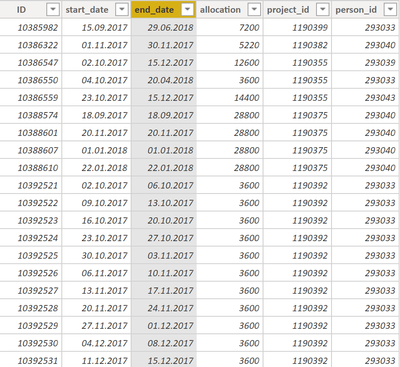
Hey i am trying to connect calculated time table and data from this data set. (down) But to correct reporting i need to create list of days between start and end in one column with all other columns in same state as they are now.

001.png

My idea is to do it with custom function. Maybe with loop cykle but i really dont know how. Can someone please help me with this?

1 ACCEPTED SOLUTION
artemus
Microsoft Employee
Microsoft Employee

You can add a custom column with:

List.Dates([start_date], Duration.Days([end_date] - [start_date]) + 1, #duration(1, 0, 0, 0))

Then, expand the custom column.

View solution in original post

1 REPLY 1
artemus
Microsoft Employee
Microsoft Employee

You can add a custom column with:

List.Dates([start_date], Duration.Days([end_date] - [start_date]) + 1, #duration(1, 0, 0, 0))

Then, expand the custom column.

Helpful resources

Announcements
Power BI DataViz World Championships

Power BI Dataviz World Championships

The Power BI Data Visualization World Championships is back! Get ahead of the game and start preparing now!

December 2025 Power BI Update Carousel

Power BI Monthly Update - December 2025

Check out the December 2025 Power BI Holiday Recap!

FabCon Atlanta 2026 carousel

FabCon Atlanta 2026

Join us at FabCon Atlanta, March 16-20, for the ultimate Fabric, Power BI, AI and SQL community-led event. Save $200 with code FABCOMM.

Top Solution Authors