cancel
Showing results for 
Search instead for 
Did you mean: 

The Power BI Data Visualization World Championships is back! Get ahead of the game and start preparing now! Learn more

Reply
Anonymous
Not applicable

Creating a new column showing change in values in power query

Hi All,


I'm new to PowerBI - I'm finding it useful but I can still do things in Excel much faster so there's a long way to go yet!


I have a table with the following columns:

Date - An end of month date - 30 June 2019 to 30 June 2002

Name:  Name of the institution - ~150 institutions

Loan amount: Showing the amount of the loan - $


I would like to create a new column in PowerQuery that shows the difference in loan amount from one year ago.  The solutions on this forum talk about creating an index key and then writing a formula to return the current row -1.  That will not work for me because I would need the index to work for both my Date and Name columns.


Does anybody know how to do this?


Thanks!!

1 ACCEPTED SOLUTION
v-frfei-msft
Community Support
Community Support

Hi @Anonymous ,


We can create a calculated column to work on it instead creating custom column in power query.

Difference = 
VAR lastyear =
    EDATE ( 'Table'[date], -12 )
VAR na = 'Table'[Name]
VAR lastyearloan =
    CALCULATE (
        SUM ( 'Table'[Loan amount] ),
        FILTER ( 'Table', 'Table'[date] = lastyear && 'Table'[Name] = na )
    )
RETURN
    IF ( ISBLANK ( lastyearloan ), BLANK (), 'Table'[Loan amount] - lastyearloan )

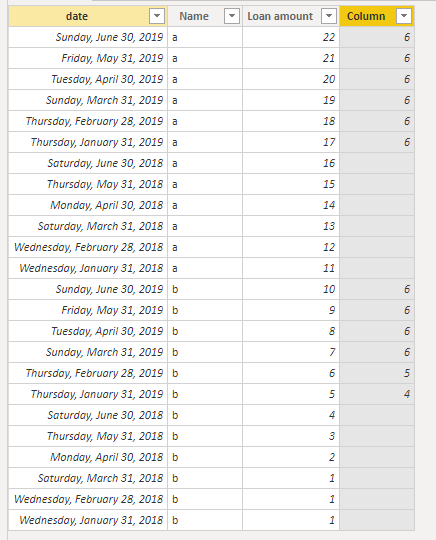
Capture.PNG

BTW, pbix as attached.


Community Support Team _ Frank
If this post helps, then please consider Accept it as the solution to help the others find it more quickly.

View solution in original post

2 REPLIES 2
v-frfei-msft
Community Support
Community Support

Hi @Anonymous ,


We can create a calculated column to work on it instead creating custom column in power query.

Difference = 
VAR lastyear =
    EDATE ( 'Table'[date], -12 )
VAR na = 'Table'[Name]
VAR lastyearloan =
    CALCULATE (
        SUM ( 'Table'[Loan amount] ),
        FILTER ( 'Table', 'Table'[date] = lastyear && 'Table'[Name] = na )
    )
RETURN
    IF ( ISBLANK ( lastyearloan ), BLANK (), 'Table'[Loan amount] - lastyearloan )

Capture.PNG

BTW, pbix as attached.


Community Support Team _ Frank
If this post helps, then please consider Accept it as the solution to help the others find it more quickly.
Anonymous
Not applicable

@v-frfei-msft 


This works - thanks for your help! 

Helpful resources

Announcements
Power BI DataViz World Championships

Power BI Dataviz World Championships

The Power BI Data Visualization World Championships is back! Get ahead of the game and start preparing now!

November Power BI Update Carousel

Power BI Monthly Update - November 2025

Check out the November 2025 Power BI update to learn about new features.

FabCon Atlanta 2026 carousel

FabCon Atlanta 2026

Join us at FabCon Atlanta, March 16-20, for the ultimate Fabric, Power BI, AI and SQL community-led event. Save $200 with code FABCOMM.