cancel
Showing results for 
Search instead for 
Did you mean: 

Next up in the FabCon + SQLCon recap series: The roadmap for Microsoft SQL and Maximizing Developer experiences in Fabric. All sessions are available on-demand after the live show. Register now

Reply
jonas123
Regular Visitor

Creating a custom column from existing table

Hi!


I'm quite new to Power BI and Power Query and I've managed to run into a problem.


I am trying to visualize data about employees. In the employee table I have something like this:

NameHiredLeft the companyFavourite color
Jonas2018 Red
Jeff20172019Red


Then what I want to do is track the favourite color of the employees for every year. (Assuming of course that a person has the same favourite color during employment). The basic idea I have to do this is to create a new table like this:


YearPeople who like red
20171
20182
20192
20201


My question is: How do I write the M-function to create the "People who like red"-column?

Or is this the wrong way to go about visualizing this data?


Thank you in advance!

1 ACCEPTED SOLUTION
v-juanli-msft
Community Support
Community Support

Hi @jonas123 

Create a date table

Date = ADDCOLUMNS(CALENDAR(DATE(MIN('Table'[Hired]),1,1),TODAY()),"year",YEAR([Date]))


Create a measure

Measure =
CALCULATE (
    DISTINCTCOUNT ( 'Table'[Name] ),
    FILTER (
        'Table',
        'Table'[Hired]
            <= MAX ( 'Date'[year] )
            && (
                'Table'[Left the company]
                    >= MAX ( 'Date'[year] )
                    || 'Table'[Left the company]
                        = BLANK ()
            )
    )
)

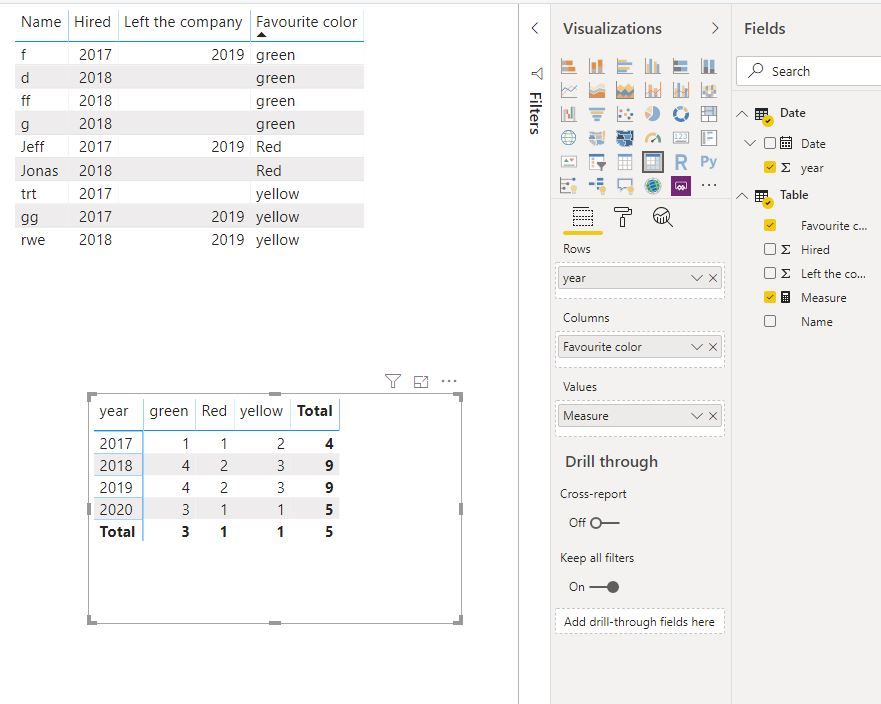
Capture1.JPG

Best Regards
Maggie
Community Support Team _ Maggie Li
If this post helps, then please consider Accept it as the solution to help the other members find it more quickly.

View solution in original post

2 REPLIES 2
v-juanli-msft
Community Support
Community Support

Hi @jonas123 

Create a date table

Date = ADDCOLUMNS(CALENDAR(DATE(MIN('Table'[Hired]),1,1),TODAY()),"year",YEAR([Date]))


Create a measure

Measure =
CALCULATE (
    DISTINCTCOUNT ( 'Table'[Name] ),
    FILTER (
        'Table',
        'Table'[Hired]
            <= MAX ( 'Date'[year] )
            && (
                'Table'[Left the company]
                    >= MAX ( 'Date'[year] )
                    || 'Table'[Left the company]
                        = BLANK ()
            )
    )
)

Capture1.JPG

Best Regards
Maggie
Community Support Team _ Maggie Li
If this post helps, then please consider Accept it as the solution to help the other members find it more quickly.

az38
Community Champion
Community Champion

Hi @jonas123 

I think DAX usage would be better idea for your task

First, create a table with years

CalendarYearTable = GENERATESERIES(MIN('Table'[Hired]), YEAR(TODAY()))

next, in this new table create a measure 

People who like red = 
calculate(COUNTROWS('Table'),
FILTER(ALL('Table'),
'Table'[Favourite color]="Red" && 
'Table'[Hired]<=SELECTEDVALUE(CalendarYearTable[Value]) && 
('Table'[Left the company]>=SELECTEDVALUE(CalendarYearTable[Value]) || ISBLANK('Table'[Left the company]))
))

see the pbix-file in attach


do not hesitate to give a kudo to useful posts and mark solutions as solution
LinkedIn

Helpful resources

Announcements
New to Fabric survey Carousel

New to Fabric Survey

If you have recently started exploring Fabric, we'd love to hear how it's going. Your feedback can help with product improvements.

Power BI DataViz World Championships carousel

Power BI DataViz World Championships - June 2026

A new Power BI DataViz World Championship is coming this June! Don't miss out on submitting your entry.

Join our Fabric User Panel

Join our Fabric User Panel

Share feedback directly with Fabric product managers, participate in targeted research studies and influence the Fabric roadmap.

March Power BI Update Carousel

Power BI Community Update - March 2026

Check out the March 2026 Power BI update to learn about new features.