cancel
Showing results for 
Search instead for 
Did you mean: 

The Power BI Data Visualization World Championships is back! Get ahead of the game and start preparing now! Learn more

Reply
Anonymous
Not applicable

Create multiple queries from a single query

Hi all,

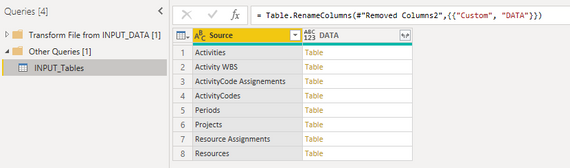
I have managed to create a Query with a list of different tables (See image). 

Stefanhh_1-1631801083057.png

This list of tables will get bigger over time. 


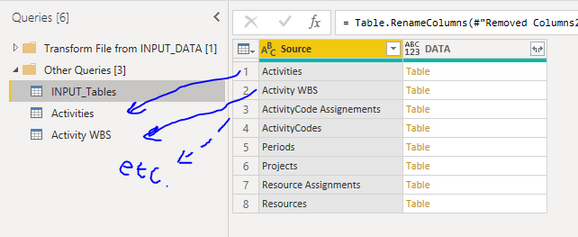
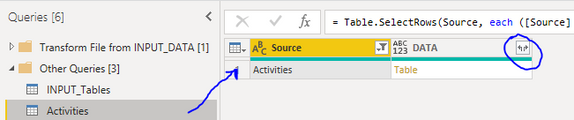
For each Source I would like to expand the table DATA in a new query and name the query based on the Source value (See image below for example)

Stefanhh_2-1631801461586.png

Stefanhh_3-1631801838710.png


Is there a way to automate these steps? I want to knip the process of creating a reference query from INPUT_Tables, renaming the query, filtering the Source by the desired value and expanding the table DATA each time a new record gets added into INPUT_Tables.

Your help is verry much appreciated.


Kind Regards,

Stefan 


3 REPLIES 3
echomarie
New Member

Would love to see the solution for this. I have the same problem and it seems like it would be a pretty popular situation.

Anonymous
Not applicable

Hi Edhans,


That is unfortunate to hear, but thanks for taking the time to help me. 

Regards, Stefan


edhans
Community Champion
Community Champion

Not to my knowledge. Power Query cannot create queries, rename them, delete them, or even identify them. THat is all "above" the layer of the M language. If all of those tables are the same format, you can use the Combine feature to bring them all in at once. But if they are not, and need to be brought in as separate queries with their own formatting, you will have to do as you explained. and then apply the relevant transformation steps if necessary.

I do not think it is supported, but you could conceivably do this with C scripts in Tabular Editor if you could get T/E to know the names of the tables, but I'm not sure how you could successfully pass that info to T/E, so I'm still thinking no.


Did I answer your question? Mark my post as a solution!
Did my answers help arrive at a solution? Give it a kudos by clicking the Thumbs Up!

DAX is for Analysis. Power Query is for Data Modeling


Proud to be a Super User!

MCSA: BI Reporting

Helpful resources

Announcements
Power BI DataViz World Championships

Power BI Dataviz World Championships

The Power BI Data Visualization World Championships is back! Get ahead of the game and start preparing now!

December 2025 Power BI Update Carousel

Power BI Monthly Update - December 2025

Check out the December 2025 Power BI Holiday Recap!

FabCon Atlanta 2026 carousel

FabCon Atlanta 2026

Join us at FabCon Atlanta, March 16-20, for the ultimate Fabric, Power BI, AI and SQL community-led event. Save $200 with code FABCOMM.

Top Solution Authors