cancel
Showing results for 
Search instead for 
Did you mean: 

July 7 - July 17 | Round 2 of the Power BI Dataviz World Championships. Don't miss your chance! Learn more

Reply
Elie_HUCHET
Helper III
Helper III

Create conditional formatting between two tables

Hello,
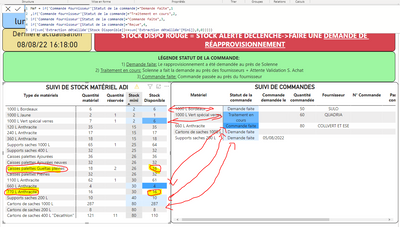
I would like to create conditional formatting from a formula. I have already created a formula allowing this. When a field in the "Order status" (Statut de la commande) column is either "Request made"(Demande faite), or "Processing in progress" (Traitement en cours) or "Order made"(Commande faite) then a value applies.

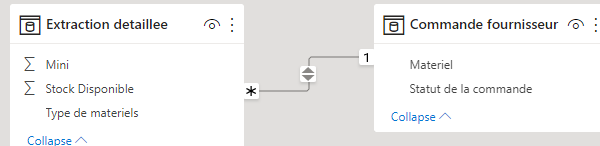
The problem is that I would like to cross two tables in this same layout conditional form.
If the available stock <=Minimum stock and it has no order status then it has the number 8 for example. The problem is that this formula does not take despite a SUM to link the two tables.

As you can see below this screenshot, we have two cases (highlighted in yellow and circled in red) where our available stock is less than our minimum stock and where no process has been started and yet it does not appear in red.

Elie_HUCHET_0-1660662486482.png

Thank you for your help

1 ACCEPTED SOLUTION
v-kkf-msft
Community Support
Community Support

Hi @Elie_HUCHET ,


Please try the measure.


MeF =
VAR color =
    SWITCH (
        SELECTEDVALUE ( 'Commande fournisseur'[Statut de la commande] ),
        "Demande faite", 1,
        "Traitment en cours", 2,
        "Commande faite", 3,
        "Recue", 4
    )
RETURN
    IF (
        color <> BLANK (),
        color,
        IF (
            SUM ( 'Extraction detaillee'[Stock Disponible] )
                < SUM ( 'Extraction detaillee'[Mini] ),
            8,
            0
        )
    )

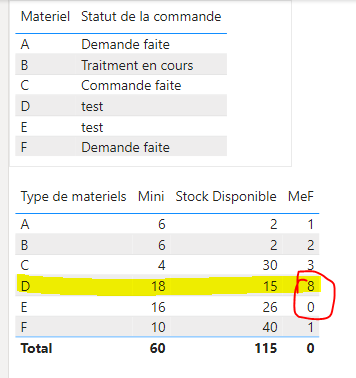
vkkfmsft_0-1660877520837.png

vkkfmsft_1-1660877534797.png


If the problem is still not resolved, please provide detailed error information or the expected result you expect. Let me know immediately, looking forward to your reply.
Best Regards,
Winniz
If this post helps, then please consider Accept it as the solution to help the other members find it more quickly.


View solution in original post

2 REPLIES 2
Elie_HUCHET
Helper III
Helper III

THANK YOU IT'S OK!! 🙂 

v-kkf-msft
Community Support
Community Support

Hi @Elie_HUCHET ,


Please try the measure.


MeF =
VAR color =
    SWITCH (
        SELECTEDVALUE ( 'Commande fournisseur'[Statut de la commande] ),
        "Demande faite", 1,
        "Traitment en cours", 2,
        "Commande faite", 3,
        "Recue", 4
    )
RETURN
    IF (
        color <> BLANK (),
        color,
        IF (
            SUM ( 'Extraction detaillee'[Stock Disponible] )
                < SUM ( 'Extraction detaillee'[Mini] ),
            8,
            0
        )
    )

vkkfmsft_0-1660877520837.png

vkkfmsft_1-1660877534797.png


If the problem is still not resolved, please provide detailed error information or the expected result you expect. Let me know immediately, looking forward to your reply.
Best Regards,
Winniz
If this post helps, then please consider Accept it as the solution to help the other members find it more quickly.


Helpful resources

Announcements
FabCon and SQLCon Barcelona 2026

FabCon & SQLCon – Barcelona 2026

Join us in Barcelona for FabCon and SQLCon, the Fabric, Power BI, SQL, and AI community event. Save €200 with code FABCMTY200.

60 days of Data Days Carousel

Data Days 2026

Join Fabric Data Days 2026: 60 days of free live/on-demand sessions, challenges, study groups, and certification opportunities.

Power BI DataViz World Championships carousel

Power BI DataViz World Championships - June 2026

A new Power BI DataViz World Championship is coming this June! Don't miss out on submitting your entry.