Hello All,
I realize that this might not be the best approach to doing this, but I was hoping to see if it's possible.
Overall Objective: I'm trying to use power query to generate a list of all columns and data types from every Stored Procedure in a database.
| Stored Procedure | name | system_type_name |
| DB_Sch.fmcParAction | ExecuteAction | nvarchar(30) |
| DB_Sch.fmcParAction | ExecuteActionId | nvarchar(30) |
| DB_Sch.fmcParContainerId | ContainerId | char(16) |
| DB_Sch.fmcParContainerIdAssembly | ContainerId | char(16) |
| DB_Sch.fmcParDataCollection | DataCollectionId | char(16) |
| DB_Sch.fmcParDataCollection | DataCollectionName | nvarchar(30) |
| DB_Sch.fmcParDataCollectionByTaskLlist | DataCollectionDefName | nvarchar(30) |
| DB_Sch.fmcParDataCollectionRev | DataCollectionDefBaseId | char(16) |
| DB_Sch.fmcParDataCollectionRev | DataCollection | nvarchar(48) |
I've been able to get pretty close with a workaround, but it requires a manual step.
I have a query that generates a list of each stored procedure in the database.
| Stored Procedure |
| DB_Sch.fmcParAction |
| DB_Sch.fmcParContainerId |
| DB_Sch.fmcParContainerIdAssembly |
| DB_Sch.fmcParDataCollection |
| DB_Sch.fmcParDataCollectionByTaskLlist |
| DB_Sch.fmcParDataCollectionRev |
I also have a query that will generate a list of each column from a single stored procedure. (The problem being that it will only return results for one stored procedure.)
SELECT 'DB_Sch.fmcParDataCollection' AS [SP], name, system_type_name
FROM sys.dm_exec_describe_first_result_set_for_object (OBJECT_ID('DB_Sch.fmcParDataCollection'), NULL)
| Stored Procedure | name | system_type_name |
| DB_Sch.fmcParDataCollection | DataCollectionId | char(16) |
| DB_Sch.fmcParDataCollection | DataCollectionName | nvarchar(30) |
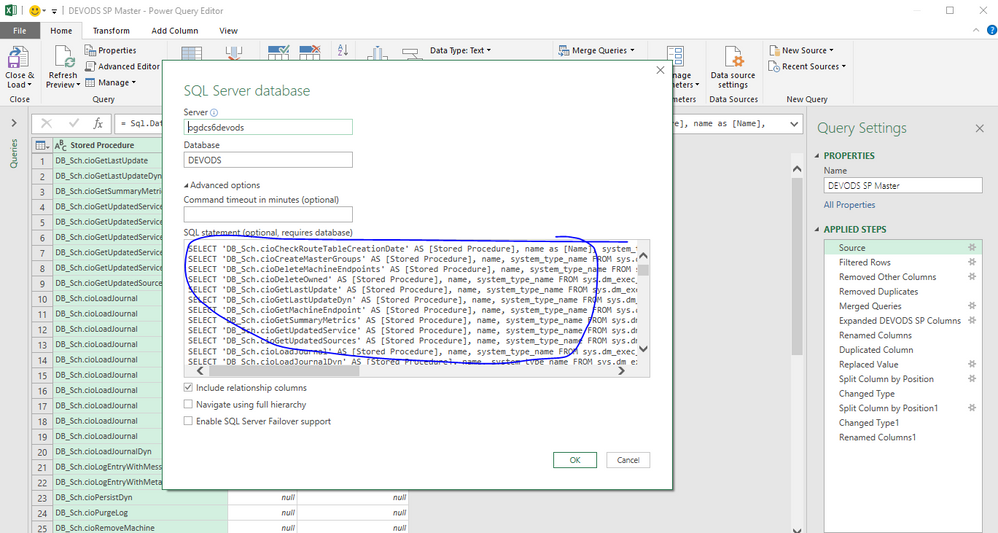
So my current solution is to use the first query to generate the list of stored procedures, then add an additional column that creates the query for each Stored Procedure with a UNION at the end of each row.

At this point, I can copy the text from the Query column and paste it in as the SQL statement that will generate what I'm looking for, but it is now a static query that will not bring in new Stored Procedures that are created without manually updating the query.
Thanks in advance!
Josh