cancel
Showing results for 
Search instead for 
Did you mean: 

Data Days is here! Join us now for 60+ days of learning, challenges, and connection. Learn more

Reply
GueguenK
Regular Visitor

Create Data Connector MSACCESS

Hello


I am new in PBI Communauty.

I try to find a sample for create my first data connector.


I need to create a connector with an Access Database.

I have Allready create my Gataway but i can't find any source of this.


Have you an idea of where i can find that.


Thanks

1 ACCEPTED SOLUTION

Hi @GueguenK ,

Actually, there is an idea about adding Access as data source for on-premises gateway, you can vote it up.


In addition, I'm afraid that an Access connection can be configured for the personal Gateway. But what if using a personal gateway is no option for you” in your post. The issue that using personal gateway to connect to the MS Access DB might be related to the 32 bit/64 bit Access database.


Power BI only have 64 bit personal gateway, it is by design to leverage only 64 bits drivers. Referring to the 32 bit MS Access DB, the 64bit access driver is required on the gateway machine .You can download it from here, after that the scheduled refresh could be configured successfully.

Best  Regards,

Cherry


Community Support Team _ Cherry Gao
If this post helps, then please consider Accept it as the solution to help the other members find it more quickly.

View solution in original post

4 REPLIES 4
v-piga-msft
Resident Rockstar
Resident Rockstar

Hi @GueguenK,

If I understand your requirement correctly that you want to get data from Access Database in Power BI.

Actually, we have Access database connector in Power BI Desktop.

Get Data>> More>>Database>>Access Database

 access db.PNG


In addition, there is no Access Database selection in the data source list when you add data source in data gateway in Power BI Service. 

Microsoft Access Database is not a server, it's a file. I'd like to suggest you add new datasource with 'file' type in data gateway.

Reference: https://community.powerbi.com/t5/Service/Power-BI-Enterprise-Access-Database/td-p/44075

Best Regards,

Cherry


Community Support Team _ Cherry Gao
If this post helps, then please consider Accept it as the solution to help the other members find it more quickly.

Hello


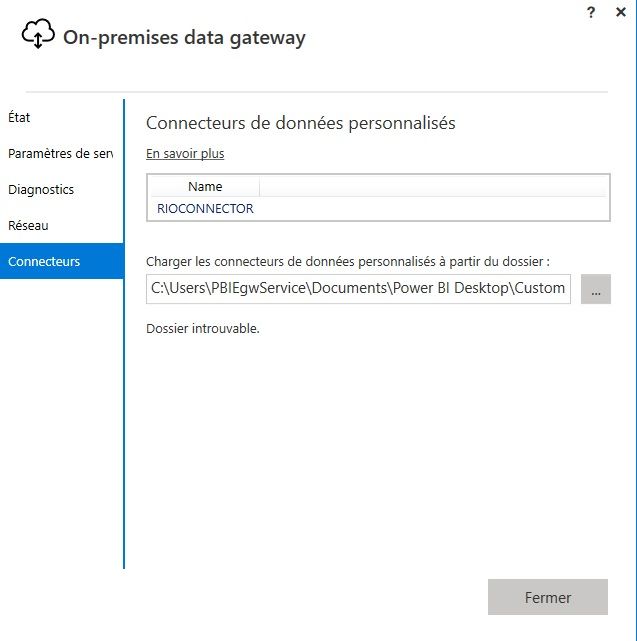
I have allready create my gateway.

The problem is i want to connect my gateway to an access file.


gateway.jpg


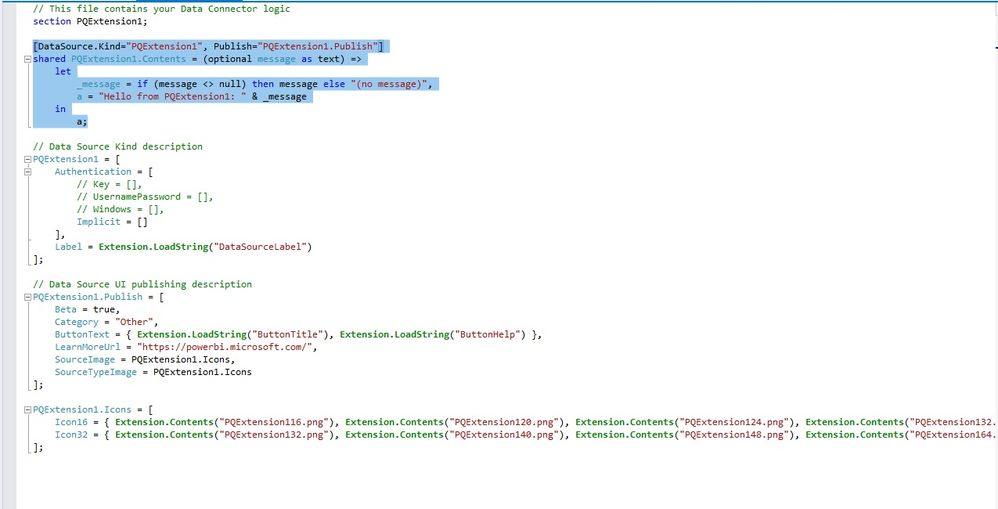
I try to create a connector to do this.


connector.jpg


I want to use this gateway connector in local an online.

I want to create a connector for the refresh data.


Hi @GueguenK ,

Actually, there is an idea about adding Access as data source for on-premises gateway, you can vote it up.


In addition, I'm afraid that an Access connection can be configured for the personal Gateway. But what if using a personal gateway is no option for you” in your post. The issue that using personal gateway to connect to the MS Access DB might be related to the 32 bit/64 bit Access database.


Power BI only have 64 bit personal gateway, it is by design to leverage only 64 bits drivers. Referring to the 32 bit MS Access DB, the 64bit access driver is required on the gateway machine .You can download it from here, after that the scheduled refresh could be configured successfully.

Best  Regards,

Cherry


Community Support Team _ Cherry Gao
If this post helps, then please consider Accept it as the solution to help the other members find it more quickly.
GueguenK
Regular Visitor

A little more details.

I am looking to put my Access database available via a gateway.

Is there another way to create a custom connector?

I would like to use this database to create Power BI reports, but I would like this data to be updated by users every day.

Helpful resources

Announcements
Fabric Data Days is here Carousel

Fabric Data Days 2026

Don't miss out on Data Days, June 15 through August 7. Learn Fabric, Power BI, SQL, AI and more.

May Power BI Update Carousel

Power BI Monthly Update - May 2026

Check out the May 2026 Power BI update to learn about new features.

Power BI DataViz World Championships carousel

Power BI DataViz World Championships - June 2026

A new Power BI DataViz World Championship is coming this June! Don't miss out on submitting your entry.