cancel
Showing results for 
Search instead for 
Did you mean: 

The Power BI Data Visualization World Championships is back! Get ahead of the game and start preparing now! Learn more

Reply
titanic123
Helper I
Helper I

CountIf in PowerBi

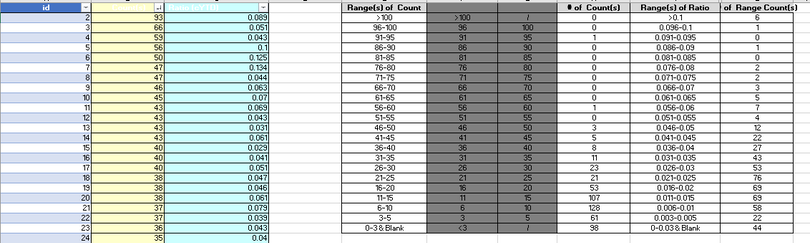
Hi All, I am stugging doing the same as below excel sheet in Power Bi. Please help me to create the Count IF's using PowerBi DAX. I have data colums : ID,  Count(s), Ratio. Please help me with the COUNTIFS in powerBi  like #of Count(s) =COUNTIFS($B$2:$B$654,F2) and Range of Count(s) =COUNTIFS($C$2:$C$654,J2)


titanic123_0-1656823096374.png


6 REPLIES 6
Vijay_A_Verma
Super User
Super User

Use below DAX where you would need to replace Table with your table name and Field with your field name (i.e. this is $B$2:$B$654) and F2 with your value for which you want to count.

COUNTIF = 
COUNTROWS(
    FILTER(
        ALL(Table),
        Table[Field] = F2
    )
)   

Hi Vijay, Thanks for yolur quick reply. I have data from past 3 years but COUNTIFS needed only for current year.In the filter if I am adding the year its not working corrcet. Please help me.

I tried my DAX like Below for the Countif formula : =COUNTIFS($B$2:$B$654,">"&F4,$B$2:$B$654,"<="&G4)


COUNTIF =
COUNTROWS(
FILTER(
ALL('Query1'),
'Query1'[$B$2:$B$654] > 'Query1'[&F4] && 'Query1'[$B$2:$B$654] <= 'Query1'[&G4] && 'Query1'[Year]=2022
)
)
 
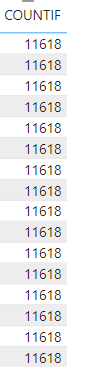
But Resultes are : titanic123_0-1656858203348.png

 I used Don't summarize alos.


Is $B$2:$B$654 a field name? What about F4 and G4...

My column names in PowerBi are different, I am just representing the column names in Excel.

My DAX ; 

COUNTIF =
COUNTROWS(
FILTER(
ALL('Query1'),
'Query1'[VN_OT] > 'Query1'[Lower Limit] && 'Query1'[VN_OT] <= 'Query1'[Upper Limit] && 'Query1'[VN Year]=2022
)
)


Isn't your count correct? I tested your formula and it is giving correct count. 

Helpful resources

Announcements
Power BI DataViz World Championships

Power BI Dataviz World Championships

The Power BI Data Visualization World Championships is back! Get ahead of the game and start preparing now!

December 2025 Power BI Update Carousel

Power BI Monthly Update - December 2025

Check out the December 2025 Power BI Holiday Recap!

FabCon Atlanta 2026 carousel

FabCon Atlanta 2026

Join us at FabCon Atlanta, March 16-20, for the ultimate Fabric, Power BI, AI and SQL community-led event. Save $200 with code FABCOMM.

Top Solution Authors