We've captured the moments from FabCon & SQLCon that everyone is talking about, and we are bringing them to the community, live and on-demand. Starts on April 14th. Register now
Hi all!
My colleagues and I want to use PBI for analysing some internal checks we're running on a monthly basis. For this we're using MS Forms which acts as the data input for PBI.
The file we recive and try to vizualise has some sort of this format:
| ID | Department | Question 1 | Text 1 | Question 2 | Text 2 | Question 3 | Text 3 | ... |
| Number | text | true/false | text | true/false | text | true/false | text |
The difficulty we're encountering has to do with the way how we rate the answers.
Each department gets points for a question answered with true. But if they have one question with answer = false, they do not score any points for all following answers (columns above are in the correct order). It's almost like a "cut-off".
E.g: True - True - True - False - False would score 3 points
True - False- True - False - True would score 1 point
Now we want to create a column, which tells us how many points they scored until they answered witha false. I know this can be done with a lot of if-conditions. But as we have 15 Questions to ask, i think it will be rather messy. So I'm asking if there's a neater way to do it! 🙂
Something related to this question:
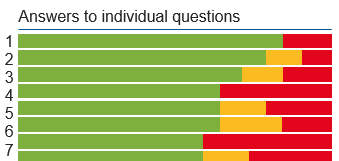
We want to display the results like this:
Example for wished outcome
Red for false,
Yellow for true, but there was a false in one of the questions before (so it does not add to the respective score)
Green for true, all other answers were true before.
For this, I'm a little stumped and don't really know how to start... maybe you have some thoughts?
Please let me know, if you need any more details to help me out!
Thanks in advance!
Joost from Hamburg, Germany
let
Source = Table.FromRows(Json.Document(Binary.Decompress(Binary.FromText("i45W8ivNTUotUtJRKkmtKAFRRaWpuHhpiTnFcG5sLAA=", BinaryEncoding.Base64), Compression.Deflate)), let _t = ((type text) meta [Serialized.Text = true]) in type table [ID = _t, Department = _t, #"Question 1" = _t, #"Text 1" = _t, #"Question 2" = _t, #"Text 2" = _t, #"Question 3" = _t, #"Text 3" = _t]),
#"Changed Type" = Table.TransformColumnTypes(Source,{{"ID", type text}, {"Department", type text}, {"Question 1", type logical}, {"Text 1", type text}, {"Question 2", type logical}, {"Text 2", type text}, {"Question 3", type logical}, {"Text 3", type text}}),
#"Added Custom" = Table.AddColumn(#"Changed Type", "trueBeforefalse", each List.PositionOf(List.Alternate(List.Skip(Record.FieldValues(_)),1,1,0),false, Occurrence.First))
in
#"Added Custom"try this
Hi, @Anonymous
This should not be difficult to solve with Power Query, using recursion, List.Accumulate, List.Generate, etc. should work, can you upload some sample data?
@Anonymous - Not sure about Power Query, I did something similar in DAX called Chtulhu - https://community.powerbi.com/t5/Quick-Measures-Gallery/Cthulhu/m-p/509739#M211
Seems like you might want to consider unpivoting columns.
If you have recently started exploring Fabric, we'd love to hear how it's going. Your feedback can help with product improvements.
A new Power BI DataViz World Championship is coming this June! Don't miss out on submitting your entry.
| User | Count |
|---|---|
| 5 | |
| 3 | |
| 3 | |
| 2 | |
| 2 |
| User | Count |
|---|---|
| 10 | |
| 8 | |
| 7 | |
| 7 | |
| 5 |