
cancel
Showing results for 
Search instead for 
Did you mean: 

The Power BI Data Visualization World Championships is back! Get ahead of the game and start preparing now! Learn more

Reply
Anonymous
Not applicable

Count Letters in Records?

Hallo Guys,

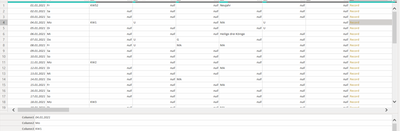
I have this table and at the end of each table I have a list.

Screenshot 2021-01-19 083448.png

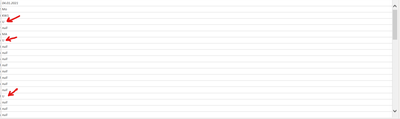
How can I count the number of U letters in this list.

Screenshot 2021-01-19 083659.png

Thanks in advance.


with best regards
kelu

1 ACCEPTED SOLUTION
AlB
Community Champion
Community Champion

@Anonymous 

Where exactly is the list? Is if a field of a record? Make sure you build te list correctly. It looks like you are not specifying the field for the record.

Can you share the pbix? Try something like:

List.Count(List.Select(Record.ToList(Record.SelectFields(RecordName, {Fieldname})) , each _ = "U")) 

Please mark the question solved when done and consider giving a thumbs up if posts are helpful.

Contact me privately for support with any larger-scale BI needs, tutoring, etc.

Cheers 


SU18_powerbi_badge

View solution in original post

3 REPLIES 3
AlB
Community Champion
Community Champion

@Anonymous 

Where exactly is the list? Is if a field of a record? Make sure you build te list correctly. It looks like you are not specifying the field for the record.

Can you share the pbix? Try something like:

List.Count(List.Select(Record.ToList(Record.SelectFields(RecordName, {Fieldname})) , each _ = "U")) 

Please mark the question solved when done and consider giving a thumbs up if posts are helpful.

Contact me privately for support with any larger-scale BI needs, tutoring, etc.

Cheers 


SU18_powerbi_badge

AlB
Community Champion
Community Champion

Hi @Anonymous 

Try this

List.Count(List.Select(YourListName_, each _ = "U")) 


Please mark the question solved when done and consider giving a thumbs up if posts are helpful.

Contact me privately for support with any larger-scale BI needs, tutoring, etc.

Cheers 


SU18_powerbi_badge

Anonymous
Not applicable

@AlB Thanks for the answer!

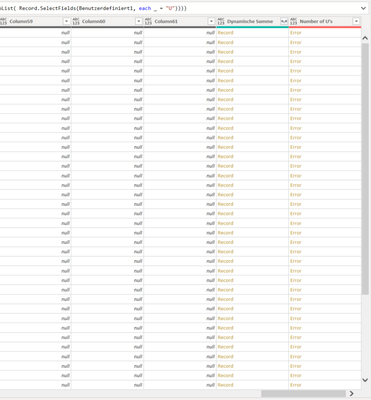
I tryed: 

Screenshot 2021-01-19 104738.png

I tried implementing that but I could not get I to work.

Screenshot 2021-01-19 104811.png

Helpful resources

Announcements
Power BI DataViz World Championships

Power BI Dataviz World Championships

The Power BI Data Visualization World Championships is back! Get ahead of the game and start preparing now!

December 2025 Power BI Update Carousel

Power BI Monthly Update - December 2025

Check out the December 2025 Power BI Holiday Recap!

FabCon Atlanta 2026 carousel

FabCon Atlanta 2026

Join us at FabCon Atlanta, March 16-20, for the ultimate Fabric, Power BI, AI and SQL community-led event. Save $200 with code FABCOMM.