cancel
Showing results for 
Search instead for 
Did you mean: 

The Power BI Data Visualization World Championships is back! Get ahead of the game and start preparing now! Learn more

Reply
Anonymous
Not applicable

Count Column and PowerBi Measures

Hi,


I need help in finding out a way for measures and in applying the count column


I have two tables - One is Call Report and the Other Building Report


The call report has details of calls occured during each date for one year or more

The Building report is like a master report - which has details of Assests in each building.


Building report looks like below

sanjurk_0-1614839415475.png


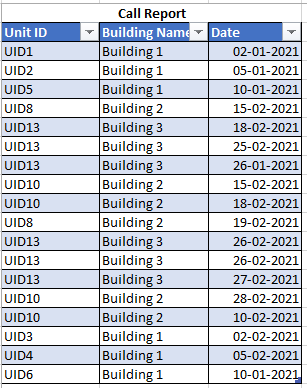
Call Report looks like below that calculates number of calls


sanjurk_1-1614839445111.png


I wanted to find call rate using measures in PowerBi - Call Rate = No of Calls/No. of Units


When I put the data in PowerBi


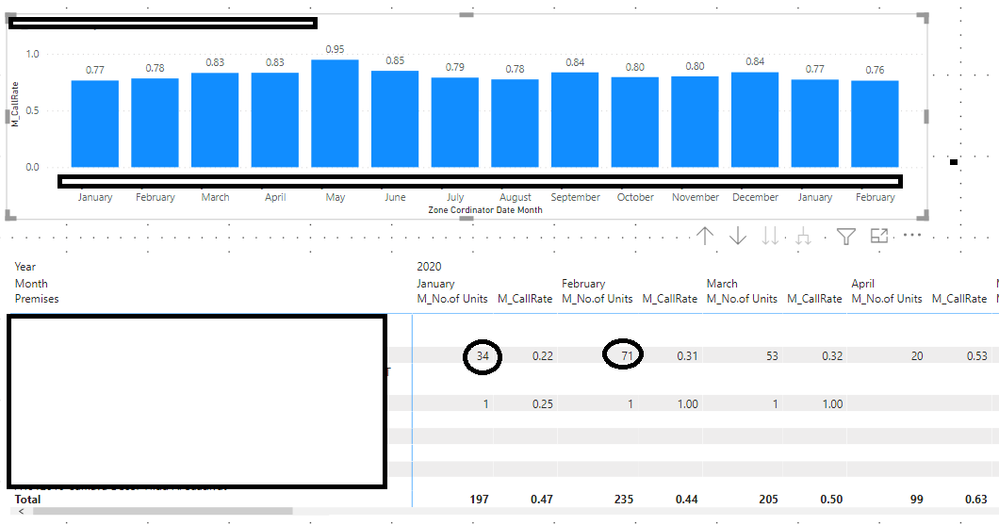
When I calculate the Call Rate - the number of units changes each year, which shouldnt because the building has same assest throughout the year.


Below is the excel calculation :


Call RateCall Rate = No of Calls/No. of Units
Building NameJan-21Feb-21
Building 10.670.33
Building 201.2
Building 30.52.5


Untitled.png


1 ACCEPTED SOLUTION
Anonymous
Not applicable

Sorry,


Atlast found it out where I was going wrong.


It was in data cardinality - many to many, which I figued it out now that created the filtering even after adding the date

View solution in original post

5 REPLIES 5
Anonymous
Not applicable

Sorry,


Atlast found it out where I was going wrong.


It was in data cardinality - many to many, which I figued it out now that created the filtering even after adding the date

Hello @Anonymous 


so you found a solution?


BR


Jimmy

Jimmy801
Community Champion
Community Champion

Hello @Anonymous 


and where is the question? What is the problem?😉

The measure has to first count rows divided distinct count of rows of your Unit ID.


If this post helps or solves your problem, please mark it as solution (to help other users find useful content and to acknowledge the work of users that helped you)
Kudoes are nice too

Have fun

Jimmy

Anonymous
Not applicable

I know it would be confusing ‌😉


Could you let me know how to write the measure.


I have

Measure 1 which is


M_No.of Units = COUNT('Current/Lost Units - Merged'[Supervisor])


Measure 2


M_No.of Calls = COUNT('Call Report'[Call])

Measure 3

M_CallRate = DIVIDE([M_No.of Units],[M_No.of Calls])


But this doesnt give me the correct answer since each year the Measure 1 keeps changing each month, which shouldnt happen - If the building has 10 units, this should remain the same every year.

The last photo in my message does show it


Hello @Anonymous 


what you mean the measure is changing every year? The datamodel will take care of that as soon you integrate a date. Meansing filtering your tables when you use a date and then the measure output changes accordingly. For me the first question is how you get the no of units the right way. Is this a distinct count of a column or a count of a table that contains x columns of your table? Depending on that you have to create a formula that does exactly that like SELCTCOLUMNS that gives you x columns of a table and then use the distinct count on that.


If this post helps or solves your problem, please mark it as solution (to help other users find useful content and to acknowledge the work of users that helped you)
Kudoes are nice too

Have fun

Jimmy

Helpful resources

Announcements
Power BI DataViz World Championships

Power BI Dataviz World Championships

The Power BI Data Visualization World Championships is back! Get ahead of the game and start preparing now!

December 2025 Power BI Update Carousel

Power BI Monthly Update - December 2025

Check out the December 2025 Power BI Holiday Recap!

FabCon Atlanta 2026 carousel

FabCon Atlanta 2026

Join us at FabCon Atlanta, March 16-20, for the ultimate Fabric, Power BI, AI and SQL community-led event. Save $200 with code FABCOMM.