cancel
Showing results for 
Search instead for 
Did you mean: 

Data Days is here! Join us now for 60+ days of learning, challenges, and connection. Learn more

Reply
Anonymous
Not applicable

Connection to BW

Hello,


I'm trying to connect PowerBi to SAP BW. 

DirectQuery connection works just fine.


The problem is in "Import" connection method.

In navigaton window I can see cubes and I can choose from their values and fields.

I can even see the result of my choice in preview on the right.

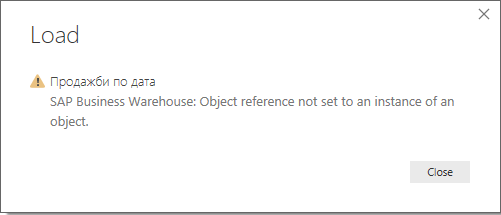
But when I try to load I get the following error:


Capture.PNG


I would be grateful if someone help me.

1 ACCEPTED SOLUTION
v-piga-msft
Resident Rockstar
Resident Rockstar

Hi @Anonymous ,


Please check if you have installed the latest version Power BI Desktop 2.67.5404.581.


In addition, what's version of SAP BW connector do you use?


Please try the Implementation 2.0 of the SAP BW Connector.


More details, please refer to this guide document.


Best  Regards,

Cherry

Community Support Team _ Cherry Gao
If this post helps, then please consider Accept it as the solution to help the other members find it more quickly.

View solution in original post

2 REPLIES 2
v-piga-msft
Resident Rockstar
Resident Rockstar

Hi @Anonymous ,

Have you solved your problem?

If you have solved, could you please share the solution or always accept the replies making sense as solution to your question so that people who may have the same question can get the solution directly.

If you still need help, please feel free to ask.

Best  Regards,

Cherry


Community Support Team _ Cherry Gao
If this post helps, then please consider Accept it as the solution to help the other members find it more quickly.
v-piga-msft
Resident Rockstar
Resident Rockstar

Hi @Anonymous ,


Please check if you have installed the latest version Power BI Desktop 2.67.5404.581.


In addition, what's version of SAP BW connector do you use?


Please try the Implementation 2.0 of the SAP BW Connector.


More details, please refer to this guide document.


Best  Regards,

Cherry

Community Support Team _ Cherry Gao
If this post helps, then please consider Accept it as the solution to help the other members find it more quickly.

Helpful resources

Announcements
Fabric Data Days is here Carousel

Fabric Data Days 2026

Don't miss out on Data Days, June 15 through August 7. Learn Fabric, Power BI, SQL, AI and more.

May Power BI Update Carousel

Power BI Monthly Update - May 2026

Check out the May 2026 Power BI update to learn about new features.

Power BI DataViz World Championships carousel

Power BI DataViz World Championships - June 2026

A new Power BI DataViz World Championship is coming this June! Don't miss out on submitting your entry.