FabCon is coming to Atlanta
Join us at FabCon Atlanta from March 16 - 20, 2026, for the ultimate Fabric, Power BI, AI and SQL community-led event. Save $200 with code FABCOMM.
Register now!- Power BI forums
- Get Help with Power BI
- Desktop
- Service
- Report Server
- Power Query
- Mobile Apps
- Developer
- DAX Commands and Tips
- Custom Visuals Development Discussion
- Health and Life Sciences
- Power BI Spanish forums
- Translated Spanish Desktop
- Training and Consulting
- Instructor Led Training
- Dashboard in a Day for Women, by Women
- Galleries
- Data Stories Gallery
- Themes Gallery
- Contests Gallery
- QuickViz Gallery
- Quick Measures Gallery
- Visual Calculations Gallery
- Notebook Gallery
- Translytical Task Flow Gallery
- TMDL Gallery
- R Script Showcase
- Webinars and Video Gallery
- Ideas
- Custom Visuals Ideas (read-only)
- Issues
- Issues
- Events
- Upcoming Events
The Power BI Data Visualization World Championships is back! Get ahead of the game and start preparing now! Learn more
- Power BI forums
- Forums
- Get Help with Power BI
- Power Query
- Jira On Premise - cannot connect
- Subscribe to RSS Feed
- Mark Topic as New
- Mark Topic as Read
- Float this Topic for Current User
- Bookmark
- Subscribe
- Printer Friendly Page

- Mark as New
- Bookmark
- Subscribe
- Mute
- Subscribe to RSS Feed
- Permalink
- Report Inappropriate Content
Connecting to JIRA - login is just stalling
Hi Folks,
when trying to connect to JIRA from online Power BI, regardless of which authentication type i choose, when i click on 'Sign In' it just stalls and stalls - it does not go anywhere and it does not give any error message
We have JIRA on premise and i can login to that without any issues. I have heard that Power BI may not work with Jira On Premise - if that is the case, when will that be available?
Any help greatly appreciated
Thanks,
Shane

- Mark as New
- Bookmark
- Subscribe
- Mute
- Subscribe to RSS Feed
- Permalink
- Report Inappropriate Content
@seancearnaigh,
The JIRA content pack only works with the cloud version of JIRA. If you want to connect to on-premises JIRA, you can use the Power BI Desktop Template. Make sure your JIRA server supports Basic Authentication.
Regards,
Lydia
- Mark as New
- Bookmark
- Subscribe
- Mute
- Subscribe to RSS Feed
- Permalink
- Report Inappropriate Content
- Mark as New
- Bookmark
- Subscribe
- Mute
- Subscribe to RSS Feed
- Permalink
- Report Inappropriate Content
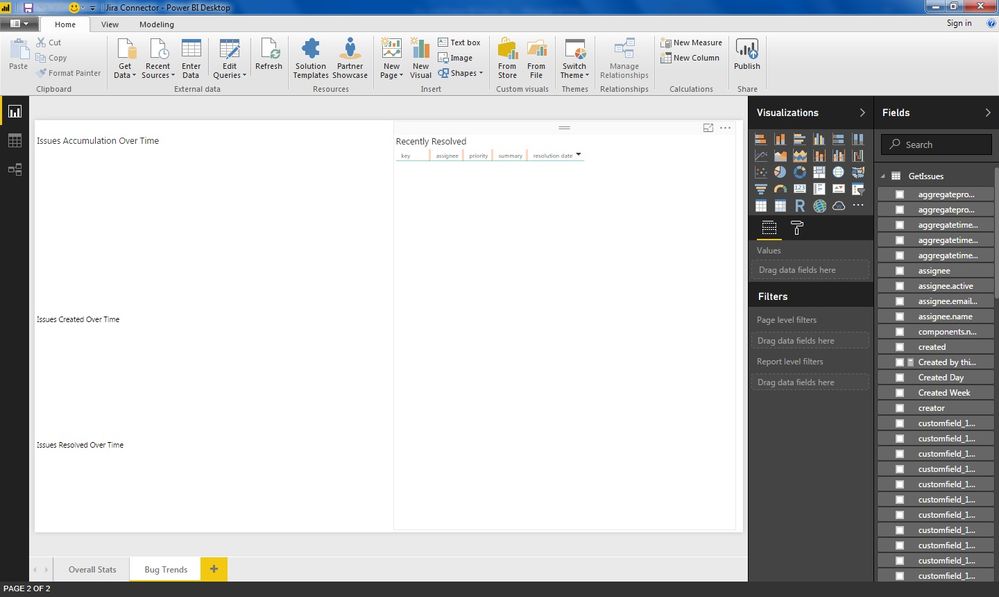
also, when i published it from desktop and went onto power bi online and checked the settings of the data source credentials, that option is actually greyed out - above it, it asks me to install a person gateway but when i try that, it tells me i only have a 32 bit PC !!
All help greatly appreciated
- Mark as New
- Bookmark
- Subscribe
- Mute
- Subscribe to RSS Feed
- Permalink
- Report Inappropriate Content
@seancearnaigh,
What do you mean blank data? Could you please post a screenshot?
In addition, gateway is required when you set refresh for this dataset in Power BI Service, and gateway can be only installed on 64 bit Server, you can review the article about requirements to install gateway.
Once you install gateway, you are able to enter credential for JIRA data source in Power BI Service.
Regards,
- Mark as New
- Bookmark
- Subscribe
- Mute
- Subscribe to RSS Feed
- Permalink
- Report Inappropriate Content
Thansk again for your assistance - i attach a screenshot below
- Mark as New
- Bookmark
- Subscribe
- Mute
- Subscribe to RSS Feed
- Permalink
- Report Inappropriate Content
@seancearnaigh,
Have you seen any data in the GetIssues table in Data view of Power BI Desktop?
Regards,
Lydia
- Mark as New
- Bookmark
- Subscribe
- Mute
- Subscribe to RSS Feed
- Permalink
- Report Inappropriate Content
No, nothing in there
- Mark as New
- Bookmark
- Subscribe
- Mute
- Subscribe to RSS Feed
- Permalink
- Report Inappropriate Content
and there is 100's of projects within our JIRA by the way obsiously.
- Mark as New
- Bookmark
- Subscribe
- Mute
- Subscribe to RSS Feed
- Permalink
- Report Inappropriate Content
Do you use the latest version of Power BI Desktop(2.49.4831.521)? And which kind of URL do you input in URL panel? What is the result when you click “Refresh” button in Power BI Desktop?
In addition, you can connect to JIRA API in Power BI Desktop to get data, for more details, please review this blog: http://blog.beyondsoft.com/using-microsofts-power-bi-to-implement-a-management-dashboard-directly-co... .
Regards,
Lydia Zhang
- Mark as New
- Bookmark
- Subscribe
- Mute
- Subscribe to RSS Feed
- Permalink
- Report Inappropriate Content
Hi Folks,
When I am trying to setup a connect to JIRA through online Power BI, i type in my URL and regardless of which 'Authentication Method' i choose, when i click on sign on, the screen just stalls and stalls - it does not crash nor does it give me any error message.
We have Jira ON Premise and i can login to that without any issues. I have heard that this does not work with JIRA On Premise - if that is the case, when will it be available please?
We use Microsoft Project Online and JIRA - MPO connects fine so connecting JIRA is last piece of puzzle.
Thanks,
Shane
Helpful resources

Power BI Dataviz World Championships
The Power BI Data Visualization World Championships is back! Get ahead of the game and start preparing now!

Power BI Monthly Update - December 2025
Check out the December 2025 Power BI Holiday Recap!

FabCon Atlanta 2026
Join us at FabCon Atlanta, March 16-20, for the ultimate Fabric, Power BI, AI and SQL community-led event. Save $200 with code FABCOMM.


| User | Count |
|---|---|
| 19 | |
| 9 | |
| 8 | |
| 7 | |
| 6 |


