cancel
Showing results for 
Search instead for 
Did you mean: 

The Power BI Data Visualization World Championships is back! It's time to submit your entry. Live now!

Reply
pablopablo
Frequent Visitor

Connect to API - Bad Request Error

Hi.


I need some help getting data from an API using OAuth & bearer token.


Here is the code that I currently have:


let
//Create the variables
 TokenURL = "xxx",
 clientId = "xxx",
 clientSecret = "xxx",
 
 //Create the Token Request
 GetJson = Web.Contents(TokenURL,
     [
         Headers = [#"Content-Type"="application/json"],
         Content = Text.ToBinary("{""clientId"":" & clientId &",""clientSecret"":"& clientSecret & "}"


         )                    ]
         
 ),
 FormatAsJson = Json.Document(GetJson),

 // Gets token from the Json response
 AccessToken = FormatAsJson[access_token],
 AccessTokenHeader = "bearer " & AccessToken,

 // ???
 GetJsonQuery = Web.Contents("xxx",
     [
         Headers = [#"wb-authorization"=AccessTokenHeader]
     ]
 ),
 FormatAsJsonQuery = Json.Document(GetJsonQuery)

in
#"FormatAsJsonQuery"


I am receiving an error DataSource.Error: Web.Contents failed to get contents from 'xxx' (400): Bad Request


So I suspect that my syntax may be incorrect on this line:


Content = Text.ToBinary("{""clientId"":" & clientId &",""clientSecret"":"& clientSecret & "}"


I have test the request in Postman using this curl and it works


curl --location --request POST 'xxx' \
--header 'Content-Type: application/json' \
--data-raw '{	"clientId": "xxx",	"clientSecret": "xxx"
	
}'


5 REPLIES 5
Anonymous
Not applicable

Your problem is is Create the token request part , so just correct that part with this code, it will work.
let apiUrl = "https://login.windows.net/61xxxxxxxxxxxx/oauth2/token", body = [ client_id="3728xxxxxxxxxxxxxx5", client_secret="bxxxxxxxxxxxxh" ], Source = Json.Document(Web.Contents(apiUrl, [Headers = [Accept = "application/json"], Content = Text.ToBinary(Uri.BuildQueryString(body))])) in Source


v-lid-msft
Community Support
Community Support

Hi @pablopablo ,


Could you please use following query to see if the problem is in create the tekon request step?


let
//Create the variables
 TokenURL = "xxx",
 clientId = "xxx",
 clientSecret = "xxx",
 
 //Create the Token Request
 GetJson = Web.Contents(TokenURL,[Headers = [#"Content-Type"="application/json"],Content = Text.ToBinary("{""clientId"":" & clientId &",""clientSecret"":"& clientSecret & "}")])
in
 GetJson


we can also try to use some tools to see if power bi desktop has send the right web request, such as Fiddler Trace: https://docs.microsoft.com/en-us/power-bi/developer/embedded-troubleshoot


Best regards,


Community Support Team _ Dong Li
If this post helps, then please consider Accept it as the solution to help the other members find it more quickly.

Hi,


I managed to get this working to the point where it is collecting a token and parsing it to the endpoint, however I am now getting an error - "Please specify how to conect"


code is:

/*

*/

let
//Create the variables
 TokenURL = "xxx",
 clientId = """xxx""",
 clientSecret = """xxx""",
 
 //Create the Token Request
 GetJson = Web.Contents(TokenURL, 
     [
         Headers = [#"Content-Type"="application/json"],
         Content = Text.ToBinary("{""clientId"": "  & clientId & ", ""clientSecret"": "& clientSecret & "}")
                
           
    ]
         
 ),
 FormatAsJson = Json.Document(GetJson),

 // Gets token from the Json response
 AccessToken = FormatAsJson[access_token],
 AccessTokenHeader = "bearer " & AccessToken,

 // ???
   GetJsonQuery = Web.Contents("xxx", 
                  [
                    Headers=[#"wb-authorization"= AccessTokenHeader, ContentType="application/json"]
                  ]
                  ),
 FormatAsJsonQuery = Json.Document(GetJsonQuery)


in
#"FormatAsJsonQuery"

Hi @pablopablo ,


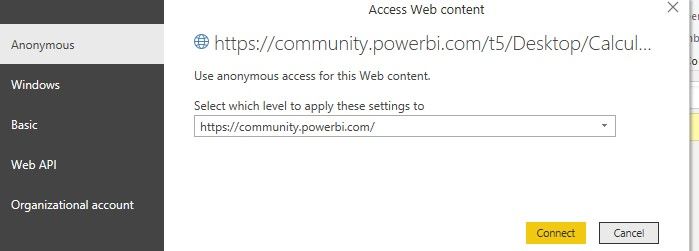
It seems like add "" to the client fix the previous problem?  If you got a warning like following, please try to edit with Anonymous since you have put the token inside the Header.


3.jpg4.jpg


Best regards,


Community Support Team _ Dong Li
If this post helps, then please consider Accept it as the solution to help the other members find it more quickly.

Yeah I added the Anonymous but now getting this error


'We couldn't authenticate with the credentials provided. Please try again'


However I can see it create the token and parse it through. I try the token in postman and it works successfully.

Helpful resources

Announcements
December 2025 Power BI Update Carousel

Power BI Monthly Update - December 2025

Check out the December 2025 Power BI Holiday Recap!

FabCon Atlanta 2026 carousel

FabCon Atlanta 2026

Join us at FabCon Atlanta, March 16-20, for the ultimate Fabric, Power BI, AI and SQL community-led event. Save $200 with code FABCOMM.