Get Fabric or SQL Certified for Free.
Get certified for free when you join Fabric Data Days 2026 and dive into Fabric, Power BI, SQL, AI, and other essential data skills.
Join now- Power BI forums
- Get Help with Power BI
- Desktop
- Service
- Report Server
- Power Query
- Mobile Apps
- Developer
- DAX Commands and Tips
- Custom Visuals Development Discussion
- Health and Life Sciences
- Power BI Spanish forums
- Translated Spanish Desktop
- Training and Consulting
- Instructor Led Training
- Dashboard in a Day for Women, by Women
- Galleries
- Data Stories Gallery
- Themes Gallery
- Contests Gallery
- QuickViz Gallery
- Quick Measures Gallery
- Visual Calculations Gallery
- Fabric Apps Gallery
- Notebook Gallery
- Translytical Task Flow Gallery
- TMDL Gallery
- R Script Showcase
- Webinars and Video Gallery
- Ideas
- Custom Visuals Ideas (read-only)
- Issues
- Issues
- Events
- Upcoming Events
July 28 - August 9 | Final Round of the Power BI Dataviz World Championships. This is your chance. Learn more
- Power BI forums
- Forums
- Get Help with Power BI
- Power Query
- Re: Conditonal Statement
- Subscribe to RSS Feed
- Mark Topic as New
- Mark Topic as Read
- Float this Topic for Current User
- Bookmark
- Subscribe
- Printer Friendly Page


- Mark as New
- Bookmark
- Subscribe
- Mute
- Subscribe to RSS Feed
- Permalink
- Report Inappropriate Content
Conditonal Statement
Hello, I am a novice user.
I have 2 fields:
Invoice Amount
USD Amount
If USD Amount is Null then I want to show Invoice Amount otherwise, show the USD Amount.
I think this is a conditional field but I am not sure how to enter it.
If could kindly assist.
Let me know if you need anything else.
thank you.
Solved! Go to Solution.


- Mark as New
- Bookmark
- Subscribe
- Mute
- Subscribe to RSS Feed
- Permalink
- Report Inappropriate Content
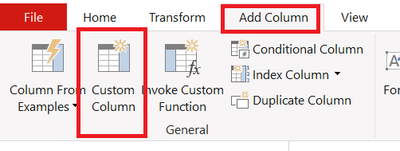
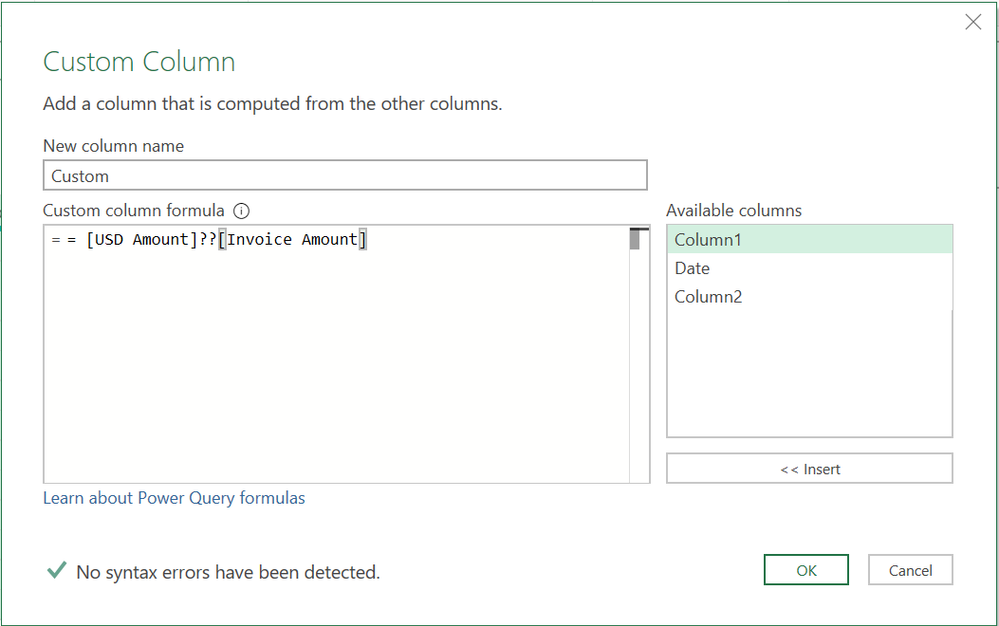
Insert a Custom column and paste following (Add column menu - Custom column)
= [USD Amount]??[Invoice Amount]
You can also put following formula as an alternative
= if [USD Amount]=null then [Invoice Amount] else [USD Amount]
- Mark as New
- Bookmark
- Subscribe
- Mute
- Subscribe to RSS Feed
- Permalink
- Report Inappropriate Content
As an alternative, you can use coalescing operator. Hence, use following
= [USD Amount]??[Invoice Amount]
See the working here - Open a blank query - Home - Advanced Editor - Remove everything from there and paste the below code to test
let
    Source = Table.FromRows(Json.Document(Binary.Decompress(Binary.FromText("i45WMjRV0lFSitWJVgLSRgYwFpg2NgCyjI2UYmMB", BinaryEncoding.Base64), Compression.Deflate)), let _t = ((type nullable text) meta [Serialized.Text = true]) in type table [#"USD Amount" = _t, #"Invoice Amount" = _t]),
    #"Changed Type" = Table.TransformColumnTypes(Source,{{"USD Amount", Int64.Type}, {"Invoice Amount", Int64.Type}}),
    #"Added Custom" = Table.AddColumn(#"Changed Type", "Result", each [USD Amount]??[Invoice Amount])
in
#"Added Custom"- Mark as New
- Bookmark
- Subscribe
- Mute
- Subscribe to RSS Feed
- Permalink
- Report Inappropriate Content
Note: I am using Power Query not Power BI.
- Mark as New
- Bookmark
- Subscribe
- Mute
- Subscribe to RSS Feed
- Permalink
- Report Inappropriate Content
Insert a Custom column and paste following (Add column menu - Custom column)
= [USD Amount]??[Invoice Amount]
You can also put following formula as an alternative
= if [USD Amount]=null then [Invoice Amount] else [USD Amount]
- Mark as New
- Bookmark
- Subscribe
- Mute
- Subscribe to RSS Feed
- Permalink
- Report Inappropriate Content
Adding a Custom Column worked. I note that if I add a Conditional Column the word null must be lower case.
here is what I used:
= if [USD Amount]=null then [Invoice Amount] else [USD Amount]
I discovered its CASE SENSITIVE, which is annoying.
thank you very much for the help.
- Mark as New
- Bookmark
- Subscribe
- Mute
- Subscribe to RSS Feed
- Permalink
- Report Inappropriate Content
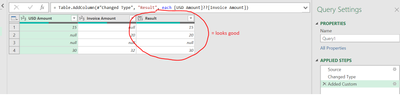
Hi Vijay, that seemed to work. How could I use that solution though? I was hoping for something simpler (ie adding a conditional column). Sorry but my experience with power query is very basic.
here is the output of the blank query:


- Mark as New
- Bookmark
- Subscribe
- Mute
- Subscribe to RSS Feed
- Permalink
- Report Inappropriate Content
equals operator followed by "null" (without quotes) as value should do it.
1. How to get your question answered quickly - good questions get good answers!
2. Learning how to fish > being spoon-fed without active thinking.
3. Please accept as a solution posts that resolve your questions.
------------------------------------------------
BI Blog: Datamarts | RLS/OLS | Dev Tools | Languages | Aggregations | XMLA/APIs | Field Parameters | Custom Visuals
- Mark as New
- Bookmark
- Subscribe
- Mute
- Subscribe to RSS Feed
- Permalink
- Report Inappropriate Content
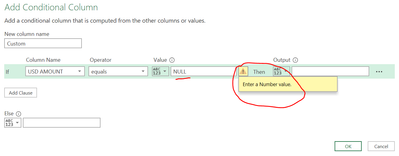
Otravers,
I had actually tried prior to posting this question but apparently you cant enter a value of NULL. It must be a value. Any other suggestions adding a Conditional Column?
- Mark as New
- Bookmark
- Subscribe
- Mute
- Subscribe to RSS Feed
- Permalink
- Report Inappropriate Content
The M language in Power Query is case sensitive, I wrote "null" (not "NULL") for a reason and what I suggested works as demonstrated here:

1. How to get your question answered quickly - good questions get good answers!
2. Learning how to fish > being spoon-fed without active thinking.
3. Please accept as a solution posts that resolve your questions.
------------------------------------------------
BI Blog: Datamarts | RLS/OLS | Dev Tools | Languages | Aggregations | XMLA/APIs | Field Parameters | Custom Visuals
- Mark as New
- Bookmark
- Subscribe
- Mute
- Subscribe to RSS Feed
- Permalink
- Report Inappropriate Content
ahh I see now. Its case sensitive. I confirm I do not get an error but I do if any letter is capitalized. Geez that is annoying.

- Mark as New
- Bookmark
- Subscribe
- Mute
- Subscribe to RSS Feed
- Permalink
- Report Inappropriate Content
You can do so from the Power Query UI as explained here:
https://docs.microsoft.com/en-us/power-query/add-conditional-column
1. How to get your question answered quickly - good questions get good answers!
2. Learning how to fish > being spoon-fed without active thinking.
3. Please accept as a solution posts that resolve your questions.
------------------------------------------------
BI Blog: Datamarts | RLS/OLS | Dev Tools | Languages | Aggregations | XMLA/APIs | Field Parameters | Custom Visuals
- Mark as New
- Bookmark
- Subscribe
- Mute
- Subscribe to RSS Feed
- Permalink
- Report Inappropriate Content
Hi, thank you. I am familiar with at least that much of it but my problem is how do I add a condition as NULL? The value in the table is NULL and I don't see NULL as being one of the operators. Thank you

Helpful resources

Fabric Community Sticker Challenge - Barcelona 2026
If you love stickers, then you will definitely want to check out our community sticker challenge, Barcelona edition!

Power BI Monthly Update - July 2026
Check out the July 2026 Power BI update to learn about new features.

Power BI DataViz World Championships - June 2026
A new Power BI DataViz World Championship is coming this June! Don't miss out on submitting your entry.


