cancel
Showing results for 
Search instead for 
Did you mean: 

The Power BI Data Visualization World Championships is back! Get ahead of the game and start preparing now! Learn more

Reply
DianneB
Frequent Visitor

Conditional formatting with different rules from different columns applied to same column

Hi, 


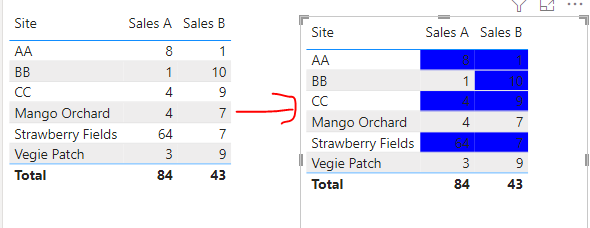
I have the following table set up.  I want to set up conditional formatting that highlights cell values based on the following criteria.


If Sales A is greater than or equal to 5 highlight blue. 

If Sales B is greater than or equal to 10 highlight blue.

That's simple for me to do BUT here is my problem.

If Sales A is greater than or equal to 5, Sales B automatically highlighted blue regardless of value against Sales B.

If there is no value against Sales A, then the conditional formatting for Sales B (that is, if greater than or equal to 10 highlight blue) applies.

If the sum of Sales A and Sales B is greater than 12 highlight both Sales A and Sales B blue regardless of other formatting conditions.


Hope this makes sense.

SiteSales ASales B
Strawberry Fields647
Mango Orchard47
Vegie Patch39
1 ACCEPTED SOLUTION
DianneB
Frequent Visitor

Wonderful - now are you able to tell me how I combine the two formulas into one DAX measure please.

View solution in original post

3 REPLIES 3
DianneB
Frequent Visitor

Wonderful - now are you able to tell me how I combine the two formulas into one DAX measure please.

v-kkf-msft
Community Support
Community Support

Hi @DianneB ,


Please try these measures.


Color_A = 
var _a = SUM('Table'[Sales A])
var _b = SUM('Table'[Sales B])
return IF(_a + _b <= 12 && _a < 5, BLANK(), "blue")
Color_B = 
var _a = SUM('Table'[Sales A])
var _b = SUM('Table'[Sales B])
return IF(_a + _b <= 12 && _a < 5 && _b < 10, BLANK(), "blue")

vkkfmsft_0-1662692632349.png


Best Regards,
Winniz
If this post helps, then please consider Accept it as the solution to help the other members find it more quickly.

I have another question please - I have worked out the formula with your help but now want to use the same criteria to highlight costs but when I do so, blank cells will highlight because whilst the criteria will apply and only highlight cells which meet the criteria when I use as described, when I apply to something else even all cells highlight even if blank. Does this make sense?

Helpful resources

Announcements
Power BI DataViz World Championships

Power BI Dataviz World Championships

The Power BI Data Visualization World Championships is back! Get ahead of the game and start preparing now!

December 2025 Power BI Update Carousel

Power BI Monthly Update - December 2025

Check out the December 2025 Power BI Holiday Recap!

FabCon Atlanta 2026 carousel

FabCon Atlanta 2026

Join us at FabCon Atlanta, March 16-20, for the ultimate Fabric, Power BI, AI and SQL community-led event. Save $200 with code FABCOMM.