Join us at FabCon Atlanta from March 16 - 20, 2026, for the ultimate Fabric, Power BI, AI and SQL community-led event. Save $200 with code FABCOMM.
Register now!The Power BI Data Visualization World Championships is back! Get ahead of the game and start preparing now! Learn more
Hi all,
In a matrix, I need to show a different color for the values in a conditional column "Success%" based on a threshold selected by a slicer (using a range 'between'), while still keeping all the values in the matrix shown (for this I can use the 'edit interaction' feature of the slicer). I can set the rules based on field "success%" but I need to be able to set it to a dynamic field which depends on the filter instead. Any idea?
Example table:
| Name | Success% |
A | 1 |
| B | 0.9 |
| C | 0.6 |
| D | 0.5 |
i.e.: if threshold is set to 90% I need the values >= 90% in green and anything below in red.
Thanks,
Solved! Go to Solution.
Make a duplicate of the table ('Color Succes%) , put the duplicat in the slicer and apply the following measure in the format of the matrix (Conditional Formatting / Succes% in the text box / Background color / advanced control / Field Value.
ColorSuccesMeasure =
VAR __MaxValueVisible = MAX('Color Succes%'[Succes%])
RETURN
IF(MAX('Table'[Succes%]) > __MaxValueVisible, "#01B8AA", "#FD625E")
Hi, @Anonymous
Based on your description, i created data to reproduce your scenario. The pbix file is attached in the end.
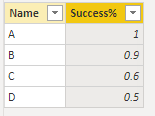
Table:
Slicer(a calculated table):
Slicer =
GENERATESERIES(
0,
1,
0.01
)
There is no relationship between two tables. You may create a measure as below.
Color Control =
IF(
SUM('Table'[Success%])<MAX(Slicer[Value]),
"red",
"green"
)
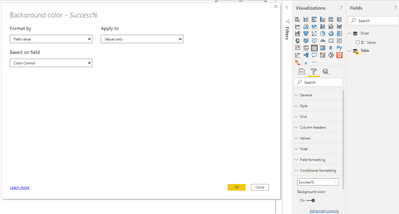
Conditional formatting:
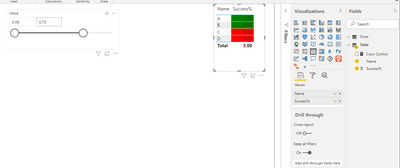
Result:
Best Regards
Allan
If this post helps, then please consider Accept it as the solution to help the other members find it more quickly.
Thanks everyone! All good solutions. I ended up using a mix of the codes that you provided, as the matrix (which I forgot to mention that I was using 🙏) reacted a bit differently to the measures. My final setup:
Percent Table (I needed some more accuracy hence the 0.0001):
Thanks everyone! All good solutions. I ended up using a mix of the codes that you provided, as the matrix (which I forgot to mention that I was using 🙏) reacted a bit differently to the measures. My final setup:
Percent Table (I needed some more accuracy hence the 0.0001):
Hi, @Anonymous
Based on your description, i created data to reproduce your scenario. The pbix file is attached in the end.
Table:
Slicer(a calculated table):
Slicer =
GENERATESERIES(
0,
1,
0.01
)
There is no relationship between two tables. You may create a measure as below.
Color Control =
IF(
SUM('Table'[Success%])<MAX(Slicer[Value]),
"red",
"green"
)
Conditional formatting:
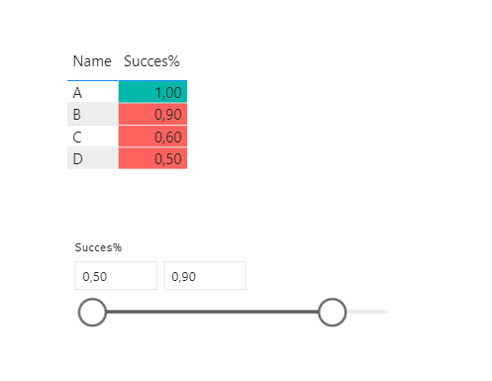
Result:
Best Regards
Allan
If this post helps, then please consider Accept it as the solution to help the other members find it more quickly.
Make a duplicate of the table ('Color Succes%) , put the duplicat in the slicer and apply the following measure in the format of the matrix (Conditional Formatting / Succes% in the text box / Background color / advanced control / Field Value.
ColorSuccesMeasure =
VAR __MaxValueVisible = MAX('Color Succes%'[Succes%])
RETURN
IF(MAX('Table'[Succes%]) > __MaxValueVisible, "#01B8AA", "#FD625E")
The Power BI Data Visualization World Championships is back! Get ahead of the game and start preparing now!
Check out the November 2025 Power BI update to learn about new features.