
Join us at FabCon Atlanta from March 16 - 20, 2026, for the ultimate Fabric, Power BI, AI and SQL community-led event. Save $200 with code FABCOMM.
Register now!The Power BI Data Visualization World Championships is back! It's time to submit your entry. Live now!
Hi folks
I have a Time Hierarchy (Year, Qtr, Month, Date) data set
I'm trying to create a conditional column so I can determine "More than 12 months' and "Less than 12 months" from today's date
I attempted this by trying the following:
1. In Power Query, selected Time column, then using Transorm - calculated Age from the Date dropdown
2. Converted to Years, Round Down
3. Applied a conditional column on the Round Down
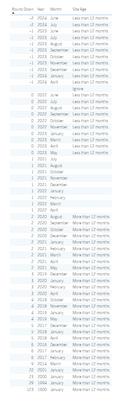
However, as can be seen from the image below, the conditional column is not working as intended - I have some years & months showing as blank
Hi @mhm006 ,
Can you provide a copyable example of your Time column from Power Query please?
Thanks,
Pete
Proud to be a Datanaut!
Hi Pete
Thanks for replying 🙂 first time user here
Below is a copy, remove duplicates and paste. original colum has 115k rows
| 01/10/2023 |
| 01/08/2023 |
| 01/09/2023 |
| 01/07/2024 |
| 01/06/2024 |
| 01/04/2022 |
| 01/06/2022 |
| 01/09/2022 |
| 01/10/2022 |
| 01/08/2022 |
| 01/04/2021 |
| 01/11/2021 |
| 01/03/2021 |
| 01/04/2018 |
| 01/01/2018 |
| 01/01/1900 |
| 01/01/2020 |
| 01/05/2023 |
| 01/02/2021 |
| 01/12/2020 |
| 01/03/2023 |
| 01/02/2022 |
| 01/01/2023 |
| 01/06/2023 |
| 01/05/2021 |
| 01/11/2022 |
| 01/07/2023 |
| 01/04/2024 |
| 01/04/2023 |
| 01/12/2023 |
| 01/01/2021 |
| 01/01/2024 |
| 01/10/2021 |
| 01/08/2021 |
| 01/12/2021 |
| 01/01/2022 |
| 01/10/2020 |
| 01/04/2020 |
| 01/02/2020 |
| 01/07/2021 |
| 01/01/2019 |
| 01/10/2018 |
| 01/02/2017 |
| 01/01/2017 |
| 01/11/2018 |
| 01/08/2020 |
| 01/07/2022 |
| 01/05/2019 |
| 01/09/2020 |
| 01/12/2019 |
| 01/03/2022 |
| 01/12/2017 |
| 01/12/2016 |
| 01/11/2023 |
| 01/01/2000 |
| 01/03/2014 |
| 01/01/2001 |
| 01/01/1994 |
No problem.
Here's the code to use for a new custom column in PQ:
if [Date] >= Date.AddMonths(Date.From(DateTime.LocalNow()), -12)
then "less than 12 months"
else "More than 12 months"
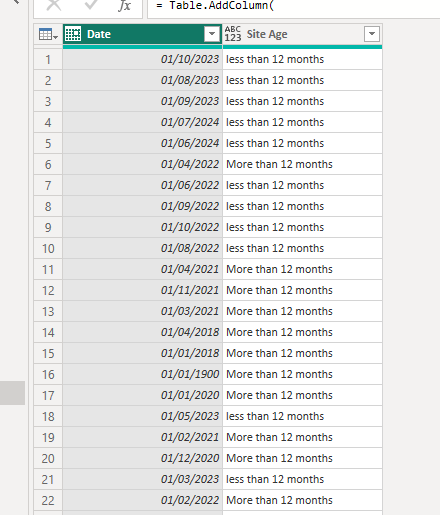
Output looks like this:
Here's the full code if you want to see it in place:
let
Source = Table.FromRows(Json.Document(Binary.Decompress(Binary.FromText("bZLBDcQgDAR7yfukeG0uQC1R+m8jxyERBuU5svF615znZtplu5vHdn3+aIVYiblhGngQU0Nn1TlqYNd16jpHaTQLaEFszSoDtaKqGar+4JcGnbrO5nhpdk4O2g8KLY6cwQbtL8EGtwrqipiYs5jzYnB5u9zIuIbRvtECR6li1HSU9laZzRnhTM3lRcgR7CPUv5nB4FQNGuQaHQ/eiDkbP4MSq7N91fqrXjc=", BinaryEncoding.Base64), Compression.Deflate)), let _t = ((type nullable text) meta [Serialized.Text = true]) in type table [Date = _t]),
chgTypes = Table.TransformColumnTypes(Source,{{"Date", type date}}),
addSiteAge =
Table.AddColumn(
chgTypes,
"Site Age",
each if [Date] >= Date.AddMonths(Date.From(DateTime.LocalNow()), -12)
then "less than 12 months"
else "More than 12 months"
)
in
addSiteAge
Pete
Proud to be a Datanaut!
Thank you Pete for the prompt reply
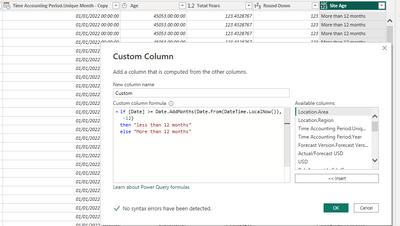
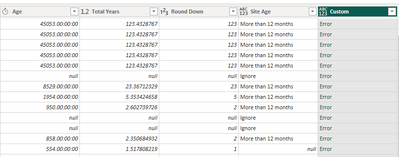
I'm sure the solution works but as I'm a newbie, I am most likely implementing it incorrectly and hence getting an error
any idea what I am doing wrong?
No worries. It looks like you need to change the '[Date]' reference in the calculation to refer to your actual date column.
As it looks like your actual date column is, in fact, a DateTime column, this should work:
if Date.From([Time Accounting Period.Unique Month - Copy])
>= Date.AddMonths(Date.From(DateTime.LocalNow()), -12)
then "less than 12 months"
else "More than 12 months"
Pete
Proud to be a Datanaut!
The conditional measure formula I have currently is as follows:
= Table.AddColumn(#"Inserted Round Down", "Site Age", each if [Round Down] = null then "Ignore" else if [Round Down] < 1 then "Less than 12 months" else if [Round Down] > 1 then "More than 12 months" else null)
The Power BI Data Visualization World Championships is back! It's time to submit your entry.
Check out the January 2026 Power BI update to learn about new features.
| User | Count |
|---|---|
| 16 | |
| 14 | |
| 9 | |
| 8 | |
| 7 |