Share feedback directly with Fabric product managers, participate in targeted research studies and influence the Fabric roadmap.
Sign up nowGet Fabric certified for FREE! Don't miss your chance! Learn more
Hi There
I m new to Power BI and need Dax to achieve the output below.
In the dateset i want to add new column output where i want leads from the latest date of same ids and for the earlier date output should be blank as shown below.
| Date | Leads | Id | Output |
| 9/12/2022 | 56 | 1 | |
| 9/19/2022 | 23 | 1 | |
| 9/26/2022 | 45 | 1 | |
| 10/3/2022 | 21 | 1 | |
| 10/10/2022 | 22 | 1 | |
| 10/17/2022 | 23 | 1 | |
| 11/24/2022 | 45 | 1 | 45 |
| 9/12/2022 | 56 | 2 | |
| 9/19/2022 | 23 | 2 | |
| 9/26/2022 | 45 | 2 | |
| 10/3/2022 | 21 | 2 | |
| 10/10/2022 | 22 | 2 | |
| 10/17/2022 | 23 | 2 | |
| 11/24/2022 | 56 | 2 | 56 |
Any help would be appreciated.
Regards
Rajat
Solved! Go to Solution.
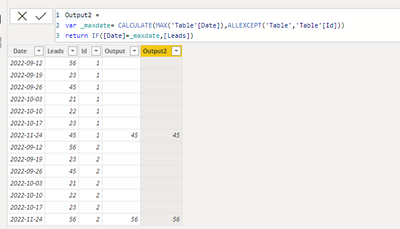
Hi, @Rajat529 ;
Try this column by dax.
Output2 =
var _maxdate= CALCULATE(MAX('Table'[Date]),ALLEXCEPT('Table','Table'[Id]))
return IF([Date]=_maxdate,[Leads])
The final show:
Best Regards,
Community Support Team _ Yalan Wu
If this post helps, then please consider Accept it as the solution to help the other members find it more quickly.
Hi, @Rajat529 ;
Try this column by dax.
Output2 =
var _maxdate= CALCULATE(MAX('Table'[Date]),ALLEXCEPT('Table','Table'[Id]))
return IF([Date]=_maxdate,[Leads])
The final show:
Best Regards,
Community Support Team _ Yalan Wu
If this post helps, then please consider Accept it as the solution to help the other members find it more quickly.
@Rajat529 Try:
Column Output =
VAR __ID = [Id]
VAR __LastDate = MAXX(FILTER('Table',[Id] = __ID),[Date])
RETURN
MAXX(FILTER('Table',[Id] = __ID && [Date] = __LastDate),[Leads])
Hi Greg,
This is very near to the solution but I m not getting blank() in the earlier dates rather i m getting like below
DateMonthNr LeadsIDSlatest_lead
| Monday, September 12, 2022 | September | 56 | 1 | 45 |
| Monday, September 19, 2022 | September | 23 | 1 | 45 |
| Monday, September 26, 2022 | September | 45 | 1 | 45 |
| Monday, October 3, 2022 | October | 21 | 1 | 45 |
| Monday, October 10, 2022 | October | 22 | 1 | 45 |
| Monday, October 17, 2022 | October | 23 | 1 | 45 |
| Thursday, November 24, 2022 | November | 45 | 1 | 45 |
| Monday, September 12, 2022 | September | 56 | 2 | 56 |
| Monday, September 19, 2022 | September | 23 | 2 | 56 |
| Monday, September 26, 2022 | September | 45 | 2 | 56 |
| Monday, October 3, 2022 | October | 21 | 2 | 56 |
| Monday, October 10, 2022 | October | 22 | 2 | 56 |
| Monday, October 17, 2022 | October | 23 | 2 | 56 |
| Thursday, November 24, 2022 | November | 56 | 2 | 56 |
see latest_lead in the last column i m getting through your dax.
can you please update?
Thanks
Rajat
Share feedback directly with Fabric product managers, participate in targeted research studies and influence the Fabric roadmap.
| User | Count |
|---|---|
| 7 | |
| 4 | |
| 4 | |
| 3 | |
| 3 |
| User | Count |
|---|---|
| 12 | |
| 11 | |
| 11 | |
| 7 | |
| 6 |