Join us in Barcelona for FabCon and SQLCon, September 28 - October 1, 2026.
This is best Fabric, Power BI, SQL and AI community event. How do we know? The last event sold out! Save €200 with code FABCMTY200.
Register now- Power BI forums
- Get Help with Power BI
- Desktop
- Service
- Report Server
- Power Query
- Mobile Apps
- Developer
- DAX Commands and Tips
- Custom Visuals Development Discussion
- Health and Life Sciences
- Power BI Spanish forums
- Translated Spanish Desktop
- Training and Consulting
- Instructor Led Training
- Dashboard in a Day for Women, by Women
- Galleries
- Data Stories Gallery
- Themes Gallery
- Contests Gallery
- QuickViz Gallery
- Quick Measures Gallery
- Visual Calculations Gallery
- Fabric Apps Gallery
- Notebook Gallery
- Translytical Task Flow Gallery
- TMDL Gallery
- R Script Showcase
- Webinars and Video Gallery
- Ideas
- Custom Visuals Ideas (read-only)
- Issues
- Issues
- Events
- Upcoming Events
The Fabric community is now in read-only for platform upgrade. Learn more
- Power BI forums
- Forums
- Get Help with Power BI
- Power Query
- Conditional Column Based on the Values In Multiple...
- Subscribe to RSS Feed
- Mark Topic as New
- Mark Topic as Read
- Float this Topic for Current User
- Bookmark
- Subscribe
- Printer Friendly Page

- Mark as New
- Bookmark
- Subscribe
- Mute
- Subscribe to RSS Feed
- Permalink
Conditional Column Based on the Values In Multiple Columns
Hi Everyone,
How can I create a conditional column either in Power query or in dax based on values in multiple columns?
Table1: Exemption data
| Student ID | Student Name | English | Maths | Science |
| 1 | ABC | Yes | No | Yes |
| 2 | BCD | No | Yes | Yes |
| 3 | CDE | No | Yes | No |
| 4 | DEF | Yes | Yes | Yes |
| 5 | EFG | Yes | No | No |
| 6 | FGH | No | Yes | No |
Table2: Results Data
| Student ID | Student Name | Subject | Marks | Exemption |
| 1 | ABC | English | 80 | |
| 1 | ABC | Maths | 75 | |
| 1 | ABC | Science | 90 | |
| 2 | BCD | English | 50 | |
| 2 | BCD | Science | 65 | |
| 3 | CDE | Maths | 45 | |
| 3 | CDE | Science | 50 | |
| 4 | DEF | Maths | 80 | |
| 5 | EFG | English | 70 | |
| 5 | EFG | Maths | 95 | |
| 5 | EFG | English | 100 | |
| 6 | FGH | Maths | 60 | |
| 6 | FGH | Science | 70 |
Based on the Student ID in the both tables I created One to Many relationship.
How can I create a column "Exemption" with the values Yes/No based on the data in the Exemption table.
Thank you in Advance.
Solved! Go to Solution.


- Mark as New
- Bookmark
- Subscribe
- Mute
- Subscribe to RSS Feed
- Permalink
@Anonymous Couple different ways. You could do this in DAX using a fairly complex calculated column to do LOOKUPVALUE or MAXX(FILTER(...),...). Or, you could unpivot your first table's last three columns, create a composite key of ID and Subject in both tables and then the problem is trivial in DAX or you could even do a Merge at that point in Power Query.
Follow on LinkedIn
@ me in replies or I'll lose your thread!!!
Instead of a Kudo, please vote for this idea
Become an expert!: Enterprise DNA
External Tools: MSHGQM
YouTube Channel!: Microsoft Hates Greg
Latest book!: DAX For Humans
DAX is easy, CALCULATE makes DAX hard...


- Mark as New
- Bookmark
- Subscribe
- Mute
- Subscribe to RSS Feed
- Permalink
Hello - Here are the steps to follow...
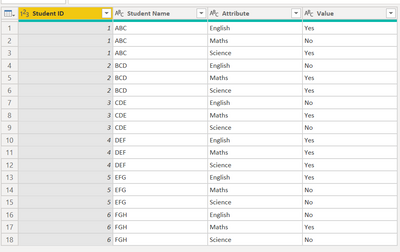
- ExemptionsData - select all columns except the subjects, then Transform (ribbon) > Unpivot Other Columns. This will transpose the subjects and exemptions from columns to rows. Note, Power Query assigned default names for the new columns as Attribute and Value.
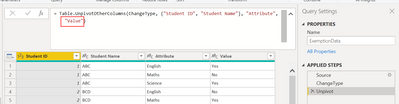
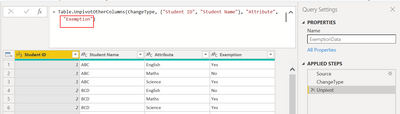
- The column of data you want to add to the results table is Value and you will likely want that column to be named Exemption. Intead of having to rename the column after the tables have been merged, save yourself a step later by editing the script to make the new column name Exemption instead of Value.
- Script generated by Power Query:
- New, edited script:
- Merge the two tables (either as a new table or join the Exemptions Data to the Results Data) with the join keys being Student ID, Student Name and Subject/Attribute. Be sure to select them in the same order on both tables (hold down the ctrl button and click the columns on the first table, repeat for the second table). Leave the join kind set to the default. Note - I have removed the Exemption column from the sample results table, since we will be adding a new column named Exemption as opposed to filling/replacing values in an existing column.
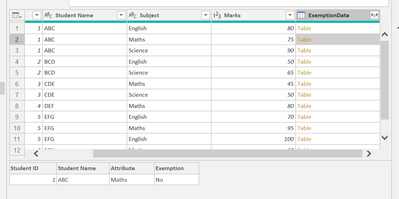
- Now that the tables are merged, you have a new column (new column name defaults to the name of the second table). Each row in that column contains a table of matching results from the second table (these are sometimes referred to as nested tables). Click the whitespace next to one of the Table values to see a preview of the results.
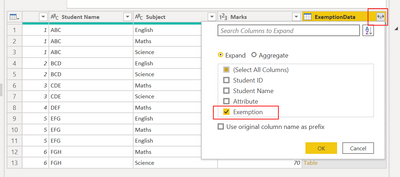
- Click the icon in the new column header and select the columns from each nested table that should be added to the primary table. In this case, we only want "Exemption".
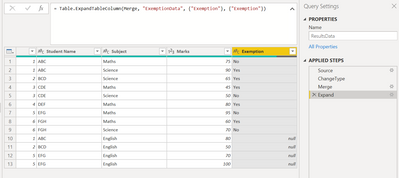
- Now you have the exemption results (yes/no) in a column.
- The values in the Exemption column that = null did not have any matches.
- Why didn't Power Query find a match in the ExemptionsData table for Student ID 1 / Student Name ABC / Subject English - it appears to be present in the ExemptionsData table?
- The reason is because they are not exactly the same. In the ResultsTable, if we select English and highlight the the subject in data preview, we can see that the value is "English".
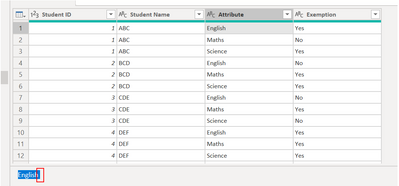
- However, when doing the same in the ExemptionsData table, we see that the value actually has an extra space at the end "English ", therefore they are not the same.
- Things like this can be prevented by cleaning up the data prior to performing transformations that rely on matching datapoints.
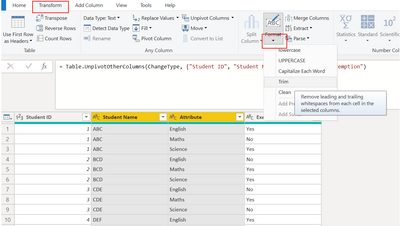
- For example, on the ExemptionsData table, you can select the Student Name and Attribute columns and then trim the values.
Now, if we view the ResultsTable again (having not made any changes to the ResultsTable), the rest of the matches have populated.
- The reason is because they are not exactly the same. In the ResultsTable, if we select English and highlight the the subject in data preview, we can see that the value is "English".
ExemptionsData table:
let
    Source = Table.FromRows(Json.Document(Binary.Decompress(Binary.FromText("i45WMlTSUXJ0cgaSkanFQNIvH8qM1YlWMgKynZxdwMIKcCUwWWMg29nFFU0WaABI0gTIdHF1Q9GE0GoKZLu6uaPaCtVpBmS6uXtAjIWaqwCVjgUA", BinaryEncoding.Base64), Compression.Deflate)), let _t = ((type nullable text) meta [Serialized.Text = true]) in type table [#"Student ID" = _t, #"Student Name" = _t, #"English " = _t, Maths = _t, Science = _t]),
    ChangeType = Table.TransformColumnTypes(Source,{{"Student ID", Int64.Type}, {"Student Name", type text}, {"English ", type text}, {"Maths", type text}, {"Science", type text}}),
    Unpivot = Table.UnpivotOtherColumns(ChangeType, {"Student ID", "Student Name"}, "Attribute", "Exemption"),
    TrimmedText = Table.TransformColumns(Unpivot,{{"Student Name", Text.Trim, type text}, {"Attribute", Text.Trim, type text}})
in
    TrimmedText
ResultsData table:
let
    Source = Table.FromRows(Json.Document(Binary.Decompress(Binary.FromText("i45WMlTSUXJ0cgaSrnnpOZnFGUCWhYFSrA6ylG9iSUYxkDY3RZMITs5MzUtOBbIsIXqMgEwnZxcU40zRpRC6zCAGGgOZzi6uSDaZoEsg9ECNMwEyXVzdkPRAnW0KstzNHcUJ5uhSMD2Wpjj1GBpANJkB2W7uHkiazNAlEI4DWRQLAA==", BinaryEncoding.Base64), Compression.Deflate)), let _t = ((type nullable text) meta [Serialized.Text = true]) in type table [#"Student ID" = _t, #"Student Name" = _t, Subject = _t, #"Marks " = _t]),
    ChangeType = Table.TransformColumnTypes(Source,{{"Student ID", Int64.Type}, {"Student Name", type text}, {"Subject", type text}, {"Marks ", Int64.Type}}),
    Merge = Table.NestedJoin(ChangeType, {"Student ID", "Student Name", "Subject"}, ExemptionData, {"Student ID", "Student Name", "Attribute"}, "ExemptionData", JoinKind.LeftOuter),
    Expand = Table.ExpandTableColumn(Merge, "ExemptionData", {"Exemption"}, {"Exemption"})
in
    Expand


- Mark as New
- Bookmark
- Subscribe
- Mute
- Subscribe to RSS Feed
- Permalink
Hello - Here are the steps to follow...
- ExemptionsData - select all columns except the subjects, then Transform (ribbon) > Unpivot Other Columns. This will transpose the subjects and exemptions from columns to rows. Note, Power Query assigned default names for the new columns as Attribute and Value.
- The column of data you want to add to the results table is Value and you will likely want that column to be named Exemption. Intead of having to rename the column after the tables have been merged, save yourself a step later by editing the script to make the new column name Exemption instead of Value.
- Script generated by Power Query:
- New, edited script:
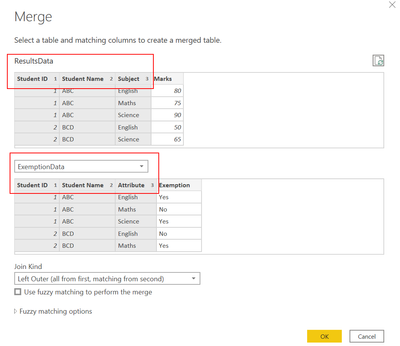
- Merge the two tables (either as a new table or join the Exemptions Data to the Results Data) with the join keys being Student ID, Student Name and Subject/Attribute. Be sure to select them in the same order on both tables (hold down the ctrl button and click the columns on the first table, repeat for the second table). Leave the join kind set to the default. Note - I have removed the Exemption column from the sample results table, since we will be adding a new column named Exemption as opposed to filling/replacing values in an existing column.
- Now that the tables are merged, you have a new column (new column name defaults to the name of the second table). Each row in that column contains a table of matching results from the second table (these are sometimes referred to as nested tables). Click the whitespace next to one of the Table values to see a preview of the results.
- Click the icon in the new column header and select the columns from each nested table that should be added to the primary table. In this case, we only want "Exemption".
- Now you have the exemption results (yes/no) in a column.
- The values in the Exemption column that = null did not have any matches.
- Why didn't Power Query find a match in the ExemptionsData table for Student ID 1 / Student Name ABC / Subject English - it appears to be present in the ExemptionsData table?
- The reason is because they are not exactly the same. In the ResultsTable, if we select English and highlight the the subject in data preview, we can see that the value is "English".
- However, when doing the same in the ExemptionsData table, we see that the value actually has an extra space at the end "English ", therefore they are not the same.
- Things like this can be prevented by cleaning up the data prior to performing transformations that rely on matching datapoints.
- For example, on the ExemptionsData table, you can select the Student Name and Attribute columns and then trim the values.
Now, if we view the ResultsTable again (having not made any changes to the ResultsTable), the rest of the matches have populated.
- The reason is because they are not exactly the same. In the ResultsTable, if we select English and highlight the the subject in data preview, we can see that the value is "English".


ExemptionsData table:
let
    Source = Table.FromRows(Json.Document(Binary.Decompress(Binary.FromText("i45WMlTSUXJ0cgaSkanFQNIvH8qM1YlWMgKynZxdwMIKcCUwWWMg29nFFU0WaABI0gTIdHF1Q9GE0GoKZLu6uaPaCtVpBmS6uXtAjIWaqwCVjgUA", BinaryEncoding.Base64), Compression.Deflate)), let _t = ((type nullable text) meta [Serialized.Text = true]) in type table [#"Student ID" = _t, #"Student Name" = _t, #"English " = _t, Maths = _t, Science = _t]),
    ChangeType = Table.TransformColumnTypes(Source,{{"Student ID", Int64.Type}, {"Student Name", type text}, {"English ", type text}, {"Maths", type text}, {"Science", type text}}),
    Unpivot = Table.UnpivotOtherColumns(ChangeType, {"Student ID", "Student Name"}, "Attribute", "Exemption"),
    TrimmedText = Table.TransformColumns(Unpivot,{{"Student Name", Text.Trim, type text}, {"Attribute", Text.Trim, type text}})
in
    TrimmedText
ResultsData table:
let
    Source = Table.FromRows(Json.Document(Binary.Decompress(Binary.FromText("i45WMlTSUXJ0cgaSrnnpOZnFGUCWhYFSrA6ylG9iSUYxkDY3RZMITs5MzUtOBbIsIXqMgEwnZxcU40zRpRC6zCAGGgOZzi6uSDaZoEsg9ECNMwEyXVzdkPRAnW0KstzNHcUJ5uhSMD2Wpjj1GBpANJkB2W7uHkiazNAlEI4DWRQLAA==", BinaryEncoding.Base64), Compression.Deflate)), let _t = ((type nullable text) meta [Serialized.Text = true]) in type table [#"Student ID" = _t, #"Student Name" = _t, Subject = _t, #"Marks " = _t]),
    ChangeType = Table.TransformColumnTypes(Source,{{"Student ID", Int64.Type}, {"Student Name", type text}, {"Subject", type text}, {"Marks ", Int64.Type}}),
    Merge = Table.NestedJoin(ChangeType, {"Student ID", "Student Name", "Subject"}, ExemptionData, {"Student ID", "Student Name", "Attribute"}, "ExemptionData", JoinKind.LeftOuter),
    Expand = Table.ExpandTableColumn(Merge, "ExemptionData", {"Exemption"}, {"Exemption"})
in
    Expand
Proud to be a Microsoft Data Platforms Super User
- Mark as New
- Bookmark
- Subscribe
- Mute
- Subscribe to RSS Feed
- Permalink
@Anonymous Couple different ways. You could do this in DAX using a fairly complex calculated column to do LOOKUPVALUE or MAXX(FILTER(...),...). Or, you could unpivot your first table's last three columns, create a composite key of ID and Subject in both tables and then the problem is trivial in DAX or you could even do a Merge at that point in Power Query.
Follow on LinkedIn
@ me in replies or I'll lose your thread!!!
Instead of a Kudo, please vote for this idea
Become an expert!: Enterprise DNA
External Tools: MSHGQM
YouTube Channel!: Microsoft Hates Greg
Latest book!: DAX For Humans
DAX is easy, CALCULATE makes DAX hard...
Helpful resources

FabCon & SQLCon – Barcelona 2026
Join us in Barcelona for FabCon and SQLCon, the Fabric, Power BI, SQL, and AI community event. Save €200 with code FABCMTY200.

Power BI DataViz World Championships - June 2026
A new Power BI DataViz World Championship is coming this June! Don't miss out on submitting your entry.


