cancel
Showing results for 
Search instead for 
Did you mean: 

Try your skills in the Power BI Dataviz World Championship! Round one ends June 26. Join now

Reply
fmahrl
New Member

Composite Model in Power Query for Excel possible?

Hi,


is it possible to build a composite model in Power Query for Excel? (not Power BI)

If not, is there any (good) workaround? Or is it planned in a future release?


Thanks & BR

Florian

1 REPLY 1
v-jingzhang
Community Support
Community Support

Hi @fmahrl 


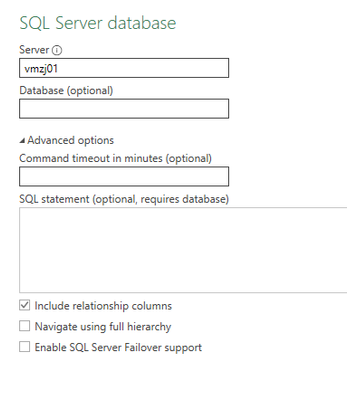
Currently Excel doesn't support DirectQuery so it is not possbile to build a composite model in Excel. I take SQL Server database for example as below, there is no DirectQuery option in Excel like that in Power BI. And there is no published plan for this feature as of now. 

vjingzhang_0-1680490077895.png

If you must use a composite model in Excel, the only possible workaround is that you still need to create a composite model by using Power BI Desktop and publish it to Power BI Service, then use Analyze in Excel or connect to a Power BI dataset from Excel. 

Create Excel workbooks with refreshable Power BI data - Power BI | Microsoft Learn

Power BI dataset experience in Excel - Power BI | Microsoft Learn


Best Regards,
Community Support Team _ Jing
If this post helps, please Accept it as Solution to help other members find it.

Helpful resources

Announcements
Fabric Data Days is here Carousel

Fabric Data Days 2026

Don't miss out on Data Days, June 15 through August 7. Learn Fabric, Power BI, SQL, AI and more.

May Power BI Update Carousel

Power BI Monthly Update - May 2026

Check out the May 2026 Power BI update to learn about new features.

Power BI DataViz World Championships carousel

Power BI DataViz World Championships - June 2026

A new Power BI DataViz World Championship is coming this June! Don't miss out on submitting your entry.