cancel
Showing results for 
Search instead for 
Did you mean: 

The Power BI Data Visualization World Championships is back! Get ahead of the game and start preparing now! Learn more

Reply
Anonymous
Not applicable

Combining the Values of one column when two other columns equal

Hello!

I have a table with three columns that I am trying to reformat but cannot figure out the correct steps to achieve the desired result.  The table consists of columns titled "project", "WBS", and "resource name" that has all values in text format.  In situations where 2 of the columns are identical, I would like to combine the values in the adjacent third column in a specified manner. Please see below for example:

Current Table

project                  WBS             resource name
MAIN01                   1.04.01.01      Jane Doe
MAIN01                   1.04.02.01      John Smith
MAIN01                   1.04.02.01      Bob Johnson
MAIN01                   1.04.02.01      Jane Doe
MAIN01                   1.04.03.01      John Smith
FACL02                   1.05.02         James Jones
FACL02                   1.05.02         Todd Doe
FACL02                   1.05.03         Jane Doe
FACL02                   1.05.04         Bob Johnson
FACL02                   1.05.04         Todd Doe


Desired Outcome:
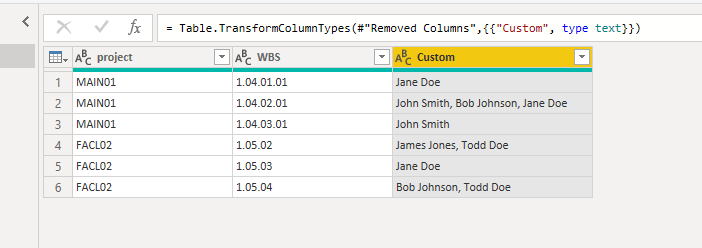
project         WBS            resource name
MAIN01          1.04.01.01  Jane Doe
MAIN01          1.04.02.01  John Smith, Bob Johnson, Jane Doe
MAIN01          1.04.03.01  John Smith
FACL02         1.05.02        James Jones, Todd Doe
FACL02          1.05.03        Jane Doe
FACL02          1.05.04        Bob Johnson, Todd Doe


Thank you in advance for any assistance provided as once I can resolve this hurdle my reporting times will be greatly reduced!

Kind Regards,

Irv

1 ACCEPTED SOLUTION
AlB
Community Champion
Community Champion

Hi @Anonymous 

A simple Group by will do:

let
    Source = Table.FromRows(Json.Document(Binary.Decompress(Binary.FromText("i45W8nX09DMwVNJRMtQzMNEzAJIgjldiXqqCS36qUqwOhhIjqJL8jDyF4NzMkgw8ipzykxRACovz8/AZhcc2Y6y2uTk6+xgYQRSZ6oFZXom5qcVAy/JSi3EpCclPSYHbgyZvjO4ONHkTLL7BogRhRSwA", BinaryEncoding.Base64), Compression.Deflate)), let _t = ((type text) meta [Serialized.Text = true]) in type table [project = _t, WBS = _t, #"resource name" = _t]),
    #"Grouped Rows" = Table.Group(Source, {"project", "WBS"}, {{"resource name", each Text.Combine([resource name], ", "), type text}})
in
    #"Grouped Rows"

 Please mark the question solved when done and consider giving kudos if posts are helpful.

Contact me privately for support with any larger-scale BI needs

Cheers 

SU18_powerbi_badge

View solution in original post

2 REPLIES 2
AlB
Community Champion
Community Champion

Hi @Anonymous 

A simple Group by will do:

let
    Source = Table.FromRows(Json.Document(Binary.Decompress(Binary.FromText("i45W8nX09DMwVNJRMtQzMNEzAJIgjldiXqqCS36qUqwOhhIjqJL8jDyF4NzMkgw8ipzykxRACovz8/AZhcc2Y6y2uTk6+xgYQRSZ6oFZXom5qcVAy/JSi3EpCclPSYHbgyZvjO4ONHkTLL7BogRhRSwA", BinaryEncoding.Base64), Compression.Deflate)), let _t = ((type text) meta [Serialized.Text = true]) in type table [project = _t, WBS = _t, #"resource name" = _t]),
    #"Grouped Rows" = Table.Group(Source, {"project", "WBS"}, {{"resource name", each Text.Combine([resource name], ", "), type text}})
in
    #"Grouped Rows"

 Please mark the question solved when done and consider giving kudos if posts are helpful.

Contact me privately for support with any larger-scale BI needs

Cheers 

SU18_powerbi_badge

camargos88
Community Champion
Community Champion

Hi @Anonymous ,


Try this m code:


let
Source = Table.FromRows(Json.Document(Binary.Decompress(Binary.FromText("i45W8nX09DMwVFDSUTLUMzDRMwCShkCOV2JeqoJLfqpSrA6mGiOomvyMPIXg3MySDHyqnPKTFEAqi/Pz8BqGz0JjrBa6OTr7GBhBVZkCTVJQUACblJtaDLQyL7UYn7KQ/JQUuIXoaoxhRiE5Cl2NCUQNuv9wKENYFwsA", BinaryEncoding.Base64), Compression.Deflate)), let _t = ((type nullable text) meta [Serialized.Text = true]) in type table [project = _t, #"WBS " = _t, #"resource name" = _t]),
#"Trimmed Text" = Table.TransformColumns(Source,{{"resource name", Text.Trim, type text}, {"WBS ", Text.Trim, type text}, {"project", Text.Trim, type text}}),
#"Grouped Rows" = Table.Group(#"Trimmed Text", {"project", "WBS "}, {{"Rows", each _, type table [resource name=text]}}),
#"Added Custom" = Table.AddColumn(#"Grouped Rows", "Custom", each Text.Combine([Rows][resource name], ", ")),
#"Removed Columns" = Table.RemoveColumns(#"Added Custom",{"Rows"}),
#"Changed Type" = Table.TransformColumnTypes(#"Removed Columns",{{"Custom", type text}})
in
#"Changed Type"
 

Capture.PNG


Did I answer your question? Mark my post as a solution!

Proud to be a Super User!


Helpful resources

Announcements
Power BI DataViz World Championships

Power BI Dataviz World Championships

The Power BI Data Visualization World Championships is back! Get ahead of the game and start preparing now!

November Power BI Update Carousel

Power BI Monthly Update - November 2025

Check out the November 2025 Power BI update to learn about new features.

FabCon Atlanta 2026 carousel

FabCon Atlanta 2026

Join us at FabCon Atlanta, March 16-20, for the ultimate Fabric, Power BI, AI and SQL community-led event. Save $200 with code FABCOMM.