Join us in Barcelona for FabCon and SQLCon, September 28 - October 1, 2026.
This is best Fabric, Power BI, SQL and AI community event. How do we know? The last event sold out! Save €200 with code FABCMTY200.
Register now- Power BI forums
- Get Help with Power BI
- Desktop
- Service
- Report Server
- Power Query
- Mobile Apps
- Developer
- DAX Commands and Tips
- Custom Visuals Development Discussion
- Health and Life Sciences
- Power BI Spanish forums
- Translated Spanish Desktop
- Training and Consulting
- Instructor Led Training
- Dashboard in a Day for Women, by Women
- Galleries
- Data Stories Gallery
- Themes Gallery
- Contests Gallery
- QuickViz Gallery
- Quick Measures Gallery
- Visual Calculations Gallery
- Fabric Apps Gallery
- Notebook Gallery
- Translytical Task Flow Gallery
- TMDL Gallery
- R Script Showcase
- Webinars and Video Gallery
- Ideas
- Custom Visuals Ideas (read-only)
- Issues
- Issues
- Events
- Upcoming Events
The Fabric community is upgrading! Read all of the details including the timeline and what you can expect. Learn more
- Power BI forums
- Forums
- Get Help with Power BI
- Power Query
- Combining Columns to create Main Columns
- Subscribe to RSS Feed
- Mark Topic as New
- Mark Topic as Read
- Float this Topic for Current User
- Bookmark
- Subscribe
- Printer Friendly Page


- Mark as New
- Bookmark
- Subscribe
- Mute
- Subscribe to RSS Feed
- Permalink
- Report Inappropriate Content
Combining Columns to create Main Columns
The table below is the data that i have which can't be changed until is transformed into power query

What I want it to become is the columns become Material, Type/Grade, Quantity Delivered and other columns like MRDO NO, MRDO DATE is populated. Inside Material has columns : Material 1, Material 2, Material 3,... Material 10, and same goes to Type/Grade and Quantity Delivered and i want them to match in a row where each row has the correct MRDO NO, MRDO DATE , MATERIAL (n), Type/Grade (n), and Quantity Delivered (n) where (n) is the same number per row. Below is the expected outcome
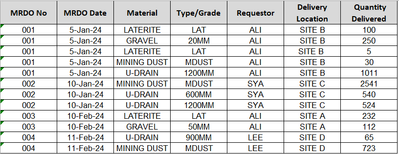
May I know if this is workable, and the possible workaround(s), Thank you.
Solved! Go to Solution.


- Mark as New
- Bookmark
- Subscribe
- Mute
- Subscribe to RSS Feed
- Permalink
- Report Inappropriate Content
Expected Outcome 1
Result
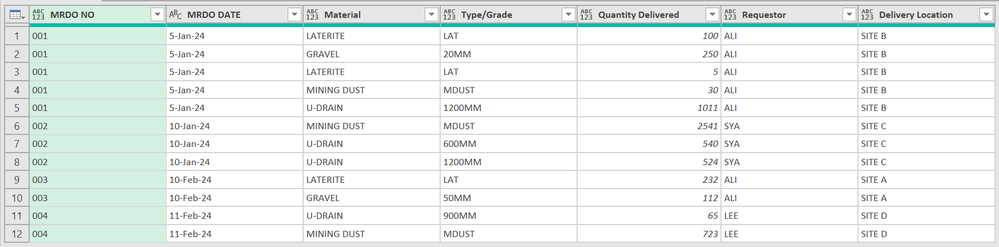
let
    Source = Excel.Workbook(File.Contents("C:\Downloads\PowerQueryForum\irfan_abdrhman\MRDO.xlsx"), null, true),
    #"Dashboard _Sheet" = Source{[Item="Dashboard ",Kind="Sheet"]}[Data],
    FilteredRows = Table.SelectRows(#"Dashboard _Sheet", each ([Column1] <> null)),
    PromotedHeaders = Table.PromoteHeaders(FilteredRows, [PromoteAllScalars=true]),
    Transformed = [ a = Table.ColumnNames(PromotedHeaders),
    b = List.Select(a, (x)=> Text.StartsWith(x, "Material")),
    c1 = {"MRDO NO", "MRDO DATE"},
    c2 = {"Requestor", "Delivery Location"},
    c3 = List.RemoveMatchingItems(a, c1 & c2),
    d = Table.SelectColumns(PromotedHeaders, c3),
    e = List.TransformMany(
            Table.ToRows(PromotedHeaders),
            each List.Split(List.RemoveLastN(List.Skip(_,2),2), List.Count(c3) / List.Count(b)),
            (x,y)=> List.FirstN(x, 2) & y & List.LastN(x, 2)),
    f = List.Transform({ 0..List.PositionOf(a, List.Skip(b){0}) -1 }, (x)=> a{x}),
    g = Table.FromRows(e, Value.Type(Table.SelectColumns(PromotedHeaders, f & c2))),
    h = Table.TransformColumnNames(g, (x)=> Text.Remove(x, {"0".."9"}))
  ][h],
    FilteredRows2 = Table.SelectRows(Transformed, each ([#"Material "] <> null)),
    ChangedType = Table.TransformColumns(FilteredRows2, {
        //{"MRDO NO", each Text.PadStart(Text.From(_), 3, "0"), type text},
        {"MRDO DATE", each Date.ToText(Date.From(_), [Format="d-MMM-yy", Culture="en-US"]), type text} })
in
    ChangedType
- Mark as New
- Bookmark
- Subscribe
- Mute
- Subscribe to RSS Feed
- Permalink
- Report Inappropriate Content
Hi @irfan_abdrhman,
for future requests provide sample data in usable format (not as a screenshot). If you don't know how to do it - read note below my post.
If you don't know how to use my query, also read Note below my post.
Result:
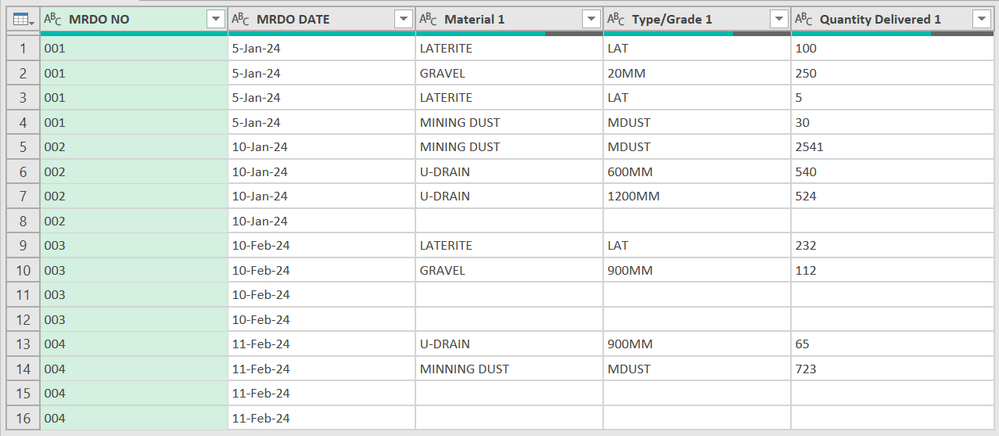
let
    Source = Table.FromRows(Json.Document(Binary.Decompress(Binary.FromText("dZDBCsMgDIZfRTy3JUbt2LFQKUL14NpdpO//GovWUgsONIlJ/H5jjFzwjuuBiYEhoKLDOm0m2M2cIVkBQHYJ09esFCA4l5yGVrOm7ay3fmHz/kkZV7wEfnSRYybWgu121Co9be/nMFlP0QinsFbwyAu8CplWVpKSRQr/z4YS69neBSUE3qgHU+Vqzbxfct0eyye0xnqhbJGPHw==", BinaryEncoding.Base64), Compression.Deflate)), let _t = ((type nullable text) meta [Serialized.Text = true]) in type table [#"MRDO NO" = _t, #"MRDO DATE" = _t, #"Material 1" = _t, #"Type/Grade 1" = _t, #"Quantity Delivered 1" = _t, #"Material 2" = _t, #"Type/Grade 2" = _t, #"Quantity Delivered 2" = _t, #"Material 3" = _t, #"Type/Grade 3" = _t, #"Quantity Delivered 3" = _t, #"Material 4" = _t, #"Type/Grade 4" = _t, #"Quantity Delivered 4" = _t]),
    Transformed = [ a = Table.ColumnNames(Source),
    b = List.Select(a, (x)=> Text.StartsWith(x, "Material")),
    c = List.FirstN(a, 2),
    d = Table.RemoveColumns(Source, c),
    e = List.TransformMany(
            Table.ToRows(Source),
            each List.Split(List.Skip(_, 2), List.Count(List.RemoveMatchingItems(a, c)) / List.Count(b)),
            (x,y)=> List.FirstN(x, 2) & y ),
    f = List.Transform({ 0..List.PositionOf(a, List.Skip(b){0}) -1 }, (x)=> a{x}),
    g = Table.FromRows(e, Value.Type(Table.SelectColumns(Source, f)))
  ][g],
    ChangedType = Table.TransformColumns(Transformed, {
        {"MRDO NO", each Text.PadStart(Text.From(_), 3, "0"), type text},
        {"MRDO DATE", each Date.ToText(Date.From(_), [Format="d-MMM-yy", Culture="en-US"]), type text} })
in
    ChangedType
- Mark as New
- Bookmark
- Subscribe
- Mute
- Subscribe to RSS Feed
- Permalink
- Report Inappropriate Content
Hi, sorry for not providing sample data. Click Here for the sample data, please see the other sheets for the expected outcome as well.
- Mark as New
- Bookmark
- Subscribe
- Mute
- Subscribe to RSS Feed
- Permalink
- Report Inappropriate Content
Expected Outcome 1
Result
let
    Source = Excel.Workbook(File.Contents("C:\Downloads\PowerQueryForum\irfan_abdrhman\MRDO.xlsx"), null, true),
    #"Dashboard _Sheet" = Source{[Item="Dashboard ",Kind="Sheet"]}[Data],
    FilteredRows = Table.SelectRows(#"Dashboard _Sheet", each ([Column1] <> null)),
    PromotedHeaders = Table.PromoteHeaders(FilteredRows, [PromoteAllScalars=true]),
    Transformed = [ a = Table.ColumnNames(PromotedHeaders),
    b = List.Select(a, (x)=> Text.StartsWith(x, "Material")),
    c1 = {"MRDO NO", "MRDO DATE"},
    c2 = {"Requestor", "Delivery Location"},
    c3 = List.RemoveMatchingItems(a, c1 & c2),
    d = Table.SelectColumns(PromotedHeaders, c3),
    e = List.TransformMany(
            Table.ToRows(PromotedHeaders),
            each List.Split(List.RemoveLastN(List.Skip(_,2),2), List.Count(c3) / List.Count(b)),
            (x,y)=> List.FirstN(x, 2) & y & List.LastN(x, 2)),
    f = List.Transform({ 0..List.PositionOf(a, List.Skip(b){0}) -1 }, (x)=> a{x}),
    g = Table.FromRows(e, Value.Type(Table.SelectColumns(PromotedHeaders, f & c2))),
    h = Table.TransformColumnNames(g, (x)=> Text.Remove(x, {"0".."9"}))
  ][h],
    FilteredRows2 = Table.SelectRows(Transformed, each ([#"Material "] <> null)),
    ChangedType = Table.TransformColumns(FilteredRows2, {
        //{"MRDO NO", each Text.PadStart(Text.From(_), 3, "0"), type text},
        {"MRDO DATE", each Date.ToText(Date.From(_), [Format="d-MMM-yy", Culture="en-US"]), type text} })
in
    ChangedType


- Mark as New
- Bookmark
- Subscribe
- Mute
- Subscribe to RSS Feed
- Permalink
- Report Inappropriate Content
i don't see Requestor and Delivery Location columns in original image so we go w/o these columns
    lst = Table.ToList(
        your_table,
        (w) => List.TransformMany(
            {w},
            (x) => List.Split(List.Skip(List.RemoveNulls(x), 2), 3),
            (x, y) => List.FirstN(x, 2) & y
        )
    ),
    tbl = Table.FromList(
        List.Combine(lst),
        each _,
        {"MRDO NO", "MRDO DATE", "Material", "Type/Grade", "Quantity Delivered"}
)- Mark as New
- Bookmark
- Subscribe
- Mute
- Subscribe to RSS Feed
- Permalink
- Report Inappropriate Content
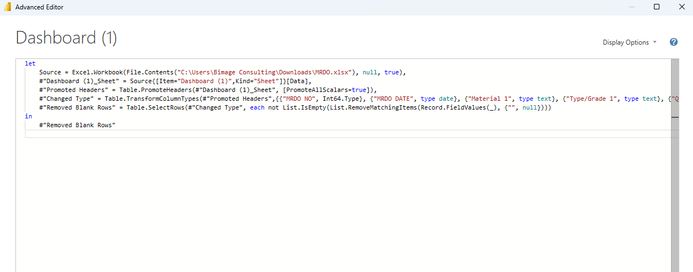
May I know where do I insert that in?
- Mark as New
- Bookmark
- Subscribe
- Mute
- Subscribe to RSS Feed
- Permalink
- Report Inappropriate Content

Helpful resources

FabCon & SQLCon – Barcelona 2026
Join us in Barcelona for FabCon and SQLCon, the Fabric, Power BI, SQL, and AI community event. Save €200 with code FABCMTY200.

Power BI DataViz World Championships - June 2026
A new Power BI DataViz World Championship is coming this June! Don't miss out on submitting your entry.


