cancel
Showing results for 
Search instead for 
Did you mean: 

The Power BI Data Visualization World Championships is back! Get ahead of the game and start preparing now! Learn more

Reply
Bfaws
Helper III
Helper III

Column to give percentage of full time hours

Hello,


I`m trying to add a new column based on a column that contains an employees contracted hours.  Full time hours are 37 and i`m looking for the following:


If the employees works: 


  •  0 - 11.1 hrs (0-30% of full time hours(37)) then column shows 0-0.3
  • 11.2 - 14.8hrs then column shows 0.3-0.4
  • 14.9 - 18.5hrs then column shows 0.4-0.5
  • 18.6 - 22.2hrs then column shows 0.5-0.6
  • 22.3 - 25.9 then column shows 0.6-0.7
  • 26 - 29.6 then column shows 0.7-0.8
  • 29.7 - 33.3 then column shows 0.8-0.9
  • 33.4 - 37  then column shows 0.9-1


Any help or ideas would be much appreciated.


Thanks,


Brendan


1 ACCEPTED SOLUTION
Anonymous
Not applicable

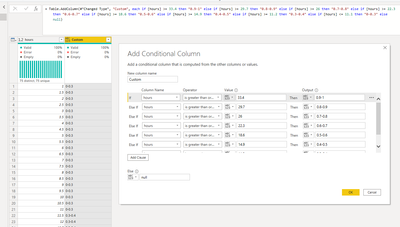
Try this - 


Add Column > Custom Column 


= Table.AddColumn(#"Changed Type", "Custom", each if [hours] >= 33.4 then "0.9-1" else if [hours] >= 29.7 then "0.8-0.9" else if [hours] >= 26 then "0.7-0.8" else if [hours] >= 22.3 then "0.6-0.7" else if [hours] >= 18.6 then "0.5-0.6" else if [hours] >= 14.9 then "0.4-0.5" else if [hours] >= 11.2 then "0.3-0.4" else if [hours] <= 11.1 then "0-0.3" else null)


Then Expandout the custom Column 


Karlos_0-1595249811441.png


View solution in original post

5 REPLIES 5
Anonymous
Not applicable

Try this - 


Add Column > Custom Column 


= Table.AddColumn(#"Changed Type", "Custom", each if [hours] >= 33.4 then "0.9-1" else if [hours] >= 29.7 then "0.8-0.9" else if [hours] >= 26 then "0.7-0.8" else if [hours] >= 22.3 then "0.6-0.7" else if [hours] >= 18.6 then "0.5-0.6" else if [hours] >= 14.9 then "0.4-0.5" else if [hours] >= 11.2 then "0.3-0.4" else if [hours] <= 11.1 then "0-0.3" else null)


Then Expandout the custom Column 


Karlos_0-1595249811441.png


Many thanks - thats done the trick!


Thanks,


Brendan

Anonymous
Not applicable

a differente way to prepare the translation table:


lt's call it query transl2


let
    Source = let
    Source = Table.FromRows(Json.Document(Binary.Decompress(Binary.FromText("dc9LCgMhFETRrTwcx4f/z1rEUQg4SLohJmT7KXVqzw+3qFKEYkWStGZN7d3p0x4H3c/n93VQb+evE4BUbEW9FQFmhnacrrAFdgs7zgMn9lfYAfuFEwdgY9hcYQ8cJoayA3sM7GSAjEuGec9k1HcyQqYlM0dIa5HeyQSZpwRxQ0akdzJLzUrU+gc=", BinaryEncoding.Base64), Compression.Deflate)), let _t = ((type text) meta [Serialized.Text = true]) in type table [Column1 = _t]),


    #"Split Column by Delimiter" = Table.SplitColumn(Source, "Column1", Splitter.SplitTextByDelimiter("shows", QuoteStyle.Csv), {"Column1.1", "to"}),
    #"Added Custom" = Table.AddColumn(#"Split Column by Delimiter", "from",  each let l= List.Transform(List.RemoveMatchingItems(Text.SplitAny([Column1.1],Text.Combine({"a".."z","- "})),{""}),Number.From) in {l{0}..l{1}})
in
    #"Added Custom"


Anonymous
Not applicable


here the code to make the translation required:


let
    Source = List.Transform(List.Random(300), each Number.RoundDown(_*37,1)),
    #"Converted to Table" = Table.FromList(Source, Splitter.SplitByNothing(), null, null, ExtraValues.Error),
    #"Changed Type" = Table.TransformColumnTypes(#"Converted to Table",{{"Column1", Int64.Type}}),
    #"Added Custom" = Table.AddColumn(#"Changed Type", "fff", each transl[to]{List.PositionOf(transl[from],[Column1]*10,Occurrence.First, (x,y)=>List.Contains(x,y))})
in
    #"Added Custom"


following this rules:


let
    Source = Table.FromRows(Json.Document(Binary.Decompress(Binary.FromText("dc9LCgMhFETRrTwcx4f/z1rEUQg4SLohJmT7KXVqzw+3qFKEYkWStGZN7d3p0x4H3c/n93VQb+evE4BUbEW9FQFmhnacrrAFdgs7zgMn9lfYAfuFEwdgY9hcYQ8cJoayA3sM7GSAjEuGec9k1HcyQqYlM0dIa5HeyQSZpwRxQ0akdzJLzUrU+gc=", BinaryEncoding.Base64), Compression.Deflate)), let _t = ((type text) meta [Serialized.Text = true]) in type table [Column1 = _t]),
    #"Changed Type" = Table.TransformColumnTypes(Source,{{"Column1", type text}}),
    #"Added Custom" = Table.AddColumn(#"Changed Type", "dict",  each clean(_[Column1],{"0".."9", " ","-"},"")),
    #"Split Column by Positions" = Table.SplitColumn(#"Added Custom", "dict", Splitter.SplitTextByPositions({0, 13}), {"from", "to"}),
    cl = Table.TransformColumns(#"Split Column by Positions",{{"from", each {Number.From(Text.Split(_,"-"){0})..Number.From(Text.Split(_,"-"){1})}}})
in
    cl


who relies on this function clean:


let

fnCngNotStndCharsToDef =( str_in as text, stndChrs, defChar as text)=>
let
str_out=Text.Combine( List.Transform(Splitter.SplitTextByRepeatedLengths(1)(str_in), each Record.FieldOrDefault(Record.FromList(stndChrs,stndChrs),_ ,defChar) ))
in
str_out
in 
fnCngNotStndCharsToDef


AlB
Community Champion
Community Champion

Hi @Bfaws 

If you are looking to do this in DAX, you cna use SWITCH:  https://dax.guide/switch/

If you prefer to do it in the query editor, check this out: https://www.thebiccountant.com/2018/02/15/generic-switch-function-query-editor-in-power-bi-and-power...


Please mark the question solved when done and consider giving kudos if posts are helpful.

Contact me privately for support with any larger-scale BI needs, tutoring, etc.

Cheers 


SU18_powerbi_badge


Helpful resources

Announcements
Power BI DataViz World Championships

Power BI Dataviz World Championships

The Power BI Data Visualization World Championships is back! Get ahead of the game and start preparing now!

December 2025 Power BI Update Carousel

Power BI Monthly Update - December 2025

Check out the December 2025 Power BI Holiday Recap!

FabCon Atlanta 2026 carousel

FabCon Atlanta 2026

Join us at FabCon Atlanta, March 16-20, for the ultimate Fabric, Power BI, AI and SQL community-led event. Save $200 with code FABCOMM.