Don't miss your chance to take the Fabric Data Engineer (DP-600) exam for FREE! Find out how by watching the DP-600 session on-demand now through April 28th.
Learn moreJoin the FabCon + SQLCon recap series. Up next: Power BI, Real-Time Intelligence, IQ and AI, and Data Factory take center stage. All sessions are available on-demand after the live show. Register now
Hello everyone!
I have this table that have a column woth different data type (currency, percentage, date, etc.). How to format this column in power bi?
The tables is the follwing:
Teste Data Type
250 Currency
0,05 Percentage
15 -11-2022 Date
Thank you for your help.
Best regards.
Joaquim Guedes
Solved! Go to Solution.
Hi, @Joaquim_Guedes ;
Yes, a column can only set one number type, if you want the display to be different, you can use the format function in dax. Like what:
Column =
var _num=CONVERT([Teste ],DOUBLE)
return
IF(CONTAINSSTRING([Teste ],"-")=FALSE(),
IF( _num<1,FORMAT(_num,"0.00%"),FORMAT(_num,"Currency")),
[Teste ])
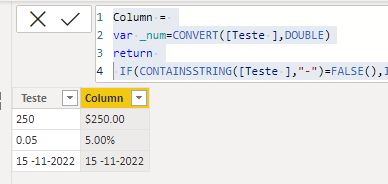
The final show:
however this column is text type, if you want convert to number or percent,you could create a measure by If().
Best Regards,
Community Support Team _ Yalan Wu
If this post helps, then please consider Accept it as the solution to help the other members find it more quickly.
Hi, @Joaquim_Guedes ;
Yes, a column can only set one number type, if you want the display to be different, you can use the format function in dax. Like what:
Column =
var _num=CONVERT([Teste ],DOUBLE)
return
IF(CONTAINSSTRING([Teste ],"-")=FALSE(),
IF( _num<1,FORMAT(_num,"0.00%"),FORMAT(_num,"Currency")),
[Teste ])
The final show:
however this column is text type, if you want convert to number or percent,you could create a measure by If().
Best Regards,
Community Support Team _ Yalan Wu
If this post helps, then please consider Accept it as the solution to help the other members find it more quickly.
I have multiples tables, with multiple columns. How can I transform the following table
Table 1
Kpi Value
Kpi 1 0,35
Kpi2 44860
Kpi3 150
Kpi4 1050
to this table
Table 2
Kpi Value
Kpi1 35%
Kpi2 26-10-2022
Kpi3 150,00€
Kpi4 1.050,00
Do I have to create a measure or a column to solve this problem? I have mutiple tables and columns with this situation. I can't chage data format in the data source files. Thank for your help.
Beste regards.
Joaquim Guedes
Hello!
Thank you very much for your help!
That solution solves the problem, but I have another situation to solve. If i have a in the Teste column a number to transform in date format? How to turn the problem around? Thank you for the help.
Best regards.
Joaquim Guedes
Hello @AntrikshSharma!I have multiple indicators in a table and each indicator has different data type!
Ok, but you can't have multiple data types in a single column, it will work in PowerQuery, but once loaded in the data model it will be text in your case.
Check out the April 2026 Power BI update to learn about new features.
If you have recently started exploring Fabric, we'd love to hear how it's going. Your feedback can help with product improvements.
A new Power BI DataViz World Championship is coming this June! Don't miss out on submitting your entry.
| User | Count |
|---|---|
| 3 | |
| 2 | |
| 2 | |
| 2 | |
| 2 |
| User | Count |
|---|---|
| 5 | |
| 5 | |
| 4 | |
| 4 | |
| 4 |